Category: Uncategorized

  • GHome Smart Fingerprint Door Lock: A Practical Guide to 4-in-1 Keyless Entry, App Control, and Auto-Locking

    GHome Smart Fingerprint Door Lock: A Practical Guide to 4-in-1 Keyless Entry, App Control, and Auto-Locking

    Traditional door knobs and keyed locks have remained largely unchanged for decades, but the way people manage access to homes, offices, bedrooms, apartments, and other spaces is becoming increasingly digital. Smart door locks offer an alternative by combining conventional locking hardware with technologies such as fingerprint recognition, keypads, smartphone applications, and automatic locking.

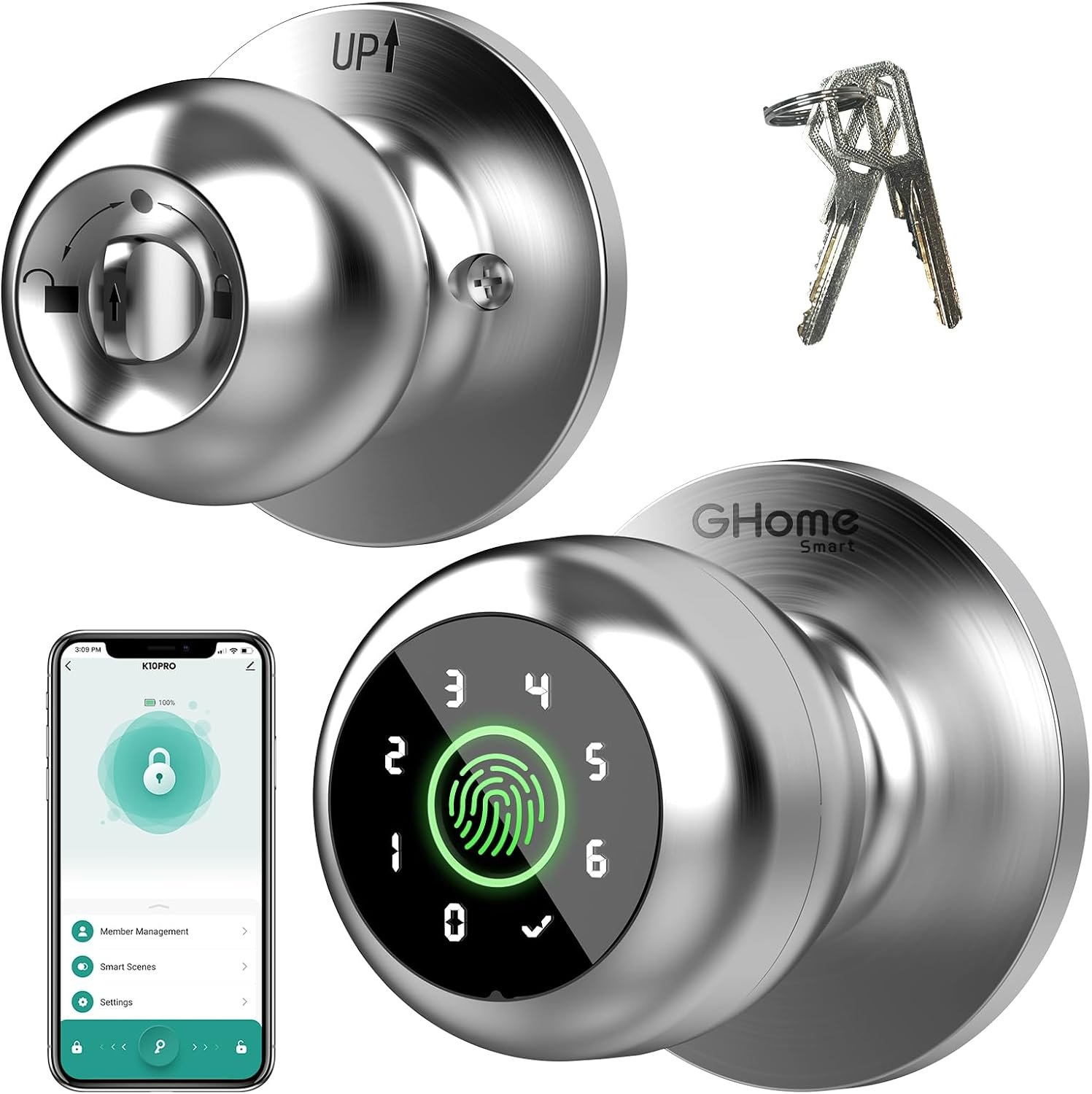
    The GHome Smart Fingerprint Door Lock is designed around this concept. This particular model, identified as the PRO version and associated with ASIN B0DHS46L2F, combines four unlocking methods: fingerprint recognition, password entry through the keypad, smartphone app control, and a physical key for backup access. The product is designed for indoor applications such as bedrooms, apartments, offices, garages, and other compatible doors.

    One of the main ideas behind a multi-method smart lock is flexibility. A fingerprint can provide quick access for an authorized user, while a keypad can provide access without requiring a phone. The app adds another management option, and a mechanical key provides a conventional backup method.

    This combination can be useful for households and small offices where several people need access but distributing and managing physical keys is inconvenient.

    At the same time, a smart lock should not be treated as a universal replacement for every type of door lock. Door measurements, lock compatibility, battery condition, installation requirements, and the way the particular door is used all matter.

    This guide explains how the GHome Smart Fingerprint Door Lock works, what its main features are, where it can be useful, and what to consider before installing a biometric door knob.

    What Is the GHome Smart Fingerprint Door Lock?

    The GHome Smart Fingerprint Door Lock is a smart replacement door knob that combines electronic access control with a traditional mechanical key system.

    Instead of relying exclusively on a key, users can authenticate themselves through several different methods. The product documentation describes four main access methods:

    • Fingerprint recognition
    • Password or keypad entry
    • Smartphone app control
    • Mechanical key access

    The PRO model is listed with local fingerprint and password data storage, automatic locking, backup keys, and indoor use. Its construction uses aluminum, and the listed finish for the product associated with ASIN B0DHS46L2F is silver.

    The lock is designed around Bluetooth connectivity rather than functioning as a conventional always-online Wi-Fi door lock. That distinction is important when considering app control.

    The manufacturer describes app control within Bluetooth range, while remote control from outside the immediate Bluetooth range can require an additional compatible gateway depending on the specific GHome setup.

    This makes the product particularly interesting for people who want smart access features without necessarily building a complete internet-connected door-lock system.


    Key Features

    1. Four Ways to Unlock the Door

    The defining feature is the combination of four access methods.

    Fingerprint Access

    Biometric access allows an authorized fingerprint to be used instead of entering a code or carrying a physical key.

    The manufacturer states that the lock can recognize fingerprints in approximately 0.2 seconds and supports up to 20 stored fingerprints for this version.

    Fingerprint recognition can be convenient for people who frequently enter and leave the same room or property because there is no need to remember a code or locate a key.

    However, biometric systems should always be considered an access convenience rather than an absolute guarantee that recognition will work perfectly in every situation. Finger condition, placement, sensor cleanliness, and enrollment quality can all affect recognition.

    For this reason, having additional access methods is useful.

    Keypad Access

    The keypad provides another way to unlock the door.

    A user can enter an assigned password rather than using a fingerprint or smartphone.

    This can be particularly useful for family members, office workers, guests, or other authorized people who may not want to register a fingerprint.

    The product information indicates support for up to 20 access codes.

    A keypad can also be useful when someone temporarily needs access but does not have the owner’s phone.

    As with any electronic keypad, codes should be managed carefully. Avoid using easily guessed combinations such as birthdays, addresses, or repeated numbers.

    Smartphone App Control

    The GHome Smart app provides another way to manage the lock.

    Depending on the configuration, the app can be used for functions such as managing fingerprints and passwords, checking unlock records, configuring automatic locking, and adjusting certain operating modes.

    App control is particularly useful for managing the lock’s settings rather than simply opening the door.

    For example, an owner may want to add an authorized fingerprint, change a passcode, or review access information.

    One important point is that the basic app connection is Bluetooth-based. The manufacturer’s information specifies app control within Bluetooth range for the relevant models. A separate gateway can provide additional remote-control capabilities when supported.

    This means users should not automatically assume that they can unlock the door from anywhere in the world using only the standard Bluetooth setup.

    Mechanical Key Backup

    Although the lock is designed around keyless access, it retains a traditional mechanical key option.

    This is an important practical feature.

    Electronic locks depend on a power source and functioning electronics. A physical key provides an alternative when the battery is depleted, the electronic system encounters a problem, or another situation prevents normal electronic unlocking.

    Keeping the backup key in a secure but accessible location is therefore an important part of using a smart lock responsibly.


    2. Fingerprint Recognition and Biometric Access

    Fingerprint recognition is one of the most noticeable differences between this type of lock and a conventional keypad lock.

    Instead of typing a password every time, an authorized user can place a registered finger on the sensor.

    The product information describes recognition in approximately 0.2 seconds and an unlocking process of around 1.5 seconds, along with a stated 99.9% recognition accuracy.

    These are manufacturer or product-listing specifications rather than guarantees of performance in every real-world condition.

    Fingerprint recognition can vary depending on factors such as:

    • Finger placement
    • Moisture
    • Dirt or residue
    • Very dry skin
    • Sensor cleanliness
    • The quality of the original fingerprint enrollment
    • Changes in the user’s finger condition

    For that reason, it is sensible to register fingerprints carefully and maintain at least one alternative access method.

    A biometric lock works best when it is treated as one part of a broader access system rather than the only possible method of entry.


    3. Local Data Storage

    Privacy is an important consideration whenever biometric information is involved.

    The GHome product information states that fingerprint and related access information for this model is stored locally rather than uploaded to cloud storage.

    Local storage can be appealing because biometric information is particularly personal. Unlike a normal password, a fingerprint cannot simply be replaced if compromised.

    However, users should still consider the security of the smartphone and app used to configure the lock.

    Keeping the phone protected with a strong passcode or biometric authentication, maintaining updated software, and limiting access to the lock-management application are sensible practices.


    4. Automatic Locking

    Automatic locking is another useful feature for everyday use.

    The lock can be configured to automatically lock after the door is closed, reducing the chance of accidentally leaving the door unlocked.

    GHome documentation describes an automatic locking function and indicates that the lock can be configured for automatic locking after a short delay.

    This can be particularly useful for people who frequently leave a room while carrying bags, equipment, documents, or other items.

    It can also help establish a consistent routine.

    Instead of remembering to manually lock the door every time, the electronic system can perform that step automatically.

    There are situations where automatic locking may not be appropriate, however. A frequently accessed room may be better suited to a passage mode or manually controlled configuration.

    Understanding the available modes before activating automatic locking is important.


    5. Passage and Privacy Modes

    Smart locks can have different operating modes depending on the situation.

    GHome’s product information describes functions such as passage mode and privacy mode on compatible models.

    Passage Mode

    Passage mode can be useful in situations where a door needs to remain accessible without requiring repeated fingerprint or password authentication.

    For example, an office or bedroom might need frequent movement through the door during a particular period.

    Instead of unlocking the door repeatedly, passage mode can provide more convenient access.

    Privacy Mode

    Privacy mode works in the opposite direction.

    It can be useful when the occupant wants to restrict exterior access temporarily.

    This can be relevant to bedrooms, private offices, or other spaces where the person inside wants greater control over access.

    The precise operation of these modes can vary by model and firmware, so the included instructions should be followed when configuring them.


    6. Rechargeable Battery

    The GHome PRO lock uses a rechargeable lithium battery rather than relying solely on conventional disposable batteries. Product information identifies a lithium-polymer battery for the PRO model, while GHome’s related documentation describes rechargeable battery operation and Type-C charging.

    Rechargeable power can reduce the need to repeatedly purchase and replace disposable batteries.

    The manufacturer indicates that battery performance varies according to usage, with related PRO models rated for extended operation between charges.

    Actual battery life can vary significantly depending on how often the lock is used, environmental conditions, and other factors.

    The most important habit is to pay attention to low-battery notifications and avoid waiting until the battery is completely depleted.


    7. Type-C Emergency Power

    A smart lock becoming unresponsive because of a depleted battery is an obvious concern.

    GHome documentation indicates that the lock provides a Type-C connection that can be used for emergency power and charging. A mechanical key is also available as another backup method.

    This creates more than one way to recover from a low-power situation.

    Even so, emergency power should be considered a backup rather than a reason to ignore battery warnings.

    Keeping the battery adequately charged and knowing where the mechanical key is stored can make unexpected situations much easier to handle.


    8. Bluetooth Connectivity

    The GHome PRO model uses Bluetooth for smart connectivity.

    Bluetooth is suitable for local management and can make the lock relatively simple to configure without requiring a permanent Wi-Fi connection.

    At the same time, Bluetooth has a practical range limitation.

    If someone expects to unlock the door from a different city, Bluetooth alone will not provide that capability.

    For users who need remote access, the manufacturer indicates that a compatible gateway can provide additional functionality such as remote control, monitoring, and alerts on supported setups.

    That makes it important to distinguish between local smartphone control and internet-based remote management.


    How the GHome Smart Fingerprint Door Lock Can Be Used

    Bedroom Access

    A bedroom is one of the most straightforward applications for this type of smart door knob.

    A fingerprint can provide quick access for the occupant, while a mechanical key or keypad provides alternatives.

    Privacy mode can also be useful for personal spaces where the occupant wants temporary control over exterior access.

    For families, multiple fingerprints can be registered so that authorized household members do not need to share one password.


    Apartment Doors

    For compatible apartment doors, a smart knob can provide an alternative to carrying keys.

    However, renters should verify the door’s existing hardware before installation.

    Apartment doors can have different construction, lock bodies, thicknesses, and hardware configurations. The fact that a product is described as suitable for apartments does not mean it fits every apartment door.

    Measurements should always be checked first.


    Home Offices

    A home office can benefit from controlled access when sensitive documents, computers, equipment, or other private materials are stored inside.

    A fingerprint can allow the owner to enter quickly without managing another physical key.

    A keypad can also be useful when access needs to be shared with an authorized person.

    For home offices, privacy mode may be particularly relevant when the room needs to remain private during meetings or focused work.


    Garage and Storage Areas

    The product is marketed for garage and other household applications, but installation suitability should be checked carefully.

    A garage door leading directly outside may have different security and environmental requirements than an interior bedroom door.

    The specific GHome model is listed for indoor use, so it should not automatically be considered appropriate for exposed outdoor locations.

    For garages exposed to significant temperature changes, moisture, dust, or direct weather, a product specifically rated for those conditions may be more appropriate.


    Small Offices

    A small office can use multiple access methods to reduce the need to distribute physical keys.

    For example, authorized employees can use individual fingerprints or assigned access codes.

    This can also make access management more flexible when compared with one shared mechanical key.

    However, businesses should establish clear procedures for removing access when an employee or contractor no longer requires entry.


    Guest Access

    A keypad can provide an alternative for authorized guests who do not have a registered fingerprint.

    This can be useful for short-term access to a room or property.

    The important consideration is how codes are created and managed.

    Sharing a single permanent code with everyone may reduce the benefits of individualized access management. Where the app supports appropriate access-code management, individual or temporary credentials can provide better organization.


    Who the GHome Smart Fingerprint Door Lock May Be Suitable For

    People Who Want Keyless Entry

    The lock may appeal to people who frequently forget, misplace, or simply prefer not to carry traditional keys.

    Fingerprint access provides a direct method of authentication, while the keypad offers another key-free option.


    Families

    A household can register multiple authorized fingerprints.

    The product information indicates support for up to 20 fingerprints and 20 access codes.

    This can make the lock more practical for households where several people need regular access.


    Renters

    Because the product is designed as a door-knob replacement rather than a completely new door structure, it may be relevant to renters who want smart access without making major modifications.

    However, renters should check their lease requirements and make sure the existing door hardware matches the lock’s installation requirements.


    Home Office Users

    People who keep private documents or equipment in a home office may find controlled access useful.

    The ability to use a fingerprint, code, or key provides flexibility depending on the situation.


    Small Business Owners

    Small offices and private workspaces can use individual access methods instead of relying exclusively on shared keys.

    This can make access management easier when staff changes over time.


    Important Things to Consider Before Installation

    Check Your Door Measurements

    This is arguably one of the most important steps.

    The product manual for the GHome PRO associated with ASIN B0DHS46L2F specifies several installation requirements:

    • Door thickness: approximately 1-3/8 to 2-1/8 inches, or 35-55 mm
    • Door hole diameter: approximately 2-1/8 inches, or 55 mm
    • Door-edge hole diameter: approximately 1 inch, or 25 mm
    • Backset: approximately 2-3/8 or 2-3/4 inches, or 60 or 70 mm

    The documentation also states that the lock is intended for single-cylinder doors and is not compatible with mortise locks.

    These measurements should be checked before ordering.

    A smart lock can have excellent features but still be unsuitable if the existing door preparation does not match.


    Understand Single-Cylinder Compatibility

    The manual specifically identifies single-cylinder compatibility and excludes mortise locks.

    This is particularly important because “door lock” is a broad category.

    Deadbolts, mortise locks, cylindrical locks, and door knobs use different hardware configurations.

    A user should compare the existing lock structure with the manufacturer’s installation requirements rather than assuming compatibility based solely on appearance.


    Consider the Door’s Condition

    Smart hardware still depends on the physical door.

    If the door is difficult to close, sticks against the frame, or requires excessive force to operate, installing a smart lock may not solve the underlying problem.

    In fact, automatic locking can make an alignment issue more noticeable.

    Before installation, check whether the latch moves smoothly and whether the door closes correctly without excessive pressure.


    Battery Maintenance Is Important

    Unlike a purely mechanical lock, an electronic door knob needs electrical power.

    Even though the GHome design provides backup options, battery management should remain part of normal use.

    Check the battery level periodically and recharge when necessary.

    Do not wait for the lock to become completely inactive before thinking about charging it.


    Fingerprints Are Not Infallible

    Biometric recognition is convenient, but it is not immune to environmental or physical factors.

    Wet fingers, very dry skin, dirt, or poor initial enrollment can affect recognition.

    For important access points, maintain a backup code and keep the physical key available.


    Do Not Depend Exclusively on the Smartphone

    It can be tempting to treat the app as the main key.

    However, phones can run out of battery, be misplaced, lose Bluetooth connectivity, or encounter software issues.

    A smart access system is more resilient when users understand and maintain all available access methods.


    Bluetooth Is Not the Same as Remote Internet Access

    This distinction deserves special attention.

    Basic smartphone control is available through Bluetooth within the appropriate range. GHome’s documentation explains that a gateway can provide remote functions for supported configurations.

    Therefore, someone buying the lock specifically for remote unlocking should investigate whether an additional gateway is required for the desired setup.


    Consider Privacy and Data Management

    Biometric information deserves particular attention.

    The manufacturer states that fingerprint information is stored locally for the relevant model rather than in cloud storage.

    Even with local storage, users should protect the smartphone and app used to administer the lock.

    Avoid leaving an unlocked phone unattended, use a strong device passcode, and keep the relevant software updated.


    Smart Fingerprint Door Knob vs Other Smart Lock Categories

    Different smart lock designs serve different purposes. Comparing the categories can help determine whether a biometric door knob is appropriate.

    Lock CategoryCommon Access MethodsMain AdvantageImportant Consideration
    Traditional Keyed LockPhysical keySimple mechanical operationRequires carrying and managing keys
    Keypad LockPIN/codeKeyless accessCodes must be managed securely
    Fingerprint Smart LockFingerprint, code, app, keyMultiple access optionsBiometric recognition can vary
    Smart DeadboltApp, keypad, key, sometimes fingerprintOften suited to exterior entry doorsRequires compatible deadbolt configuration
    Wi-Fi Smart LockApp, keypad, biometric or keyPotential remote accessRequires network and additional power considerations
    Bluetooth Smart LockApp, fingerprint, keypadLocal smartphone controlLimited by Bluetooth range
    Traditional Smart KnobApp or codeSimple replacement formatCompatibility depends on door hardware

    The GHome PRO falls into the multi-method Bluetooth smart door-knob category.

    Its appeal comes from combining biometric access, keypad entry, app management, and mechanical backup in one system.


    Smart Lock Security Is More Than the Electronics

    A common mistake when evaluating smart locks is to focus only on the fingerprint sensor or app.

    Physical security still matters.

    The quality and condition of the door, frame, hinges, latch, strike plate, and surrounding hardware can all affect overall security.

    A sophisticated electronic lock installed on a weak or poorly aligned door does not automatically create a highly secure entry point.

    Likewise, strong electronic authentication does not compensate for poor installation.

    For an exterior entrance, users should evaluate the entire door assembly rather than treating the smart knob as the only security component.


    Practical Setup Tips

    Once compatibility has been confirmed, a few simple practices can make the setup easier.

    Register fingerprints carefully

    When adding a fingerprint, follow the enrollment instructions and use a finger that will be easy to place consistently on the sensor.

    If the system allows multiple fingerprints per person, registering more than one finger can provide another option.

    Create sensible access codes

    Avoid obvious combinations.

    If multiple people need access, consider assigning separate codes where supported instead of sharing one permanent password.

    Name the lock clearly in the app

    If the app manages several smart devices, a clear name can prevent confusion.

    For example:

    • Bedroom Door
    • Home Office
    • Garage Entry
    • Apartment Door

    Test every access method

    After installation, do not test only the fingerprint.

    Check:

    • Fingerprint unlocking
    • Keypad access
    • App control
    • Mechanical key
    • Automatic locking
    • Manual interior operation
    • Emergency charging procedure

    Testing these functions before relying on the lock gives users a better understanding of how the system behaves.

    Keep the mechanical key accessible

    The backup key should be available when needed without being left in an obvious location.

    A practical backup strategy is particularly important for electronic locks.


    Frequently Asked Questions

    How many ways can the GHome Smart Fingerprint Door Lock be unlocked?

    The PRO model provides four primary methods: fingerprint recognition, password/keypad entry, smartphone app control, and a mechanical key.

    How many fingerprints can it store?

    The product information associated with the PRO model indicates support for up to 20 fingerprints.

    This allows multiple household members or authorized users to have their own registered biometric access.

    How many passwords can be created?

    The manufacturer information indicates support for up to 20 access codes for the relevant PRO model.

    Does the lock need Wi-Fi?

    The GHome PRO model uses Bluetooth for its smart connectivity rather than requiring a permanent Wi-Fi connection for basic local operation.

    Additional equipment may be required for certain remote-control functions.

    Can I unlock it with my phone?

    Yes. The lock supports app-based control through Bluetooth within the appropriate range.

    For remote operation beyond Bluetooth range, a compatible gateway may be necessary.

    Does it have a physical key?

    Yes. The lock includes mechanical backup keys.

    This provides an alternative if electronic access is unavailable.

    What happens if the battery dies?

    The product supports emergency power through its charging connection, and the mechanical key provides another backup method.

    Keeping the battery charged and knowing how to use both backup methods is recommended.

    Is the battery rechargeable?

    Yes. The PRO model uses a rechargeable lithium battery, with Type-C charging described in the manufacturer’s product information.

    Does the lock automatically lock?

    Yes. Automatic locking is one of the product’s listed features. The exact timing and behavior can depend on the configuration and operating mode.

    Can automatic locking be disabled?

    Compatible GHome models provide settings for automatic locking and passage-style operation.

    The exact procedure should be checked in the instructions for the specific model.

    Is the lock suitable for a garage?

    It can be suitable for compatible indoor garage doors, and the product is marketed for garage applications.

    However, the specific installation environment matters. The product is listed for indoor use, so it should not be assumed to be weatherproof or suitable for exposed exterior locations.

    Is it suitable for an apartment?

    It may be suitable for an apartment if the existing door matches the required dimensions and lock configuration.

    The installation manual specifies door thickness, hole diameter, backset, and single-cylinder compatibility requirements.

    Can it be installed on a mortise lock?

    The manual states that the GHome PRO is compatible with single-cylinder doors and is not compatible with mortise locks.

    This should be checked before attempting installation.

    Does it store fingerprints in the cloud?

    GHome states that fingerprint and related access data are stored locally for this product family rather than uploaded to cloud storage.

    Users should still protect the smartphone and app used to manage the lock.

    Can I use it without the internet?

    Basic operation does not require a permanent internet connection, and the manufacturer describes Bluetooth-based setup and local operation.

    Internet connectivity becomes more relevant if remote access through a compatible gateway is desired.

    Is fingerprint recognition always guaranteed to work?

    No biometric system should be treated as infallible.

    Recognition can be affected by finger placement, moisture, dirt, sensor condition, and other factors.

    The availability of a keypad and mechanical key makes the multi-method design useful as a backup system.

    Can several family members use the same lock?

    Yes. The PRO model supports multiple stored fingerprints and access codes, allowing authorized users to have their own credentials.

    Is installation complicated?

    The manufacturer describes the lock as designed for relatively straightforward installation with a screwdriver, provided that the existing door matches the required dimensions and hardware configuration.

    If the existing door requires modification or does not match the specified measurements, professional installation may be more appropriate.


    Conclusion

    The GHome Smart Fingerprint Door Lock is designed to bring several modern access methods into a familiar door-knob format.

    Its four-in-one approach combines fingerprint recognition, keypad access, smartphone control, and a mechanical key, giving users multiple ways to enter the same space. The product also provides features such as automatic locking, access management through the app, rechargeable power, and local data storage.

    For bedrooms, compatible apartment doors, home offices, and certain indoor garage or workspace applications, this type of lock can provide an alternative to relying exclusively on traditional keys.

    Its Bluetooth-based design also makes it different from Wi-Fi-first smart locks. Basic local app control does not require the same type of always-online connection, while users who want remote access may need an additional compatible gateway.

    The most important consideration is compatibility. Before installation, users should verify the door thickness, hole dimensions, backset, latch configuration, and single-cylinder requirement. The manufacturer specifically states that the PRO model is not compatible with mortise locks.

    It is also worth remembering that electronic convenience and physical security are separate considerations. A smart lock still depends on a properly functioning door, suitable hardware, sensible access-code management, adequate battery maintenance, and responsible use.

    For households or small workspaces looking for multiple keyless entry options in one door knob, understanding these details can make it easier to decide whether a biometric smart lock fits the intended door and daily routine.
    You can check more details on Amazon here.

  • Linkind Matter Smart Plug: A Practical Guide to Smart Home Control, Scheduling, and Matter Compatibility

    Linkind Matter Smart Plug: A Practical Guide to Smart Home Control, Scheduling, and Matter Compatibility

    Smart plugs are one of the simplest ways to add connected control to ordinary household electronics. Instead of replacing an existing lamp, fan, coffee maker, or other compatible appliance with a dedicated smart device, a smart plug can sit between the appliance and the wall outlet and provide remote switching, scheduling, and voice-control features.

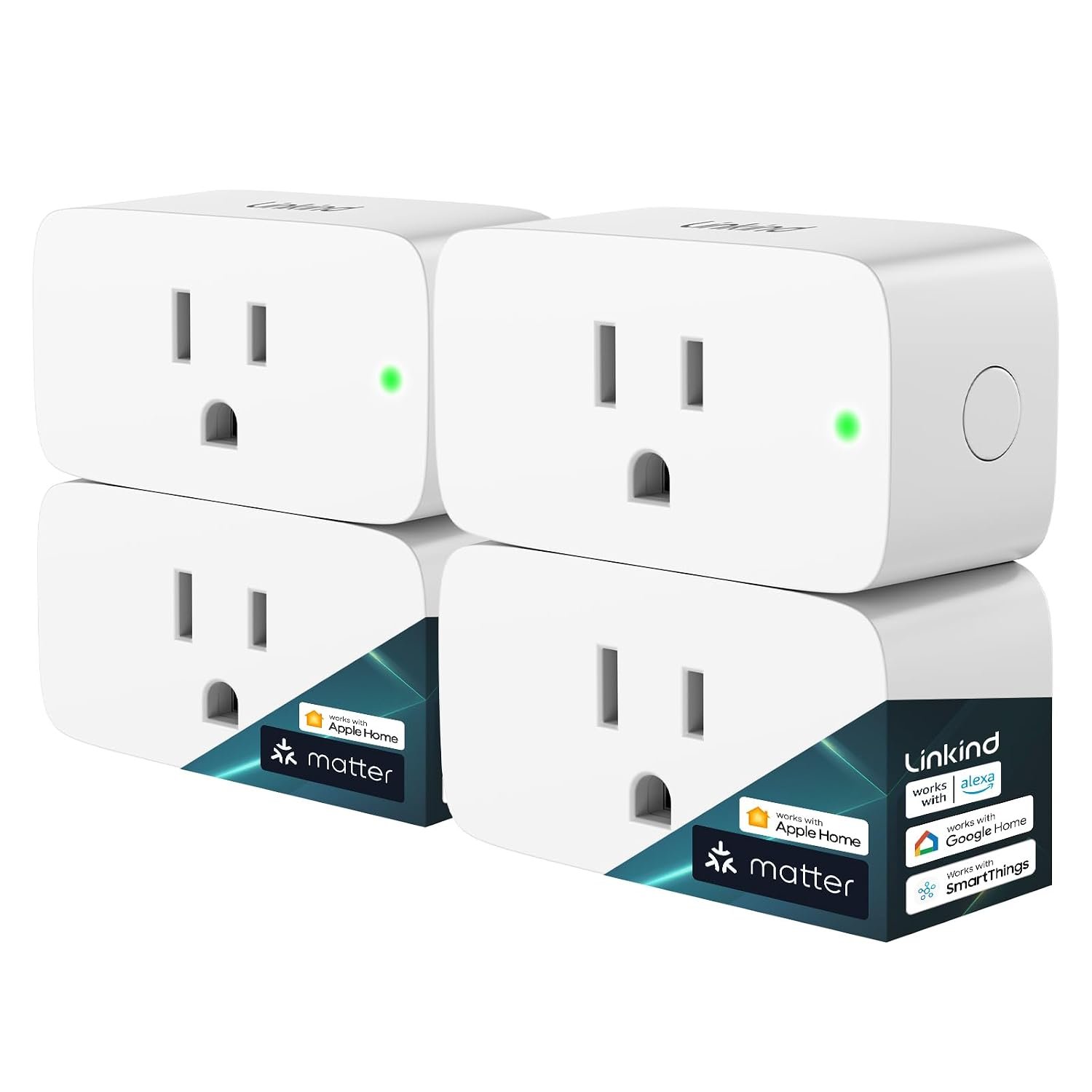
    The Linkind Matter Smart Plug is designed around this idea while adding support for the Matter smart-home standard. The product is designed to work with platforms including Apple Home, Alexa, Google Home, SmartThings, and Siri, giving households more flexibility when choosing how to control their connected devices. The particular Amazon listing covered in this article is the four-pack version, identified by ASIN B0C36WXGP1.

    One of the more interesting aspects of this smart plug is its use of Matter over a 2.4 GHz Wi-Fi connection. Matter is intended to make compatible smart-home products easier to integrate across different ecosystems rather than forcing users to stay inside one manufacturer’s platform.

    That can be useful for households that already use Apple Home, Google Home, Alexa, or Samsung SmartThingsโ€”or for people who expect their smart-home setup to evolve over time.

    This guide looks at what the Linkind Matter Smart Plug offers, how Matter changes the setup experience, where a smart plug can be useful around the home, and what should be considered before connecting appliances to a remotely controlled outlet.

    Understanding the Linkind Matter Smart Plug

    At its most basic level, the Linkind Matter Smart Plug turns a conventional electrical outlet into a controllable smart outlet.

    The appliance itself does not necessarily need built-in Wi-Fi or Bluetooth. Instead, the plug provides the connection between the appliance and the smart-home ecosystem.

    Once configured, compatible devices can potentially be switched on or off through a smartphone app, voice command, or an automation. The Linkind product supports control through Apple Home, Alexa, Google Home, SmartThings, and Linkind’s supported ecosystem.

    The listed model supports up to 15 amps and 1,800 watts, according to product information associated with the Amazon listing and Linkind’s product documentation. It is designed for standard household use and is specified for 2.4 GHz Wi-Fi connectivity.

    The four-pack configuration can also be useful when several ordinary devices around the home need basic smart control. Rather than adding smart functionality to only one outlet, multiple plugs can be distributed between rooms and assigned individual names within the relevant smart-home platform.

    Key Features

    Matter Smart Home Compatibility

    Matter is one of the central features of this product.

    Traditional smart-home accessories have often depended heavily on individual manufacturer ecosystems. A particular smart plug might have been designed primarily for one app or one voice assistant, creating additional complications when a household used products from several brands.

    Matter was developed to provide a common communication standard for compatible smart-home devices.

    The Linkind Matter Smart Plug is designed to work with several major smart-home platforms, including Apple Home, Alexa, Google Home, and Samsung SmartThings. Linkind also identifies Siri and its own AiDot platform among supported control options.

    This does not mean every platform provides exactly the same features. Smart-home capabilities can vary depending on the controller, app, hub, and automation system being used.

    Still, Matter compatibility can make the plug more flexible than a device tied exclusively to a single ecosystem.

    Apple Home and Siri Control

    For Apple households, the plug can be integrated into Apple Home.

    Once the device has been properly added to a compatible Matter setup, it can become part of the same Home environment used for other supported accessories. This can make it possible to control a connected lamp or other suitable appliance alongside other smart-home devices.

    Siri can provide another control method where the relevant Apple setup supports the device.

    For example, a user might assign a clear name such as “Desk Lamp” or “Bedroom Fan” to the plug. A voice command can then be easier to remember than identifying the device by its technical model name.

    The exact voice commands and automation options depend on the Apple Home configuration and the devices involved.

    Alexa Compatibility

    The Linkind Matter Smart Plug can also be used with Amazon Alexa through a compatible Matter setup.

    This can be useful for households that already use Echo devices or the Alexa app for smart-home management.

    A smart plug can become part of a broader routine. For example, a routine could coordinate a lamp with another compatible smart-home accessory rather than treating the plug as an isolated device.

    The benefit is less about the plug itself and more about how it fits into the wider automation system.

    Google Home Integration

    Google Home is another supported ecosystem.

    This gives households using Google’s smart-home platform an additional way to organize and control the connected outlet.

    The same physical plug can therefore be approached from different smart-home environments depending on the user’s existing setup.

    For people who move between ecosystems or have family members using different platforms, Matter can reduce some of the compatibility barriers that have traditionally existed between smart-home brands.

    Samsung SmartThings Support

    SmartThings is also listed among the compatible platforms.

    This can be useful for users who already manage smart-home accessories through Samsung’s ecosystem.

    As with Apple Home, Alexa, and Google Home, the availability of specific functions can depend on the Matter controller and the way the device is added to the network.

    App-Based Remote Control

    The Linkind Matter Smart Plug supports app-based control, allowing a connected appliance to be switched remotely through a supported smart-home application. Linkind describes remote control as a way to operate connected electronics even when the user is away from home.

    Remote control can be particularly useful for simple situations.

    For example, someone leaving home might realize that a lamp connected to a smart plug was left on. If the setup and network connection support remote access, the plug can potentially be switched off without returning home.

    Likewise, a light connected to the plug can be turned on before someone arrives.

    Remote control should not, however, be interpreted as a replacement for proper safety practices. Some appliances are not appropriate for unattended operation, even when their power supply can be controlled remotely.

    Scheduling and Timers

    Scheduling is another practical feature.

    Instead of manually switching an appliance on and off every day, users can create a schedule through their supported smart-home platform.

    A lamp could be scheduled to switch on at a particular time in the evening and off later at night. A suitable household device could also be configured around a daily routine.

    Timers provide another approach when an appliance only needs to remain powered for a defined period.

    These features can reduce the number of repetitive manual actions required throughout the day.

    15A / 1800W Electrical Rating

    The product is listed with a maximum electrical rating of 15 amps and 1,800 watts.

    That specification is important because a smart plug should not automatically be treated as suitable for every electrical appliance.

    The rating describes the electrical load the device is designed to handle under its specified conditions. Users should still check the appliance’s requirements before connecting it.

    A device that consumes significantly more power than the plug is designed to support should not be connected.

    It is also important to pay attention to appliances with motors, heating elements, compressors, or other characteristics that may require special consideration.

    2.4 GHz Wi-Fi Connectivity

    The Linkind Matter Smart Plug uses 2.4 GHz Wi-Fi.

    This is worth knowing before installation because modern routers frequently provide multiple Wi-Fi bands.

    A phone may be connected to a 5 GHz network while the smart-home accessory is designed for 2.4 GHz operation. Depending on the router and setup process, this can sometimes create confusion during initial pairing.

    A good first step is to check the router configuration and follow the setup instructions supplied with the plug and the selected Matter platform.

    Local Matter Communication

    One of the useful characteristics of Matter is that compatible devices can communicate over the local network.

    Linkind states that Matter devices configured on the same local network can communicate directly and may remain controllable locally even if the wider internet connection becomes unavailable.

    This distinction is important.

    A local network connection and an internet connection are not exactly the same thing. If internet access disappears, certain cloud-dependent features may no longer work, while local Matter control can continue when the necessary local infrastructure is available.

    The actual behavior can depend on the smart-home controller and network configuration, so users should not assume that every feature will work identically during an internet outage.

    How the Linkind Matter Smart Plug Can Be Used

    The biggest advantage of a smart plug is its flexibility.

    It can add smart switching to many everyday devices without requiring the device itself to be replaced.

    Controlling Lamps

    Lamps are among the most straightforward uses.

    A bedside lamp, floor lamp, desk lamp, or decorative light can be connected to the smart plug and controlled through an app, schedule, or supported voice assistant.

    A simple evening schedule can automatically turn a lamp on around a chosen time.

    Another schedule can switch it off later, reducing the need to remember the switch every night.

    There is one important consideration: the physical switch on the lamp generally needs to remain in the appropriate position for the smart plug to control the electrical supply. If the lamp’s own switch is turned off, cutting power to the lamp, the smart plug cannot make the bulb illuminate until the lamp’s switch is restored.

    Creating a Morning Routine

    A smart plug can also be incorporated into a morning routine.

    For example, a suitable device can be scheduled to receive power at a particular time.

    The practical benefit comes from consistency. Instead of remembering the same task every morning, the schedule can handle the repetitive part automatically.

    However, users should only automate appliances that are designed to operate safely in the intended way.

    Managing Decorative Lighting

    Holiday lights and decorative lighting are another common smart-plug application.

    A user could establish a schedule that controls when decorative lights receive power.

    This can be convenient for seasonal lighting because the lights do not need to remain on throughout the day.

    Before using a smart plug outdoors, however, users should verify whether the specific plug is rated for outdoor exposure. The Linkind model discussed here is a standard indoor smart plug, so it should not be treated as an outdoor-rated product merely because it can control decorative lighting.

    Home Office Equipment

    A desk setup may contain several devices that are manually switched every day.

    A smart plug can be useful for selected low-risk accessories such as a lamp or another compatible device where automated power control makes sense.

    It is generally better to use smart control selectively rather than putting an entire computer workstation behind one remotely controlled outlet.

    Computers, monitors, storage systems, printers, and networking equipment can have different shutdown and startup requirements.

    For devices containing important data, a normal operating-system shutdown procedure may be more appropriate than simply cutting electrical power.

    Fans and Similar Appliances

    Some fans and other appliances can be controlled through a smart plug if they resume operation automatically when power is restored.

    This characteristic matters.

    For example, if a fan has a physical power switch that remains in the “on” position and the appliance automatically resumes operation when electricity is supplied, a smart plug may provide useful scheduling.

    If the appliance requires a button press after power is restored, the smart plug cannot simulate that physical interaction.

    Understanding the behavior of the appliance is therefore essential before creating automation.

    Small Household Appliances

    Depending on their electrical requirements and operating characteristics, some small household appliances may work with a smart plug.

    The most important question is not simply whether the plug can supply enough electricity.

    Users should also consider whether the appliance is safe to operate when unattended and whether restoring power causes the appliance to start automatically.

    Heating appliances deserve particular caution. A remotely controlled outlet should not be used as a reason to leave a potentially hazardous heating device operating without supervision.

    Automation Around the Home

    The plug becomes more interesting when combined with other Matter-compatible devices.

    Instead of manually controlling every accessory, a smart-home system can coordinate multiple devices.

    For example, a household might have:

    • A smart plug controlling a lamp
    • Smart lights in another room
    • A motion sensor
    • A smart speaker
    • A Matter-compatible door or window accessory

    The smart-home platform can then provide a centralized environment for controlling compatible devices.

    The Linkind plug does not need to perform every part of the automation. Its role can simply be to provide controllable power to an otherwise conventional appliance.

    Who the Linkind Matter Smart Plug May Be Suitable For

    People Building a Matter-Based Smart Home

    The product can make sense for someone intentionally building around Matter.

    Instead of selecting devices exclusively based on one manufacturer’s ecosystem, Matter-compatible accessories can provide additional flexibility.

    This can be especially relevant when a household already owns products from several brands.

    Apple Home Users

    Apple Home users may appreciate having a Matter-compatible plug that can be incorporated into their existing smart-home environment.

    The same applies to people who regularly use Siri for voice control.

    Alexa Users

    Households already using Alexa can use the plug as another controllable accessory within a compatible Matter setup.

    This can be useful when expanding a smart-home system gradually rather than replacing every appliance at once.

    Google Home Users

    Google Home households can similarly use the plug for controlling compatible appliances and building routines.

    SmartThings Users

    People who already organize their home through SmartThings may find the Matter compatibility useful for expanding their collection of connected accessories.

    Renters

    A plug-in accessory can be particularly practical for renters because it does not require replacing an electrical wall switch or making permanent modifications to the property.

    The smart functionality can generally move with the user when they change homes.

    People With Multiple Everyday Devices

    The four-pack format can be useful for households that have several suitable devices they want to automate.

    Instead of adding one smart plug at a time, several rooms or devices can be incorporated into the smart-home system.

    Important Things to Consider Before Setup

    Matter Does Not Mean Every Platform Works Exactly the Same

    Matter improves interoperability, but it does not guarantee identical functionality across every smart-home platform.

    Different ecosystems can expose different features, automation options, and interfaces.

    Before purchasing or configuring the device, it is worth checking that the particular Matter controller being used supports the intended setup.

    A Matter Controller May Be Required

    Linkind indicates that compatible Matter-certified controllers or hubs may be required when using platforms such as Apple Home, Alexa, Google Home, or SmartThings. Examples listed in associated product information include devices such as a HomePod, Echo, Nest, or SmartThings Hub, depending on the ecosystem. The AiDot app provides an alternative setup path according to Linkind’s information.

    This is one of the most important setup details to understand.

    “Matter compatible” does not necessarily mean that a phone alone can provide every required function.

    The controller requirements depend on the platform and the intended use.

    Check Your Wi-Fi Setup

    Because this model uses 2.4 GHz Wi-Fi, the home network should be compatible with that requirement.

    If the router combines 2.4 GHz and 5 GHz networks under one name, the setup may still work depending on the router, but users should follow the manufacturer’s pairing instructions if problems occur.

    Check the Appliance’s Electrical Requirements

    The plug is listed at 15A/1800W, but that does not mean every 15-amp appliance is automatically suitable for every use.

    Look at the appliance label and manufacturer’s documentation.

    Consider the device’s normal power consumption, startup behavior, and whether it is appropriate for unattended operation.

    Avoid Overloading the Plug

    A smart plug should not be treated as a substitute for a properly designed electrical circuit.

    Do not exceed the specified load, and avoid questionable combinations of extension cords, adapters, power strips, and high-draw appliances.

    When in doubt about an electrical installation, consult a qualified electrician.

    Consider What Happens When Power Returns

    Some appliances automatically resume operation after a power interruption.

    Others remain off until a physical button is pressed.

    This distinction affects whether a smart plug can actually automate the appliance in the way you expect.

    Checking this behavior before creating schedules can prevent unexpected results.

    Indoor Use Matters

    The standard Linkind Matter Smart Plug discussed here should not be assumed to be weatherproof.

    Outdoor electrical equipment requires appropriate weather and moisture protection.

    If an outdoor application is required, look specifically for a product designed and rated for outdoor use.

    Think About Privacy and Account Security

    Smart-home devices introduce another layer of connected technology into the home.

    Use strong account credentials, keep supported apps and controllers updated, and use appropriate security settings on the home network.

    Matter can help with standardized device communication, but overall smart-home security still depends on the broader network and account environment.

    Comparing Smart Plug Categories

    Not every smart plug is designed around the same technology. Understanding the main categories can make it easier to determine whether a Matter model fits a particular home.

    Smart Plug CategoryMain ConnectionTypical AdvantagePotential Consideration
    Basic Wi-Fi Smart PlugWi-FiSimple app and remote controlMay depend heavily on one ecosystem
    Matter-over-Wi-Fi Smart Plug2.4 GHz Wi-Fi with MatterCross-platform compatibilityCompatible controller may be required
    Bluetooth Smart PlugBluetoothSimple local communicationShorter range and fewer remote-control options
    Zigbee Smart PlugZigbeeWorks well in some smart-home networksUsually requires a compatible hub
    Z-Wave Smart PlugZ-WaveDesigned for dedicated smart-home networksRequires compatible Z-Wave infrastructure
    Outdoor Smart PlugWi-Fi or another protocolDesigned for outdoor environmentsWeather rating and installation requirements matter

    The Linkind model belongs to the Matter-over-Wi-Fi category.

    That makes it particularly relevant to people who want to use a common smart-home standard while keeping the convenience of Wi-Fi networking.

    Matter Versus Traditional Smart Plug Systems

    The most important difference is the role of the communication standard.

    A traditional smart plug might be tightly associated with a particular manufacturer’s app. Users may need to create an account, install the manufacturer’s application, and use that ecosystem for configuration and control.

    Matter aims to reduce this fragmentation by providing a common standard that compatible platforms can recognize.

    For users, this can mean more flexibility when choosing a smart-home ecosystem.

    However, Matter does not eliminate all setup requirements. A compatible controller, network configuration, app, or hub can still be necessary depending on the platform.

    The result is best understood as improved interoperability rather than universal compatibility with every smart-home product.

    Practical Ways to Organize Multiple Smart Plugs

    If several plugs are installed around a home, naming becomes surprisingly important.

    Instead of generic names such as “Smart Plug 1” and “Smart Plug 2,” use names based on the device or location.

    Examples include:

    • Living Room Lamp
    • Bedroom Lamp
    • Desk Fan
    • Kitchen Light
    • Coffee Corner Lamp
    • Entryway Light

    Clear naming makes voice commands easier and reduces confusion when creating routines.

    It can also help to document which physical appliance is connected to each plug.

    If a household eventually contains several smart accessories, good organization can make the entire system easier to maintain.

    Frequently Asked Questions

    What is a Matter smart plug?

    A Matter smart plug is an electrical plug accessory that uses the Matter smart-home standard to communicate with compatible smart-home platforms.

    The Linkind model combines Matter compatibility with Wi-Fi connectivity and can be integrated with supported ecosystems such as Apple Home, Alexa, Google Home, and SmartThings.

    Does the Linkind Matter Smart Plug work with Apple Home?

    Yes. Linkind lists Apple Home among the supported smart-home platforms for this Matter smart plug.

    A compatible Apple Home/Matter controller may be required depending on the intended setup.

    Can it be controlled with Siri?

    The product is designed to support Siri through the compatible Apple Home environment. The exact voice-control experience depends on the Apple Home configuration.

    Does it work with Alexa?

    Yes. Alexa is listed among the compatible platforms.

    Users should follow the Matter setup process appropriate to their Alexa environment.

    Does it work with Google Home?

    Yes. Google Home is listed as a supported Matter ecosystem for the Linkind smart plug.

    Does it support Samsung SmartThings?

    Yes. Linkind identifies SmartThings as one of the supported smart-home platforms.

    Does the Linkind smart plug use 5 GHz Wi-Fi?

    The product information specifies 2.4 GHz Wi-Fi.

    If your router uses both 2.4 GHz and 5 GHz bands, follow the manufacturer’s setup instructions when connecting the plug.

    Can the plug work when the internet goes down?

    Matter’s local communication capabilities can allow compatible devices to communicate over the local network without relying entirely on an external internet connection. Linkind specifically describes local Matter communication as a feature of the product.

    However, the exact behavior of remote access and other cloud-dependent features can differ from local control.

    Can I schedule the plug to turn on and off automatically?

    Yes. Linkind lists timer and scheduling functionality for the Matter smart plug.

    Schedules can be useful for lamps, selected household accessories, and other devices that are appropriate for automated power control.

    Can I control the plug when I am away from home?

    The product supports remote app control according to Linkind’s product information.

    Remote access depends on the smart-home platform, network connection, and account configuration.

    Is it suitable for every appliance?

    No.

    The electrical rating and the appliance’s operating characteristics should always be considered.

    Particular care should be taken with heating appliances, motor-driven equipment, and devices that are not designed to restart automatically after power is restored.

    Can I use it outside?

    The standard product should not automatically be considered suitable for outdoor use.

    For outdoor applications, use an electrical accessory specifically designed and rated for outdoor conditions.

    Is a hub required?

    It depends on the smart-home ecosystem.

    Linkind indicates that a Matter-certified controller or hub may be required for platforms such as Apple Home, Alexa, Google Home, and SmartThings. Its AiDot ecosystem offers another setup route according to the manufacturer’s information.

    What is the advantage of buying multiple smart plugs?

    A multi-pack can be useful when several devices need smart control.

    Rather than building the system one outlet at a time, multiple suitable appliances can be incorporated into the smart-home environment and given individual names.

    Does Matter make a smart plug future-proof?

    Matter is intended to improve interoperability across supported smart-home ecosystems, which can provide useful flexibility as a smart-home system evolves.

    However, no technology standard can guarantee compatibility with every future product or feature. It is more accurate to view Matter as a way to reduce ecosystem dependence and improve compatibility among supported devices.

    Conclusion

    The Linkind Matter Smart Plug is designed for households that want to add smart control to ordinary electrical devices while using a widely supported smart-home standard.

    Its combination of Matter compatibility, 2.4 GHz Wi-Fi, scheduling, remote control, and support for ecosystems such as Apple Home, Alexa, Google Home, and SmartThings makes it suitable for a variety of smart-home arrangements.

    For everyday use, the concept is straightforward: connect a suitable appliance to the smart plug, configure it through a compatible Matter environment, give it a recognizable name, and use schedules, app controls, voice commands, or automations according to the capabilities of the selected platform.

    The most important part is choosing the right appliances and understanding the electrical and network requirements before creating automations. A smart plug is not simply a remote switch; it becomes part of an electrical and connected-home system, so load limits, appliance behavior, Wi-Fi configuration, controller requirements, and appropriate usage all matter.

    For someone gradually building a connected home, Matter compatibility can also make the decision less dependent on a single smart-home ecosystem. That flexibility can be particularly useful for households using a combination of Apple, Amazon, Google, or Samsung products.

    If you are considering this type of smart plug for a particular appliance or smart-home setup,

    you can check more details on Amazon here.

  • 5/6 Inch 13W Recessed Lighting Color Changing Can Light: A Practical Guide to Multicolor LED Downlights

    5/6 Inch 13W Recessed Lighting Color Changing Can Light: A Practical Guide to Multicolor LED Downlights

    Introduction

    Lighting can change the character of a room without requiring a major renovation. A ceiling light that provides bright general illumination can make a kitchen easier to work in, while softer or more colorful lighting can create a different atmosphere for relaxing, entertaining, or watching a movie.

    Recessed lighting is particularly popular for this reason. Because the light source sits within the ceiling rather than extending significantly into the room, recessed fixtures can provide illumination while maintaining a relatively clean visual appearance.

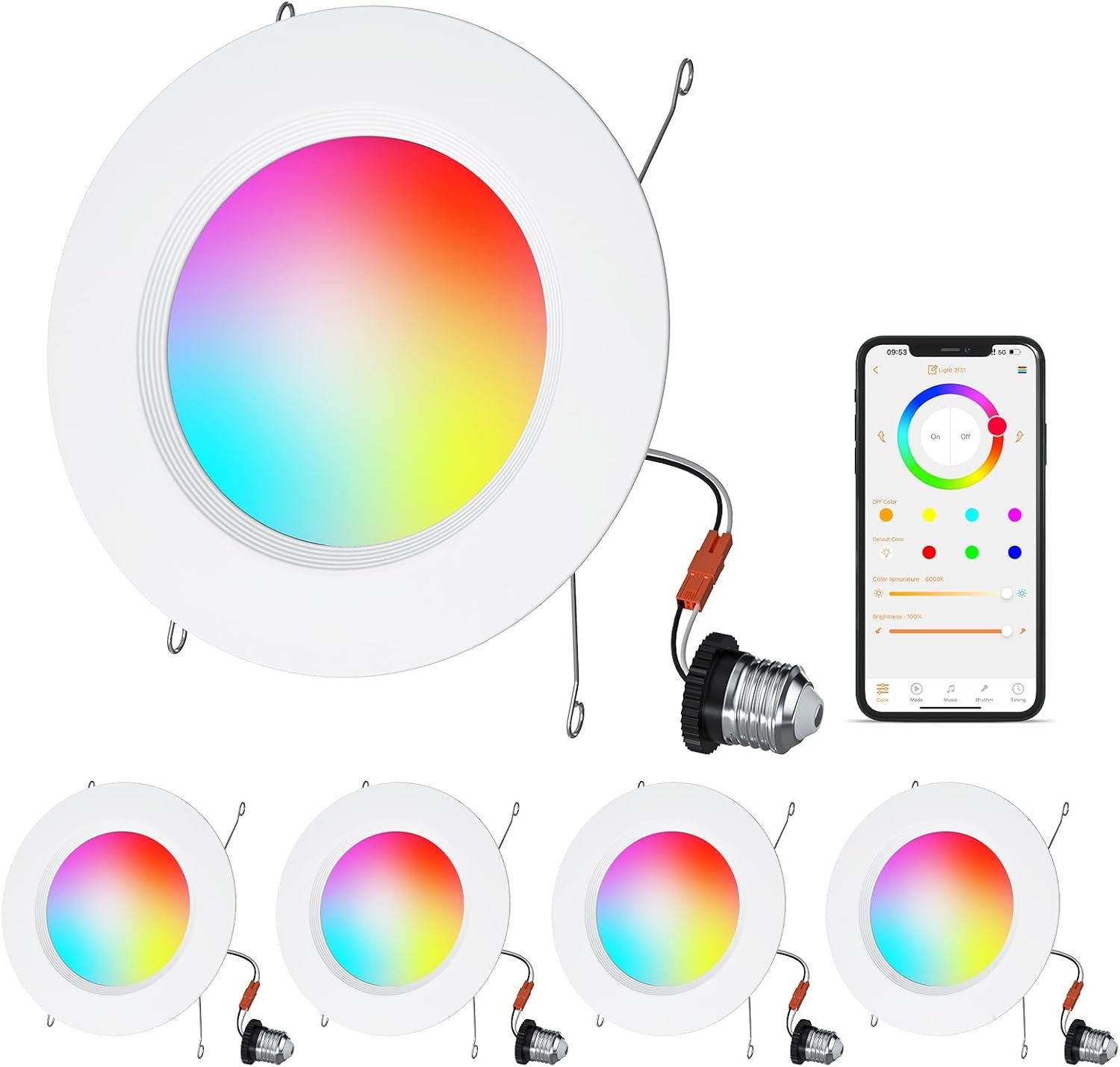
    The 5/6 Inch 13W Recessed Lighting Color Changing Can Light is designed around this type of installation. The product listing associated with the HYDONG model describes a four-pack of recessed LED downlights with a white finish, color-changing capabilities, and compatibility with common recessed-lighting installations. The listing identifies the lights as 5/6-inch recessed lighting and describes multiple lighting colors and dimming functionality.

    A color-changing recessed light can serve a different purpose from a conventional fixed-color ceiling fixture. Instead of committing a room to one color temperature or color, the user can adjust the lighting according to the activity or preferred atmosphere.

    This can make the same room feel different throughout the day. A brighter white setting may be appropriate when preparing food or working, while a warmer setting can be more comfortable for an evening environment. Color modes can also be used for decorative purposes.

    However, smart or color-changing lighting should be approached as part of a complete lighting system rather than as a replacement for every other type of light. Room size, ceiling construction, existing electrical connections, dimmer compatibility, installation depth, and local electrical requirements all matter.

    This guide takes an informational look at the 5/6 Inch 13W Color Changing Recessed Lighting four-pack, explaining how recessed LED lights work, what the color-changing feature can offer, how they can be used around the home, and what to consider before installation.


    What Is 5/6 Inch Recessed Lighting?

    Recessed lighting is a type of ceiling fixture in which the light source is installed within an opening in the ceiling.

    Instead of hanging down from the ceiling like a pendant or chandelier, a recessed light sits relatively flush with the ceiling surface.

    This creates a streamlined appearance and can help distribute light across a room without introducing a large visible fixture.

    The “5/6-inch” terminology used for recessed lights generally refers to the compatible recessed housing or aperture category rather than necessarily describing the diameter of the visible trim itself.

    This is an important distinction when planning an installation.

    Existing recessed housings can differ in size, shape, electrical configuration, and mounting method. Before purchasing replacement downlights, homeowners should compare the product’s installation requirements with their existing ceiling opening and housing.


    Key Features

    13-Watt LED Lighting

    The product is identified as a 13W recessed LED light.

    Wattage describes electrical power consumption, not brightness by itself.

    LED technology can produce substantial illumination while using relatively little electrical power compared with many older lighting technologies.

    However, brightness should be evaluated using lumens rather than wattage alone.

    When comparing different recessed lights, users should consider:

    • Lumens
    • Color temperature
    • Beam distribution
    • Ceiling height
    • Room dimensions
    • Number of fixtures
    • Surface colors
    • Intended activity

    A 13-watt rating therefore provides information about power consumption, but it does not independently determine how bright a room will appear.


    Four-Pack Configuration

    The product is offered as a four-pack.

    A multiple-light configuration can be useful when installing or updating several recessed fixtures within the same room.

    Using matching fixtures can create visual consistency across the ceiling.

    For example, four recessed lights may be used in:

    • A small kitchen
    • Bedroom
    • Hallway
    • Home office
    • Living room
    • Basement
    • Dining area

    The appropriate number of lights depends on the size and layout of the room.

    More fixtures are not automatically better. Too many lights can produce excessive illumination or create unwanted glare.


    Color-Changing Lighting

    One of the defining features is color-changing functionality.

    Traditional recessed lights typically provide one fixed color temperature.

    A color-changing fixture provides more flexibility.

    Depending on the supported modes and controls, users can select different lighting appearances for different situations.

    Common categories include:

    • Warm white
    • Neutral white
    • Cool white
    • Decorative colors

    Warm lighting can create a relaxed atmosphere, while cooler white light can feel more energetic and task-oriented.

    Color modes can be useful for decorative purposes, special occasions, entertainment spaces, or accent lighting.


    White Housing and Trim

    The white finish is designed to blend into many conventional ceiling surfaces.

    White recessed trims are commonly used because they can appear relatively unobtrusive when installed in a white ceiling.

    This allows the lighting to become part of the room rather than becoming a major visual feature.

    For ceilings with another color or texture, the contrast may be more noticeable.


    Understanding Color Temperature

    Color temperature is one of the most important concepts when selecting LED lighting.

    It is normally expressed in Kelvin, abbreviated as K.

    Lower Kelvin values generally appear warmer, with more yellow or amber tones.

    Higher values generally appear cooler and more blue-white.

    A simplified example:

    Color TemperatureGeneral AppearanceCommon Use
    Warm WhiteSoft and yellowishBedrooms, living rooms
    Neutral WhiteBalanced whiteKitchens, offices
    Cool WhiteCrisp and bright-lookingWorkspaces, utility areas
    Color ModesDecorative colorsEntertainment and accents

    The exact appearance depends on the light’s design and surrounding surfaces.

    Color-changing recessed lights can be useful because the preferred lighting environment does not have to remain fixed.

    A kitchen used during the day for food preparation may benefit from a different lighting appearance in the evening.


    How It Can Be Used

    Kitchen Lighting

    The kitchen is one of the most common applications for recessed lighting.

    A ceiling-mounted downlight can provide general illumination over work areas.

    Multiple fixtures can be positioned to distribute light across:

    • Countertops
    • Islands
    • Sinks
    • Cooking areas
    • Walkways
    • Dining spaces

    Color adjustment can add flexibility.

    A neutral or cooler white setting may be suitable for food preparation, cleaning, and other detailed tasks.

    A warmer setting can create a more relaxed atmosphere during meals or evenings.

    The positioning of recessed lights matters considerably. Lights installed too far from work surfaces can create shadows, while lights placed directly behind a person can cause the user’s body to block illumination.


    Living Room

    A living room often needs flexible lighting because it can serve several purposes.

    The same room might be used for:

    • Reading
    • Watching television
    • Conversations
    • Entertaining guests
    • Relaxing
    • Playing games

    Adjustable lighting can help accommodate these different activities.

    A warmer light can create a calmer atmosphere, while a brighter white setting can provide more general illumination when the room is being actively used.

    Color modes can also provide decorative lighting for gatherings or entertainment.


    Bedroom

    Bedrooms generally benefit from lighting that can transition from functional to relaxing.

    Recessed fixtures can provide general ceiling illumination without taking up wall or floor space.

    During the morning, a brighter setting can make the room easier to navigate and prepare in.

    Later in the evening, warmer lighting can create a softer visual environment.

    However, recessed lighting should not necessarily be the only light source in a bedroom. Bedside lamps and other localized fixtures can provide more comfortable light for reading or other activities.


    Home Office

    A home office requires careful lighting because screen glare and reflections can become uncomfortable.

    Recessed lights can provide general overhead illumination, while a desk lamp can provide localized task lighting.

    Color-changing functionality can make it possible to select a lighting appearance that works better for different activities.

    When using computer screens, users should pay attention to reflections on the display.

    The ideal location of recessed lights depends on the desk position, ceiling height, and direction of the user’s view.


    Basement

    Basements often have limited natural light.

    Recessed fixtures can provide broad ceiling illumination while maintaining ceiling clearance.

    A four-pack can be useful for distributing multiple light sources across a basement area.

    Color-changing functionality can also make a basement more flexible.

    For example, a brighter white setting can be used for cleaning or working, while a warmer or decorative setting can be used in a recreational area.


    Hallways

    Hallways can benefit from recessed lighting because the fixtures do not protrude significantly from the ceiling.

    Multiple fixtures can provide consistent illumination along a corridor.

    The spacing should be planned according to the ceiling height and desired light distribution.

    Installing fixtures too close together can create unnecessary brightness, while excessive spacing can create dark areas.


    Dining Areas

    Dining rooms often benefit from a combination of general and decorative lighting.

    Recessed lights can provide overall illumination while a pendant or chandelier serves as the visual centerpiece.

    Color-changing recessed fixtures can provide background lighting that changes with the occasion.

    For a formal dinner, warmer light may create a softer environment.

    For cleaning or everyday activities, a brighter white setting can be more practical.


    Entertainment Rooms

    Color-changing lighting can be particularly useful in entertainment spaces.

    A media room, gaming room, or recreational area can use different lighting colors to create a more customized environment.

    Color modes can also complement other decorative lighting.

    The goal should generally be to create atmosphere without producing distracting reflections on television or monitor screens.


    Recessed Lighting and Room Design

    Lighting affects more than visibility.

    It also influences how colors, textures, furniture, and architectural details appear.

    A warmer light can make wood tones and warm-colored walls appear more inviting.

    Cooler lighting can emphasize white surfaces and create a cleaner visual appearance.

    Color-changing modes can introduce a decorative element without requiring separate lamps.

    This flexibility can be useful when one room has multiple functions.

    However, lighting should complement the room rather than overwhelm it.

    A small room with too many bright fixtures can feel uncomfortable, while a large room with too few lights may contain dark areas.


    Installing Recessed LED Lights

    Check the Existing Housing

    Before replacing existing recessed lights, identify the type of housing already installed.

    Important details can include:

    • Housing diameter
    • Housing depth
    • Connector type
    • Voltage
    • Existing trim
    • Mounting clips
    • IC rating requirements
    • Ceiling material

    A fixture designed for one type of installation may not be suitable for another.


    Turn Off Power

    Electrical work should always begin with appropriate safety precautions.

    Turn off the relevant circuit at the electrical panel before working on an existing fixture.

    Do not rely solely on the wall switch.

    A qualified electrician can verify that the circuit is de-energized and perform installation when the wiring or housing is unfamiliar.


    Follow the Product Instructions

    Recessed lights can have different installation procedures.

    The correct method depends on the specific model and existing housing.

    Follow the manufacturer’s installation instructions rather than assuming that every 5/6-inch recessed light installs in exactly the same way.


    Check Local Electrical Requirements

    Electrical codes differ by location.

    Some installations may have requirements related to insulation contact, junction boxes, grounding, wiring, fire protection, or ceiling construction.

    When there is uncertainty, professional electrical advice is appropriate.


    Important Things to Consider

    Existing Ceiling Opening

    The first practical question is whether the light fits the existing opening.

    The term “5/6-inch” can refer to a category of recessed housing rather than meaning that every opening measuring exactly that amount will automatically accept the fixture.

    Measure the existing installation carefully.


    Dimmer Compatibility

    If the lights are intended to be used with a wall dimmer, verify compatibility between the light and the dimmer.

    Not every LED fixture works correctly with every dimmer.

    An incompatible combination can cause:

    • Flickering
    • Buzzing
    • Limited dimming range
    • Unexpected shutdown
    • Uneven brightness

    The manufacturer’s compatibility information should be checked before installation.


    Color Control Method

    Color-changing lights can use different control methods depending on the model.

    Some use a wall switch, remote control, app, or other control system.

    Before installation, users should understand how the particular model changes colors and modes.

    This is especially important when several fixtures are installed together.

    If all four lights are intended to operate together, the control system should be configured appropriately.


    Brightness and Lumens

    Wattage alone does not tell users how much light a fixture produces.

    When comparing recessed lighting, look for the lumen rating.

    A fixture with more watts is not automatically brighter than another fixture with fewer watts.

    LED efficiency varies by design.


    Ceiling Height

    Ceiling height affects how light spreads across a room.

    A fixture installed in a low ceiling may illuminate a smaller area effectively than the same fixture installed in a higher ceiling.

    Spacing should therefore be based on the actual room rather than a fixed formula.


    Glare

    Recessed lights can produce glare if positioned incorrectly or if the light source is too intense for the environment.

    Glare can become particularly noticeable around:

    • Television screens
    • Computer monitors
    • Glossy countertops
    • Mirrors
    • Polished surfaces

    Planning fixture locations before installation can reduce these problems.


    Comparison of General Lighting Categories

    Lighting CategoryInstallationAdjustabilityTypical Use
    Fixed Recessed LEDCeilingLimitedGeneral illumination
    Color-Changing Recessed LEDCeilingHighGeneral and decorative lighting
    Pendant LightCeilingVariesDining and focal areas
    Track LightingCeiling/WallHighAccent and directional lighting
    Floor LampPortableModerateLocalized room lighting
    Table LampPortableModerateTask and ambient lighting
    Smart BulbExisting fixtureHighFlexible connected lighting

    The 5/6-inch color-changing recessed format occupies the space between conventional ceiling illumination and decorative smart lighting.

    It retains the clean appearance of recessed fixtures while providing more flexibility than a fixed-color downlight.


    Color-Changing Recessed Lighting vs. Smart Bulbs

    Smart bulbs can also provide adjustable colors and brightness.

    However, they require a compatible bulb socket or fixture.

    A recessed LED fixture can offer a more integrated ceiling appearance.

    The choice depends on the existing installation.

    If a home already has recessed housings, a compatible retrofit downlight can be a practical approach.

    If the home uses conventional lamps and ceiling sockets, smart bulbs may be easier to introduce without changing the fixture.


    Using Multiple Recessed Lights Together

    Installing several matching fixtures can create a more consistent lighting environment.

    With a four-pack, users may place the lights in a grid or distribute them according to the room’s architecture.

    For example, a rectangular room could use two rows of two lights.

    However, room dimensions vary.

    A kitchen island, furniture arrangement, or architectural feature may require a different pattern.

    Before drilling or cutting openings, mark the intended locations and consider where shadows will fall.


    Energy Considerations

    LED lighting is generally associated with lower energy consumption than traditional incandescent lighting for comparable illumination.

    However, actual energy consumption depends on the number of fixtures and how long they are operated.

    Four 13-watt fixtures operating simultaneously would consume more electricity than one fixture.

    For that reason, zoning can be useful.

    If the electrical system allows separate switches or controls for different groups of lights, users can illuminate only the area they are currently using.

    Color-changing functionality may also allow users to adapt the atmosphere without installing additional decorative fixtures.


    Maintenance

    LED recessed fixtures generally require less routine maintenance than traditional bulbs because there is no conventional filament to replace.

    However, the visible trim can accumulate dust.

    Cleaning should be performed with the power turned off and using methods appropriate for the fixture’s materials.

    Do not spray cleaning products directly into electrical components.

    If a fixture begins flickering, overheating, producing unusual noise, or behaving unexpectedly, investigate the cause rather than continuing to use it without checking the installation.


    Bathroom and Moisture-Prone Areas

    Bathrooms require additional consideration.

    Not every recessed light is rated for wet or damp locations.

    If the light is being installed in a bathroom, users should verify the fixture’s applicable location rating and compare it with local electrical requirements.

    The fact that an LED light is installed in a ceiling does not automatically make it suitable for areas exposed to moisture.

    Placement near showers and bathtubs can have additional electrical safety requirements.

    When in doubt, consult a qualified electrician.


    Outdoor Applications

    The product is designed as recessed indoor-style lighting unless its specifications explicitly state otherwise.

    It should not automatically be installed outdoors or in locations exposed to rain.

    Outdoor lighting requires suitable environmental protection and electrical ratings.

    If outdoor recessed lighting is needed, choose a fixture specifically designed for that environment.


    Frequently Asked Questions

    What size are these recessed lights?

    The product is marketed as 5/6-inch recessed lighting. This terminology generally refers to compatibility with a particular recessed-light housing category. The existing ceiling opening should still be measured before installation.

    How many lights are included?

    The product is sold as a four-pack.

    This can be useful when updating multiple recessed fixtures in one room or creating a coordinated lighting arrangement.

    What is the power rating?

    Each light is identified as a 13-watt LED fixture.

    Wattage describes electrical consumption rather than directly measuring brightness.

    Can the color be changed?

    Yes. The product is designed with color-changing functionality, allowing users to select different lighting appearances depending on the supported control system and available modes.

    Can the lights be dimmed?

    The product listing identifies dimming functionality. Users should verify the applicable dimmer and control compatibility before connecting the lights to an existing wall dimmer.

    Are these smart lights?

    Color-changing does not necessarily mean that a light is Wi-Fi or app-controlled.

    The exact control method should be confirmed from the product instructions and listing. Users should not assume that every color-changing recessed fixture supports smartphone or voice control.

    Are these lights suitable for a kitchen?

    Recessed lighting can be very useful in kitchens.

    These fixtures can provide overhead illumination for countertops, islands, walkways, and general kitchen areas when positioned appropriately.

    Can they be used in a bedroom?

    Yes. Recessed lighting can provide general bedroom illumination, while warmer settings can be used to create a softer atmosphere when appropriate.

    Can they be installed in a living room?

    Yes. Recessed lights are commonly used for living-room general illumination.

    Color-changing functionality can also provide additional flexibility for entertainment or decorative lighting.

    Can they be used in a basement?

    They can be suitable for basement applications if the installation environment and electrical requirements are compatible.

    Basement ceiling construction, insulation, moisture, and existing electrical housing should be considered before installation.

    Do recessed lights need a housing?

    The answer depends on the specific fixture design.

    Some recessed LEDs are designed to retrofit into existing housings, while others are complete new-construction or remodel fixtures.

    Users should follow the installation instructions for this particular product.

    Can these lights replace existing recessed lights?

    They may be suitable for certain existing recessed installations if the housing, opening, connectors, and electrical specifications match.

    Compatibility should be confirmed before removing the existing fixtures.

    What does 13W mean?

    13W refers to the electrical power consumption of the light.

    It does not directly tell you how bright the fixture will be. Lumens are a better measurement for comparing light output.

    Are LED recessed lights energy efficient?

    LED technology generally provides more illumination per watt than traditional incandescent lighting.

    Actual energy savings depend on the fixture, operating time, number of lights, and the lighting technology being replaced.

    Do color-changing lights consume more electricity?

    Power consumption depends on the lighting mode and electronics in the fixture.

    The maximum power rating provides a useful reference, but actual consumption can vary depending on the selected setting.

    Can the four lights be controlled together?

    That depends on the control system and installation configuration.

    When installing multiple fixtures, users should follow the manufacturer’s instructions to ensure the lights operate as intended.

    Do the lights remember the last color setting?

    Memory behavior varies between lighting systems.

    Users should consult the specific product documentation rather than assuming that a particular color or brightness level will always be retained after power is switched off.

    Can they be installed with an existing dimmer?

    Only if the light and dimmer are compatible.

    LED lights can behave unpredictably with incompatible dimmers, including flickering or limited dimming.

    Check the manufacturer’s compatibility information before installation.

    Are they suitable for bathrooms?

    Suitability depends on the fixture’s location rating and the specific bathroom installation.

    The user should verify whether the light is rated for damp or wet locations and follow applicable electrical requirements.

    Are they waterproof?

    Users should not assume that a recessed light is waterproof unless the manufacturer specifically provides an appropriate rating.

    Moisture-prone installations require fixtures designed for the environment.

    Can these lights be installed outdoors?

    Not unless the product is specifically rated for outdoor use.

    Outdoor recessed lighting requires appropriate weather and electrical protection.

    Can I install recessed lights myself?

    Installation difficulty depends on the existing wiring and ceiling construction.

    Anyone unfamiliar with residential electrical work should consider using a qualified electrician.

    Always turn off power at the circuit breaker and follow applicable electrical requirements.

    How should recessed light locations be planned?

    Consider the room’s dimensions, ceiling height, furniture arrangement, task areas, and potential shadows.

    It is often helpful to mark fixture locations before cutting into the ceiling.

    Can recessed lighting replace every other light in a room?

    Not necessarily.

    A well-designed lighting system often combines general illumination with task and accent lighting.

    For example, a kitchen may use recessed ceiling lights together with under-cabinet lighting.

    How should the fixtures be cleaned?

    Turn off the power and allow the fixture to cool before cleaning.

    Use a soft, appropriate cloth and avoid introducing moisture into electrical components.

    Follow the manufacturer’s care instructions.


    Conclusion

    The 5/6 Inch 13W Recessed Lighting Color Changing Can Light four-pack is designed for people looking to combine the clean appearance of recessed ceiling lighting with the flexibility of adjustable lighting colors.

    Its 13-watt LED configuration provides a relatively compact lighting solution, while the four-pack format can make it practical for updating several fixtures within the same room. The color-changing feature adds another layer of flexibility, allowing a room’s lighting environment to be adjusted according to the activity, time of day, or desired atmosphere.

    Recessed lighting can be particularly useful in kitchens, living rooms, bedrooms, home offices, basements, hallways, dining areas, and entertainment spaces. The best results depend heavily on fixture placement, ceiling height, room dimensions, and the balance between general, task, and accent lighting.

    There are also several technical considerations that should be addressed before installation. The existing ceiling opening and recessed housing need to be compatible, the electrical connection must be appropriate, and dimmer compatibility should be verified when applicable. Bathrooms and other moisture-prone locations require additional attention to electrical and environmental ratings.

    The color-changing capability should also be viewed as a flexibility feature rather than a replacement for thoughtful lighting design. A room still needs appropriate brightness, sensible fixture spacing, and consideration of glare and shadows.

    For homeowners planning to update several compatible recessed fixtures, a coordinated four-pack can provide a straightforward way to create a consistent ceiling-lighting arrangement while giving the room more control over its visual atmosphere.

    As with any electrical installation, safety and compatibility should come before appearance. Measuring the existing installation, reading the manufacturer’s instructions, and obtaining professional assistance when necessary can help ensure that the lighting system is installed correctly.

    You can check more details on Amazon here.

  • Etekcity Smart Scale for Body Weight, Body Fat and BMI: A Practical Guide to Smart Body Composition Tracking

    Etekcity Smart Scale for Body Weight, Body Fat and BMI: A Practical Guide to Smart Body Composition Tracking

    Introduction

    A bathroom scale can provide one simple number, but personal health and fitness progress rarely comes down to one number alone. Body weight can change from day to day because of hydration, meals, exercise, and other normal fluctuations. For people who want a broader picture of their measurements, a smart body composition scale can add additional information and make it easier to keep a record over time.

    The Etekcity Smart Scale for Body Weight, Body Fat and BMI is designed to combine traditional weight measurement with app-connected body composition tracking. The model associated with the product listing is the Etekcity ESF-551, a Bluetooth-enabled smart scale with a tempered-glass platform, LED display, and support for the VeSync app. Product specifications list a maximum weight capacity of 400 pounds or 180 kilograms, with measurements in pounds, kilograms, or stones.

    Beyond body weight, the scale is designed to provide measurements such as BMI, body fat, muscle mass, body water, bone mass, basal metabolic rate, and other body-composition metrics through its connected app. Etekcity describes the model as using bioelectrical impedance analysis, or BIA, to estimate these additional measurements.

    That distinction is important. Weight is measured directly by the scale’s sensors, while many body-composition values are estimates produced using electrical measurements and user information. These estimates can be useful for observing trends, but they should not be treated as medical diagnoses or as replacements for professional testing.

    The Etekcity Smart Scale is therefore best understood as a home tracking tool. It can help users establish a consistent weighing routine, record measurements, visualize changes, and integrate weight-related information with other fitness applications.

    This guide explores how the scale works, its main features, possible uses, important considerations, general smart-scale categories, and practical ways to interpret the information it provides.


    What Is the Etekcity Smart Scale?

    The Etekcity Smart Scale is a digital bathroom scale designed to measure body weight and provide additional body-composition estimates through a connected smartphone application.

    The ESF-551 model uses a tempered-glass platform and four high-precision sensors. Etekcity lists weight measurements in increments as small as 0.1 pound or 0.05 kilogram, with a maximum supported weight of 400 pounds or 180 kilograms.

    The scale also connects to the VeSync application using Bluetooth. This creates a distinction between the physical scale and the broader tracking system.

    The scale itself provides the immediate weighing experience, while the app can be used to store measurements, review historical information, view progress, and work with additional fitness-related data.

    This can be useful because a single measurement has limited context.

    For example, knowing that someone’s weight changed by a small amount between two days does not necessarily indicate a meaningful change in body composition. Looking at measurements across several weeks can provide a more useful picture of long-term trends.


    Key Features

    Digital Weight Measurement

    The foundation of the Etekcity Smart Scale is still its ability to measure body weight.

    The ESF-551 has four high-precision sensors and supports readings in pounds, kilograms, and stones. Its listed maximum capacity is 400 pounds, or 180 kilograms.

    The scale is designed to provide readings in relatively small increments, which can make it useful for monitoring gradual changes.

    However, a small displayed increment does not mean that every tiny change represents a meaningful physiological change.

    Body weight naturally fluctuates throughout the day. Food, fluids, exercise, clothing, and other everyday factors can affect the number displayed.

    For that reason, consistent measurement conditions are generally more useful than focusing on individual readings.


    Body Mass Index

    BMI, or body mass index, is another measurement supported by the scale.

    BMI is calculated using body weight relative to height. It is commonly used as a broad population-level screening measure, but it does not directly measure body fat.

    For example, people with substantial muscle mass can have a relatively high BMI without having a high level of body fat.

    The Etekcity scale can therefore provide BMI as part of a larger collection of measurements rather than treating it as a complete description of an individual’s health.

    This is an important distinction when interpreting the app’s information.

    BMI can provide context, but it should be considered alongside other factors and, where appropriate, professional health guidance.


    Body Fat Estimation

    Body fat is one of the measurements that makes a smart scale different from a conventional digital bathroom scale.

    The ESF-551 uses BIA technology. According to Etekcity, the scale uses electrodes on the platform to send a low-amplitude electrical current through the body and uses the resulting resistance measurement to estimate body-composition values.

    BIA-based body-fat measurements are estimates rather than direct laboratory measurements.

    Hydration, recent food intake, exercise, skin temperature, and measurement conditions can influence BIA results.

    This means the most useful application is often tracking trends under consistent conditions rather than treating one individual percentage as an exact measurement.

    For example, measuring around the same time of day and under similar circumstances can make comparisons more meaningful.


    Muscle Mass and Other Body-Composition Metrics

    The scale’s connected system can provide more information than body weight and BMI.

    Etekcity lists measurements including:

    • Body weight
    • BMI
    • Body fat
    • Muscle mass
    • Body water
    • Bone mass
    • Protein
    • Visceral fat
    • Subcutaneous fat
    • Skeletal muscle
    • Fat-free body weight
    • Basal metabolic rate
    • Metabolic age

    These measurements are provided through the smart-scale system and app rather than representing thirteen independent direct measurements.

    This distinction matters when reading the data.

    A smart scale is collecting certain physical measurements and using algorithms and user information to estimate additional metrics.

    The results can be useful for observing changes over time, but they should not be interpreted as equivalent to clinical laboratory testing or diagnostic examinations.


    Bluetooth and the VeSync App

    One of the defining features of a smart scale is the ability to connect measurements to a digital record.

    The Etekcity ESF-551 works with the VeSync app through Bluetooth. Etekcity describes the app as a way to track measurements and view progress over time.

    This can eliminate the need to manually write down every measurement.

    Instead, users can build a historical record that makes it easier to see broader patterns.

    For example, someone tracking their weight for several months may find that individual daily changes are less important than the overall direction of the data.

    The app can also provide graphs and progress information, making numerical measurements easier to interpret visually.


    Fitness App Integration

    Smart-scale data becomes more useful when it can be incorporated into a broader fitness ecosystem.

    Etekcity states that VeSync can connect with services including Apple Health, Google Fit, Fitbit, Samsung Health, and MyFitnessPal, depending on supported integrations and configurations.

    This can help users avoid maintaining completely separate records.

    For example, someone might already use a smartwatch or fitness application to monitor physical activity while using the Etekcity scale to record weight-related measurements.

    Combining these data sources can create a broader personal tracking system.

    However, users should review the privacy settings and permissions of each connected service before enabling data sharing.


    Tempered Glass Platform

    The scale uses a tempered-glass platform.

    Tempered glass is commonly used in bathroom scales because it provides a smooth, easy-to-clean surface while maintaining a relatively slim profile.

    The ESF-551 is listed with dimensions of approximately 11 by 11 by 1.1 inches.

    A glass platform also makes placement important.

    The scale should be positioned on a firm, level surface. Soft carpets or uneven flooring can affect the stability of a weighing scale and may lead to inconsistent readings.

    The manufacturer also specifies anti-skid padding as part of the design.


    Multiple User Profiles

    A smart scale becomes more useful in a household when several people can use it without mixing their data.

    The VeSync ecosystem supports multiple user profiles, allowing individual measurements to be associated with the appropriate account or profile. Etekcity describes its smart-scale platform as supporting multiple users.

    This can make the scale suitable for shared household use.

    Each person can establish their own tracking history instead of maintaining separate devices.

    When multiple people use the same scale, however, it is important to make sure that measurements are assigned correctly.


    Baby and Light-Item Modes

    The ESF-551 is also described as supporting specialized weighing modes, including a mode for weighing babies and another for light items. Etekcity’s product information describes the scale as capable of weighing lighter objects and using a dedicated baby mode through its app.

    A baby-weighing mode generally works by using an adult’s known weight as a reference and then calculating the difference when the adult holds the baby.

    This can provide a convenient way to track changes at home.

    It should not be interpreted as a substitute for professional infant weighing equipment when medical precision is required.

    Similarly, a light-item mode can be useful for household objects, but the scale’s intended design remains centered around personal weighing.


    How It Can Be Used

    Establishing a Consistent Weighing Routine

    One of the simplest ways to use a smart scale is to establish a regular measurement routine.

    Rather than weighing at random times, a user might choose a consistent time of day.

    For example, some people prefer measuring in the morning before breakfast. Others may choose another routine that fits their schedule.

    Consistency can make measurements easier to compare because fewer variables are changing between readings.

    The important point is not that one specific time is universally correct, but that the chosen routine is practical enough to maintain.


    Tracking Long-Term Weight Trends

    Daily body weight can fluctuate.

    A person may weigh slightly more after a high-sodium meal or slightly less after exercise and fluid loss. These short-term changes do not necessarily represent corresponding changes in body fat.

    This is where historical tracking becomes useful.

    Instead of focusing on one day’s number, users can look at measurements across weeks or months.

    A graph can make broader trends easier to see.

    The smart scale’s app-based tracking is therefore potentially more useful than simply reading the number on the display and stepping off.


    Supporting a Fitness Routine

    Someone following an exercise routine may use the scale as one part of their overall tracking system.

    For example, a person could combine:

    • Body-weight measurements
    • Exercise records
    • Food tracking
    • Activity data
    • Sleep information
    • Personal goals

    The scale does not determine whether a fitness program is working by itself.

    Instead, it can provide one source of information that can be considered alongside other indicators.

    This is especially important for people participating in resistance training, because body weight alone may not reflect changes in muscle and fat.


    Monitoring Body-Composition Trends

    The additional BIA estimates can provide another perspective beyond weight.

    For example, someone might observe that body weight remains relatively stable while estimated body-fat and muscle measurements change over time.

    These measurements should still be interpreted cautiously because BIA estimates can vary.

    The value comes primarily from observing trends under similar conditions.

    A single unexpected reading is usually less informative than a consistent pattern across multiple measurements.


    Family Use

    A smart scale can also serve as a shared household device.

    Parents, partners, or other household members can use separate profiles where supported.

    This eliminates the need for multiple bathroom scales while keeping individual tracking information separate within the app.

    For households with several users, it is worth establishing a simple routine so that each person’s measurements are recorded under the correct profile.


    Who It May Be Suitable For

    People Tracking Weight at Home

    The scale can be useful for people who want a digital way to monitor their weight without manually recording each measurement.

    The large display and smartphone connection provide two ways to access information.


    Fitness Enthusiasts

    People who already track workouts and nutrition may find additional body-composition estimates useful as another data point.

    The scale can be integrated into a broader tracking routine through VeSync and supported fitness services.


    People Interested in Trends Rather Than Single Readings

    The app-based history can be particularly relevant to people who want to observe changes over weeks and months.

    Rather than treating each measurement as an isolated result, users can look for broader patterns.


    Families

    Multiple-user support makes this type of smart scale practical for shared households.

    Each person can maintain their own tracking information instead of relying on a single paper record.


    People Building a Connected Fitness Setup

    Someone already using Apple Health, Google Fit, Fitbit, Samsung Health, or another supported ecosystem may appreciate the ability to connect weight-related information with other activity data.


    Important Things to Consider

    Body-Composition Numbers Are Estimates

    This is perhaps the most important consideration.

    The scale directly measures weight, but BIA-based values such as body fat and muscle mass are calculated estimates.

    They should not be treated as exact measurements of internal body composition.

    Different devices can produce different estimates, and the same device can produce different readings depending on hydration and other conditions.

    The best approach is to use the information as a trend indicator rather than a diagnostic measurement.


    Hydration Can Affect BIA Measurements

    BIA technology depends partly on how electrical signals move through the body.

    Because hydration affects electrical conductivity, changes in hydration can influence estimated body-composition results.

    Exercise, meals, alcohol, fluid intake, and other factors can also affect measurements.

    For more consistent tracking, users should try to measure under similar conditions whenever possible.


    Medical Conditions and Devices

    BIA scales are not appropriate for everyone.

    People who are pregnant or who have implanted electronic medical devices such as pacemakers should pay particular attention to the manufacturer’s safety guidance.

    Etekcity provides a Zero-Current Mode on certain newer models to disable BIA, while the ESF-551 documentation should be consulted for the exact safety guidance applicable to this model.

    Anyone with a medical condition, implanted device, or uncertainty about whether BIA is appropriate should consult a qualified healthcare professional before using the body-composition functions.

    The scale should not be used as a diagnostic medical device.


    Placement Matters

    A bathroom scale should be placed on a hard, level, stable surface.

    A carpeted floor can behave differently from tile, wood, or another hard surface.

    Users should also avoid moving the scale repeatedly between measurements if consistency is important.

    Keeping it in the same location can help establish a more repeatable measurement routine.


    Foot Position Matters

    BIA measurements depend on contact between the feet and the scale’s electrodes.

    Standing differently from one measurement to another can potentially affect the results.

    For consistent tracking, users should follow the manufacturer’s instructions regarding foot placement and measurement conditions.


    Bluetooth and App Setup

    The smart features require more setup than a basic bathroom scale.

    Users need a compatible smartphone and the appropriate app.

    Bluetooth permissions and application settings may also affect synchronization.

    If the scale is used without the app, some functionality may be limited compared with the connected experience.

    Before relying on app tracking, it is sensible to confirm that the scale is properly paired and that measurements are being recorded under the intended profile.


    Understanding BMI

    BMI is frequently displayed on smart scales, but understanding what it means is important.

    BMI is calculated from weight and height.

    It can be useful as a broad screening measure at a population level, but it does not directly measure:

    • Body fat percentage
    • Muscle mass
    • Fat distribution
    • Bone density
    • Overall fitness
    • Metabolic health

    For example, an individual with significant muscle mass can have a higher BMI because muscle contributes to body weight.

    The BMI number should therefore be interpreted in context.

    The Etekcity scale can make BMI convenient to track, but it should not be treated as a complete health assessment.


    Comparing General Scale Categories

    Different bathroom scales serve different purposes.

    Scale CategoryWeight MeasurementBody CompositionApp ConnectivityTypical Purpose
    Basic Digital ScaleYesNoNoSimple weight tracking
    Bluetooth Smart ScaleYesOftenYesWeight and digital tracking
    Body Composition ScaleYesYes, estimatedOftenBroader personal tracking
    Advanced Multi-Sensor ScaleYesMore extensiveOftenDetailed body-composition estimates
    Clinical/Professional EquipmentYesDepending on systemVariesProfessional assessment

    The Etekcity ESF-551 falls into the smart body-composition category.

    Its main difference from a basic digital scale is not simply the display. It combines weight measurement with Bluetooth connectivity and app-based tracking, while also providing BIA-derived body-composition estimates.

    Someone who only wants to know their body weight may not need those additional features.

    Someone who wants historical records and additional estimates may find the connected approach more useful.


    Smart Scale vs. Traditional Bathroom Scale

    A traditional digital scale is straightforward.

    Step on it, read the number, and step off.

    There is little setup and generally no need for a smartphone.

    A smart scale adds another layer.

    It can record measurements automatically, create historical graphs, and provide additional information.

    The trade-off is complexity.

    Users who prefer simple equipment may appreciate a conventional scale. Users who enjoy tracking data may prefer a connected model.

    Neither approach is inherently necessary for everyone.

    The important consideration is whether the additional information will actually be used.


    Making Measurements More Consistent

    Use a Similar Time of Day

    Measurements taken at different times can naturally vary.

    Using a similar time each day can reduce some of the variation.


    Use Similar Clothing Conditions

    Clothing contributes to body weight.

    If accurate trend comparison matters, measuring under similar clothing conditions can make the data easier to interpret.


    Avoid Comparing Immediately After Exercise

    Exercise can temporarily alter hydration and other physiological factors.

    Because BIA measurements can be influenced by hydration, measurements taken immediately after exercise may not be directly comparable with measurements taken under resting conditions.


    Keep the Scale in One Place

    Moving the scale between different surfaces can introduce unnecessary variation.

    A stable, permanent location can make the routine simpler.


    Focus on Trends

    A single reading can be misleading.

    A longer record can show whether a change is persistent or simply part of normal daily fluctuation.

    This is especially relevant to body-fat and other BIA-derived measurements.


    FSA and HSA Eligibility

    The product is marketed as FSA/HSA eligible.

    However, eligibility and reimbursement rules can depend on the specific account, plan administrator, purchase documentation, and applicable tax rules.

    A product being advertised as FSA or HSA eligible should not be interpreted as a guarantee that every individual’s account will reimburse the purchase.

    Users who intend to use FSA or HSA funds should verify the current rules with their plan administrator or benefits provider before purchasing.

    Keeping the receipt and relevant product documentation can also be useful for record-keeping.


    Privacy and Health Data

    Smart scales can create a significant amount of personal information when connected to an app.

    Weight, body-composition estimates, goals, and related fitness information may be considered personal data.

    Users should review the privacy policies and permissions associated with the VeSync app and any third-party services they connect.

    Before enabling integrations with services such as Apple Health, Google Fit, Fitbit, Samsung Health, or MyFitnessPal, users should understand what information is being shared and where it may be stored.

    Good digital-health habits include using a secure account password, keeping apps updated, and reviewing permissions periodically.


    Frequently Asked Questions

    What does the Etekcity Smart Scale measure?

    The ESF-551 measures body weight and can provide additional body-composition estimates through its BIA technology and VeSync app. Listed metrics include BMI, body fat, muscle mass, body water, bone mass, protein, visceral fat, subcutaneous fat, skeletal muscle, fat-free body weight, BMR, and metabolic age.

    What is the maximum weight capacity?

    Etekcity lists the ESF-551 with a maximum capacity of 400 pounds, 180 kilograms, or 28 stone.

    What measurements can it display?

    The scale uses pounds, kilograms, or stones for weight measurements. The connected app provides additional body-composition information.

    Does it connect to a smartphone?

    Yes. The ESF-551 connects with the VeSync app through Bluetooth.

    Does it measure body fat directly?

    No. The body-fat figure is an estimate generated using BIA technology and other relevant information. It should not be treated as a direct laboratory measurement.

    How accurate are body-fat measurements?

    BIA measurements can vary based on hydration, exercise, food intake, foot placement, and other conditions. They are most useful for observing trends when measurements are taken under reasonably consistent conditions.

    Can the scale calculate BMI?

    Yes. BMI is one of the measurements provided through the smart-scale system.

    Does BMI tell me how healthy I am?

    No. BMI is a screening measure based on height and weight. It does not directly measure body fat, muscle distribution, fitness, or overall health.

    Can several people use the same scale?

    The VeSync ecosystem supports multiple users, making the scale suitable for shared household use.

    Can it connect to fitness apps?

    Etekcity states that VeSync supports integration with services including Apple Health, Google Fit, Fitbit, Samsung Health, and MyFitnessPal, subject to supported configurations.

    Does it use batteries?

    The ESF-551 uses three 1.5V AAA batteries, which are listed as included with the product.

    Does it have a glass platform?

    Yes. The scale uses a tempered-glass platform.

    Can it weigh babies?

    Etekcity describes a Baby Mode within its smart-scale ecosystem for tracking infant or child weight.

    For medical or clinical monitoring, however, users should follow guidance from a pediatrician or healthcare professional.

    Can it weigh small objects?

    Etekcity’s product information describes a light-item weighing capability for items as light as approximately 100 grams.

    Can pregnant people use the scale?

    Pregnancy requires particular consideration because the body-composition function uses BIA. Users should follow the manufacturer’s safety instructions and consult a healthcare professional if they are uncertain about whether BIA is appropriate.

    Can people with pacemakers use the body-composition feature?

    People with implanted electronic medical devices should not assume that BIA is appropriate for them. Consult a healthcare professional and follow the manufacturer’s safety guidance before using the body-composition function.

    Can the scale be used without the app?

    The scale can provide basic weighing functionality, but smart features and historical tracking depend on the connected app experience.

    Why do body-fat readings change from one day to another?

    BIA estimates can be affected by hydration, exercise, meals, skin conditions, foot placement, and other factors.

    Daily variation does not necessarily represent a real change in body fat.

    Why can body weight change even when I have not gained fat?

    Body weight naturally changes due to food, fluids, glycogen, digestion, exercise, and other normal factors.

    A short-term increase or decrease should not automatically be interpreted as a corresponding change in body fat.

    Should I weigh myself every day?

    There is no universal requirement to weigh every day.

    Some people prefer daily measurements because they provide more data for identifying trends, while others prefer weekly or less frequent measurements.

    The most useful schedule is one that is consistent and does not create unnecessary stress.

    Is the scale a medical device?

    It should not be treated as a diagnostic medical device. Its body-composition measurements are estimates intended for personal tracking.

    Anyone concerned about a health condition should consult a qualified healthcare professional rather than relying on smart-scale measurements.

    Is the Etekcity Smart Scale FSA/HSA eligible?

    The product is marketed as FSA/HSA eligible. Actual reimbursement depends on the user’s specific plan and applicable rules, so users should verify eligibility with their benefits administrator.


    Conclusion

    The Etekcity Smart Scale for Body Weight, Body Fat and BMI is designed to turn a basic bathroom weighing routine into a more connected system for personal tracking.

    At its foundation, it provides digital weight measurement through four sensors, a tempered-glass platform, and a maximum capacity of 400 pounds or 180 kilograms. It then adds Bluetooth connectivity and the VeSync app, allowing users to store measurements, review trends, and access additional body-composition estimates.

    The broader set of measurements can include BMI, body fat, muscle mass, body water, bone mass, visceral fat, skeletal muscle, BMR, and other estimates. These additional figures can provide context beyond the number shown on a traditional bathroom scale.

    At the same time, it is important to understand what these numbers represent. Weight is measured by the scale, while many body-composition values are calculated estimates based on BIA and other information. Hydration, exercise, food intake, foot placement, and measurement conditions can influence the results.

    For that reason, the scale is most useful as a tracking tool rather than a diagnostic instrument. Consistent measurement habits, stable placement, and attention to long-term trends can make the information more meaningful.

    The Bluetooth and app functionality may be particularly useful for people who already track exercise, nutrition, or other wellness information digitally. Integration with supported fitness platforms can also reduce the need to manually transfer weight data between different services.

    For households, multiple-user support provides another practical advantage, while features such as Baby Mode and light-item weighing can extend the scale’s usefulness beyond a single person’s daily measurements.

    Ultimately, a smart scale is not a replacement for professional health assessment. It is a convenient way to collect and organize personal measurements at home. When used with realistic expectations, the Etekcity Smart Scale can serve as one component of a broader approach to monitoring weight and fitness-related trends.

    You can check more details on Amazon here.

  • Amazon Echo Spot (Newest Model): A Practical Guide to a Smart Alarm Clock for the Bedroom, Office, and Kitchen

    Amazon Echo Spot (Newest Model): A Practical Guide to a Smart Alarm Clock for the Bedroom, Office, and Kitchen

    Introduction

    The traditional alarm clock has changed considerably over the years. What was once a simple device designed to display the time and wake someone up can now be part of a broader connected-home setup. Smart alarm clocks combine a digital display with voice assistance, audio playback, timers, reminders, and other connected features.

    The Amazon Echo Spot, the newer generation of the Echo Spot family, is designed around this idea. It combines a compact display, speaker, microphone, and Alexa functionality in a small countertop device. Its design makes it particularly relevant for locations such as nightstands, home offices, kitchens, and other areas where having quick access to both information and voice controls can be useful.

    Unlike a conventional smart display with a large screen, the Echo Spot uses a smaller visual interface focused on essential information. This can make it easier to glance at the time, alarms, or selected information without turning a larger screen toward the user.

    The device is also designed for Alexa+, Amazon’s newer Alexa experience. As with other connected products, available functions can depend on factors such as region, account configuration, subscriptions, compatible services, and software updates.

    This guide looks at the Amazon Echo Spot from a practical perspective. Rather than treating it as simply an alarm clock, we will explore its design, key functions, everyday applications, potential users, limitations, and how it compares with other categories of smart home and timekeeping devices.


    Key Features of the Amazon Echo Spot

    The Echo Spot brings several functions together in a relatively compact form. Understanding each part helps explain where the device can fit into a household.

    Compact Smart Alarm Clock Design

    The most noticeable difference between the Echo Spot and a traditional Echo speaker is its integrated display.

    The display allows users to see selected information rather than relying entirely on spoken responses. For an alarm clock, this is particularly useful because the time can be checked with a quick glance.

    The compact design can work well on surfaces such as:

    • Bedside tables
    • Office desks
    • Kitchen counters
    • Shelves
    • Small side tables

    A smaller device can also be easier to accommodate in rooms where countertop or desk space is limited.

    Placement still matters. The display should ideally be positioned where it can be viewed easily from the intended location, while the microphone and speaker should remain reasonably unobstructed.


    Customizable Display

    A visual display gives the Echo Spot another layer of functionality compared with a speaker-only device.

    Depending on available settings and software features, users can configure aspects of the display to suit their preferences.

    The screen can provide information such as:

    • Time
    • Alarm information
    • Weather information
    • Other supported visual details

    The exact options available can change over time as Amazon updates the device software and Alexa experience.

    The display is not intended to function like a full-size tablet. Its smaller format is designed more for glanceable information and interaction with Alexa.


    Alexa Voice Assistant

    Alexa is central to the Echo Spot’s functionality.

    Users can interact with Alexa using voice commands for a variety of supported activities. These may include:

    • Setting alarms
    • Creating timers
    • Asking questions
    • Checking information
    • Playing supported audio
    • Managing reminders
    • Controlling compatible smart-home products
    • Creating routines

    This voice-controlled approach can be particularly useful when the user’s hands are occupied.

    For example, someone preparing food in the kitchen may want to set a timer without touching a phone. Likewise, someone getting ready for work may ask Alexa for information while continuing with another task.


    Designed for Alexa+

    The Echo Spot is described as being designed for Alexa+, Amazon’s newer Alexa experience.

    Alexa+ expands the conversational and assistant-oriented capabilities available through supported Alexa devices. However, availability can vary depending on region, account eligibility, subscription arrangements, and the specific features currently supported.

    This distinction is important because smart speakers and smart displays can receive software updates that change their capabilities over time.

    The hardware remains the same, but the software experience can evolve.


    Audio Playback

    Although the Echo Spot includes a screen, it is also an audio device.

    It can be used for supported audio content such as:

    • Music
    • Podcasts
    • Audiobooks
    • Radio or other supported services

    The speaker is suitable for everyday listening in smaller spaces, but it should not necessarily be considered a replacement for a dedicated home audio system.

    Room size, placement, source material, and listening preferences all influence the perceived audio experience.

    For a nightstand or office desk, however, having audio and voice assistance in one compact device can be convenient.


    Smart Alarm Functions

    The Echo Spot is particularly suited to people who want more functionality than a basic alarm clock provides.

    A smart alarm can be integrated into a broader daily routine. Instead of simply sounding at a particular time, users can combine alarms with other supported Alexa functions.

    Potential uses include:

    • Setting multiple alarms
    • Creating recurring alarms
    • Using different alarm sounds
    • Managing timers
    • Checking the time visually
    • Incorporating alarms into routines

    This can make the device useful beyond the simple purpose of waking someone up.


    Physical Interaction and Voice Controls

    A smart alarm clock needs to be easy to interact with, especially during the night or early morning.

    The Echo Spot combines physical interaction with voice control. This gives users more than one way to manage common functions.

    Voice commands can be convenient when someone does not want to reach for the device, while the screen can provide quick visual confirmation.

    This combination is one of the main differences between a smart alarm clock and a basic digital clock.


    How the Echo Spot Can Be Used

    The Echo Spot’s usefulness depends heavily on where it is placed. Its compact display and voice-assistant functionality make it adaptable to several parts of a home.

    1. Bedroom and Nightstand Use

    The bedroom is one of the most obvious locations for the Echo Spot.

    Its compact design allows it to serve as a combination of:

    • Alarm clock
    • Small speaker
    • Voice assistant
    • Timer
    • Information display

    A user can glance at the time without reaching for a smartphone.

    Voice commands can also be useful in the morning. For example, users may ask Alexa to provide information, start supported audio, or control compatible smart-home devices.

    A smart routine could potentially connect several morning activities, depending on the services and devices configured in the household.


    2. Morning Routines

    A smart alarm clock can become part of a structured morning routine.

    For example, a user could organize a routine around a consistent wake-up schedule and then use Alexa for supported actions such as:

    1. Providing the current time
    2. Giving selected information
    3. Starting audio
    4. Controlling compatible lights
    5. Managing other connected devices

    The exact sequence depends on the available Alexa features and connected products.

    This approach can reduce the number of separate devices needed to manage simple morning tasks.


    3. Home Office Use

    The Echo Spot can also work on an office desk.

    A compact display can provide a quick reference for time while Alexa handles voice-controlled tasks.

    Office-related uses may include:

    • Setting work timers
    • Creating reminders
    • Managing alarms
    • Playing background audio
    • Asking general questions
    • Controlling compatible smart-home equipment

    For people working from home, a voice assistant can complement computer-based productivity tools without necessarily replacing them.


    4. Kitchen Use

    The kitchen is another environment where the Echo Spot can be practical.

    Cooking often involves timing, multitasking, and hands that may not be clean or available to interact with a phone.

    The device can potentially help with:

    • Cooking timers
    • Multiple timers
    • Audio playback
    • General information
    • Unit conversions
    • Reminders
    • Compatible smart-home controls

    For example, while preparing a meal, a user can start a timer through Alexa and continue cooking.

    The display can also make it easier to confirm the time or certain supported information without relying entirely on audio.


    5. Controlling Compatible Smart-Home Devices

    The Echo Spot can be part of a larger smart-home ecosystem.

    Depending on compatibility and setup, Alexa can provide voice control for products such as:

    • Smart bulbs
    • Smart plugs
    • Thermostats
    • Certain appliances
    • Other compatible connected devices

    This can be especially useful in bedrooms.

    A user may be able to control compatible lights or other devices without getting out of bed.

    Compatibility should always be checked before adding third-party smart-home products because supported functions can differ between devices.


    6. Timers and Reminders

    Timers are useful far beyond cooking.

    They can be used for:

    • Study sessions
    • Work breaks
    • Exercise
    • Household chores
    • Laundry
    • Short tasks
    • Medication reminders where appropriate

    Multiple timers can be useful when several activities are happening at once.

    Reminders provide another way to organize recurring tasks, although users should verify how a particular reminder function works with their current Alexa configuration.


    Who the Amazon Echo Spot May Be Suitable For

    The Echo Spot is designed for people who want a compact device that combines timekeeping, audio, and voice-assistant functionality.

    People Looking Beyond a Traditional Alarm Clock

    A conventional alarm clock mainly provides time and alarm functions.

    The Echo Spot expands that concept by adding Alexa capabilities, audio playback, and smart-home integration.

    For someone who wants more functionality from the space occupied by a bedside clock, this type of device may be worth considering.


    Smart-Home Users

    People already using compatible smart lights, plugs, thermostats, or other Alexa-compatible devices may find a smart display useful as an additional control point.

    Instead of keeping a phone nearby for every command, voice interaction provides another option.


    Home Office Workers

    A compact smart device can sit alongside a computer without occupying much desk space.

    Timers, reminders, audio, and voice commands can all be useful during a workday.


    Families

    A shared smart device can provide household functions such as timers, alarms, audio, and information.

    However, families should consider privacy and account settings, especially when several people regularly use the same device.


    Kitchen Users

    People who cook regularly can use a smart speaker or display for hands-free timers and other supported voice functions.

    The compact format can be easier to position on a counter than a larger smart display.


    Important Things to Consider

    A smart alarm clock has several advantages over a traditional clock, but there are also factors worth considering.

    Internet Connectivity

    Many Alexa functions rely on an internet connection.

    If Wi-Fi or internet service is unavailable, cloud-based voice-assistant features may be limited or unavailable.

    This is an important difference between connected smart clocks and standalone digital alarm clocks.


    Privacy

    Privacy is an important consideration for any voice-enabled device.

    The Echo Spot includes microphones that allow Alexa to respond to voice commands. Users should review the privacy controls associated with their Amazon account and understand how voice interactions and recordings are handled.

    The location of the device also matters.

    A device positioned in a bedroom, office, or common area may be exposed to conversations that are unrelated to its intended use.

    Understanding privacy controls before installing a voice assistant is a sensible part of setting up any connected home device.


    Screen Size

    The Echo Spot uses a compact display rather than a large screen.

    That can be an advantage when the goal is simply to glance at the time or selected information. However, it also means that it is not designed for activities that benefit from a large visual interface.

    Users looking for a device for video, detailed recipes, visual dashboards, or extensive touchscreen interaction may need to consider a smart-display category with a larger screen.


    Power Requirements

    The Echo Spot is designed for stationary use and requires access to electrical power.

    Therefore, the location should have a suitable outlet nearby.

    Unlike a battery-powered portable speaker, it is not intended to function as a completely wireless device that can be used anywhere.


    Alexa and Service Availability

    Some Alexa features depend on location, account type, subscriptions, or third-party service support.

    A feature available to one user may not necessarily be available in another country or account configuration.

    This is particularly relevant when considering newer assistant features such as Alexa+.


    Smart-Home Compatibility

    A smart speaker or display becomes more useful when connected to compatible devices, but compatibility should be checked individually.

    Before adding a smart-home product, look for information regarding:

    • Alexa compatibility
    • Required hubs
    • Supported voice commands
    • Regional availability
    • Account requirements

    A product may support Alexa while still having limitations on certain advanced functions.


    Audio Expectations

    The Echo Spot is a compact smart device rather than a large dedicated audio system.

    It may be appropriate for everyday listening in a bedroom, office, or kitchen, but users seeking powerful room-filling audio or a specialized music setup may want to explore larger speaker categories.

    The right choice depends on whether voice assistance or audio performance is the primary goal.


    Comparison of General Device Categories

    Understanding the differences between smart alarm clocks, smart speakers, and smart displays can make the purchasing decision easier.

    Traditional Digital Alarm Clocks

    Traditional alarm clocks typically focus on:

    • Time display
    • Alarm functions
    • Snooze controls
    • Simple operation

    They can operate independently of internet services and tend to have fewer features.

    Their simplicity can be an advantage for users who want nothing more than basic timekeeping.


    Compact Smart Speakers

    Compact smart speakers focus primarily on:

    • Voice assistance
    • Audio playback
    • Timers
    • Reminders
    • Smart-home controls

    They often have little or no display.

    For users who primarily want voice interaction, a compact smart speaker may be sufficient.


    Smart Alarm Clocks With Displays

    Devices such as the Echo Spot combine:

    • Time display
    • Alarm functions
    • Voice assistance
    • Audio playback
    • Selected visual information
    • Smart-home controls

    This category sits between a traditional alarm clock and a larger smart display.


    Full-Size Smart Displays

    Larger smart displays provide a bigger visual interface.

    They may be more suitable for:

    • Video
    • Visual recipes
    • Detailed information
    • Video calls
    • Camera feeds
    • Touchscreen interaction

    The tradeoff is a larger footprint.


    Smartphones

    A smartphone can already provide:

    • Alarms
    • Timers
    • Music
    • Information
    • Smart-home applications

    However, using a dedicated smart clock can reduce the need to keep a phone beside the bed.

    For some users, separating the alarm from the smartphone can also create a more dedicated nighttime setup.


    Practical Setup Considerations

    Once a smart alarm clock is placed in the home, a few simple considerations can improve everyday usability.

    Choose a Comfortable Viewing Angle

    For a bedside table, position the Echo Spot so that the display can be seen easily from the bed.

    In an office, the screen should be visible without interfering with normal computer use.


    Keep the Microphones Unobstructed

    Avoid covering the device with objects or placing it somewhere that could interfere with voice recognition.

    A relatively open position generally makes more sense for a voice-controlled device.


    Give Smart-Home Devices Clear Names

    If the Echo Spot is connected to several smart devices, descriptive names can make voice commands easier.

    For example, names based on rooms or functions can be easier to remember than generic labels.


    Start With Simple Routines

    Users who are new to Alexa may find it easier to begin with simple alarms, timers, and commands before creating more complex routines.

    Once the basic system is familiar, additional compatible devices and automation can be introduced gradually.


    Frequently Asked Questions

    What is the Amazon Echo Spot?

    The Amazon Echo Spot is a compact smart device that combines a small display, speaker, microphones, alarm-clock functionality, and Alexa voice assistance.

    Is the Echo Spot an alarm clock?

    Yes. It is designed to function as a smart alarm clock, allowing users to set alarms while also providing additional Alexa features.

    Can it display the time?

    Yes. Timekeeping is one of its primary visual functions, making it suitable for bedside and desk use.

    Can the Echo Spot play music?

    Yes. It can play supported music and audio services through Alexa, subject to service availability and account configuration.

    Can it set multiple timers?

    Alexa supports timer functionality, and users can use voice commands for cooking, work, study, and other activities. Exact behavior can depend on the current Alexa software experience.

    Can it control smart lights?

    Compatible smart lights can be controlled through Alexa once they have been connected and configured.

    Does the Echo Spot require Wi-Fi?

    Most Alexa-connected functions require an internet connection, so Wi-Fi is an important part of normal operation.

    Can it be used in the kitchen?

    Yes. Its compact design and voice-controlled timers make it suitable for kitchen environments. Users should place it somewhere stable and away from conditions that could damage electronics.

    Can it be used in a home office?

    Yes. It can provide alarms, timers, reminders, audio, information, and compatible smart-home controls in an office environment.

    Is the Echo Spot portable?

    It is compact and can be moved between rooms, but it is designed for powered operation and is not a conventional battery-powered portable speaker.

    Does it support Alexa+?

    The product is designed for Alexa+, but specific Alexa+ availability and functionality can depend on region, account eligibility, subscriptions, and Amazon’s current service availability.

    Is the display similar to a tablet?

    No. The Echo Spot has a compact display designed primarily for glanceable information and interaction with Alexa rather than general-purpose tablet use.

    Can it replace a smartphone alarm?

    It can serve as a dedicated alarm device, but whether it completely replaces a smartphone depends on how someone uses alarms, calendars, reminders, and other phone-based functions.

    Is it suitable for a bedroom?

    Yes. The compact form factor and alarm functionality make bedroom use one of its intended applications. Privacy settings and device placement should be considered in any bedroom environment.

    Does it work with third-party smart-home products?

    It can work with compatible third-party devices through Alexa. Compatibility and available functions should be verified for each product.


    Conclusion

    The Amazon Echo Spot takes the familiar concept of an alarm clock and combines it with features associated with modern smart-home devices. Its compact display makes it possible to check the time and selected information at a glance, while Alexa provides voice-controlled access to supported alarms, timers, audio, reminders, questions, routines, and smart-home functions.

    Its size makes it particularly relevant for nightstands, office desks, and kitchens where a full-size smart display may be unnecessary. At the same time, the smaller screen means that it serves a different purpose from larger touchscreen smart displays.

    For anyone considering a connected alarm clock, the main question is not simply whether it can display the time. It is whether the combination of timekeeping, voice assistance, audio, and smart-home integration fits naturally into their daily routine.

    As with any connected device, internet access, privacy settings, compatibility, regional availability, and evolving software features should all be considered before making a decision.

    You can check more details on Amazon here.

  • Amazon Echo Dot (Newest Model) in Glacier White: A Practical Guide to Everyday Smart Speaker Use

    Amazon Echo Dot (Newest Model) in Glacier White: A Practical Guide to Everyday Smart Speaker Use

    Introduction

    Smart speakers have become a familiar part of many modern homes. What started as a convenient way to play music has developed into a broader category of connected devices that can provide information, manage routines, control compatible smart-home products, and make everyday tasks easier through voice interaction.

    The Amazon Echo Dot in Glacier White is a compact smart speaker designed around Alexa and everyday voice-controlled functionality. Its small footprint makes it suitable for spaces such as bedrooms, dining areas, offices, kitchens, and other rooms where a larger speaker may not be practical.

    The product is positioned as a newer generation of the Echo Dot family, with an emphasis on sound, Alexa-based features, and integration with connected devices and services. Depending on the services and features available in a user’s region and account, it can be used for tasks ranging from music playback and timers to smart-home controls and personalized routines.

    One important point when considering any smart speaker is that its usefulness depends not only on the hardware but also on the surrounding ecosystem. Compatible smart-home devices, supported services, internet connectivity, privacy settings, and account configuration can all influence what the speaker can do.

    This guide takes a closer look at the Amazon Echo Dot, including its key features, practical uses, suitability for different households, important considerations, and how compact smart speakers compare with other categories of connected home devices.


    Key Features of the Amazon Echo Dot

    The Echo Dot combines several functions in a relatively small device. Rather than being designed around one specific task, it acts as a voice-controlled interface for Alexa and compatible services.

    Compact Speaker Design

    One of the defining characteristics of the Echo Dot range is its compact form factor.

    A smaller smart speaker can be easier to place in areas where desk or shelf space is limited. For example, it may fit naturally on:

    • A bedside table
    • An office desk
    • A kitchen counter
    • A bookshelf
    • A dining-room cabinet
    • A side table

    The compact design also makes it possible to distribute multiple compatible speakers around a home if someone wants voice access in different rooms.

    Placement still matters. A speaker positioned behind objects, inside a cabinet, or very close to another electronic device may not provide the same voice-interaction experience as one placed in a more open location.


    Alexa Voice Assistant

    The central feature of the Echo Dot is Alexa, Amazon’s cloud-based voice assistant.

    Users can interact with Alexa by using voice commands for supported tasks. Depending on the services and settings available, these can include:

    • Asking general questions
    • Setting alarms
    • Creating timers
    • Checking information
    • Playing supported audio
    • Managing reminders
    • Controlling compatible smart-home devices
    • Creating or using routines

    The speaker therefore serves as more than a traditional audio device. It can function as a voice-controlled access point to a range of digital services.

    Because Alexa is cloud-based, many voice-assistant functions depend on an internet connection.


    Audio Playback

    The Echo Dot is also designed to function as a compact speaker for audio content.

    Its intended uses can include listening to:

    • Music
    • Podcasts
    • Audiobooks
    • Radio or other supported audio services
    • Spoken information

    Sound perception is naturally influenced by room size, placement, source material, and personal preferences. A compact smart speaker is generally intended for everyday room listening rather than replacing a dedicated home theater or large audio system.

    For someone working at a desk, preparing food, or getting ready in the morning, having a small speaker nearby can provide convenient access to audio without occupying much space.


    Support for Alexa+

    The product is presented as being designed for Alexa+, Amazon’s newer Alexa experience.

    Availability and functionality of Alexa+ can depend on factors such as region, account eligibility, subscription arrangements, and the specific features Amazon makes available at a given time. Smart-assistant capabilities can also change through software updates.

    This is worth remembering when comparing a smart speaker based on advertised assistant capabilities. The physical hardware is only one part of the overall experience.


    Glacier White Finish

    The Glacier White finish gives the device a light, neutral appearance that can work with a range of interior styles.

    A neutral-colored smart speaker can be placed in common areas without drawing as much visual attention as some darker or more brightly colored electronics.

    The finish is ultimately a matter of personal preference, but color can be relevant when the device is intended to remain visible on a desk, nightstand, shelf, or kitchen counter.


    Voice-Controlled Timers and Alarms

    One particularly practical use for a smart speaker is time management.

    A user can ask Alexa to set a timer while performing another activity. This can be useful when:

    • Cooking
    • Working
    • Studying
    • Exercising
    • Taking a short break
    • Managing a morning routine

    For example, someone preparing food may set a timer without having to stop what they are doing to interact with a phone.

    Similarly, alarms and reminders can become part of a morning or evening routine.


    Smart-Home Integration

    The Echo Dot can also serve as a voice interface for compatible smart-home products.

    Depending on device compatibility and configuration, a user may be able to control products such as:

    • Smart lights
    • Plugs
    • Thermostats
    • Certain appliances
    • Other compatible connected devices

    This can make simple commands more convenient. Instead of opening an application, a user may be able to use a voice command to perform an action.

    Compatibility should always be checked before purchasing or configuring additional smart-home equipment because not every connected device supports every ecosystem or feature.


    How the Amazon Echo Dot Can Be Used

    The versatility of a smart speaker becomes clearer when looking at everyday situations rather than individual specifications.

    1. Bedroom Use

    A compact smart speaker can be useful in a bedroom because it occupies relatively little surface area.

    Potential uses include:

    • Setting a morning alarm
    • Playing relaxing audio
    • Listening to podcasts
    • Checking the time
    • Setting a bedtime timer
    • Managing compatible lights
    • Creating a morning routine

    For example, a routine could potentially combine several supported actions, such as providing information at a particular time and controlling compatible smart-home equipment.

    The exact actions available depend on the user’s configuration and Amazon’s supported features.


    2. Home Office Use

    A smart speaker can also fit into a home office environment.

    During a workday, voice commands can help with simple tasks without requiring the user to switch away from the computer.

    Possible examples include:

    • Setting a meeting reminder
    • Starting a short timer
    • Playing background audio
    • Checking information
    • Managing compatible smart devices

    This can be particularly useful when both hands are occupied with another task.

    However, a smart speaker should not automatically be treated as a replacement for dedicated productivity software. Calendar, task-management, and communication functions depend on supported integrations.


    3. Kitchen and Dining Areas

    The kitchen is another environment where voice-controlled devices can be practical.

    When cooking, users may need to keep their hands busy while still wanting access to certain functions.

    An Echo Dot can potentially help with:

    • Cooking timers
    • Music or podcasts
    • Unit conversions
    • General questions
    • Reminders
    • Compatible smart lighting

    For example, a user could start a timer while preparing ingredients and continue working without touching a phone.

    This type of hands-free interaction is one of the more practical applications of a voice assistant.


    4. Playing Music and Podcasts

    Audio remains an important reason people use smart speakers.

    The Echo Dot can provide a convenient way to access supported audio services through voice commands.

    Instead of searching manually through an application, users can request supported music or spoken content directly.

    The usefulness of this feature depends on the user’s preferred service and whether that service is supported in their location and account configuration.


    5. Smart-Home Control

    For people with several compatible smart devices, the Echo Dot can act as a central voice interface.

    Imagine a home with compatible lights and smart plugs. Instead of physically reaching for each switch or opening separate applications, voice commands can provide another control method.

    Routines can make this more structured.

    A single routine might be configured to perform multiple supported actions at a particular time or after a particular voice command.

    The exact possibilities depend on the connected products and available Alexa functionality.


    6. Daily Routines

    One of the more interesting applications of smart speakers is routine automation.

    Rather than repeatedly giving several individual commands, supported routines can combine actions into a more organized sequence.

    For example, a morning routine could potentially include:

    1. An alarm or scheduled action
    2. A request for information
    3. Audio playback
    4. Smart-light control

    The actual sequence and available actions depend on the user’s settings.

    This approach can make a smart speaker more useful over time because it shifts the device from being a simple command-based speaker toward being part of a broader daily system.


    Who the Amazon Echo Dot May Be Suitable For

    The Echo Dot can make sense for different types of users, although its usefulness depends heavily on individual habits.

    People New to Smart Speakers

    Someone entering the smart-speaker category may appreciate having several functions in one relatively compact device.

    Instead of purchasing separate devices for timers, alarms, basic audio, and voice assistance, a smart speaker combines these functions.


    Users Already Using Alexa

    People who already use Alexa-compatible services or smart-home products may find a compact Echo device useful for extending voice access to another room.

    Multiple speakers can provide a more consistent voice-assistant setup across a home, subject to account and device compatibility.


    Home Office Users

    For people working from home, voice access to timers, reminders, audio, and compatible smart-home functions can complement an existing computer-based workspace.


    Families

    A shared smart speaker can be useful in common areas for timers, music, general questions, and household routines.

    Families should also consider voice purchasing settings and privacy controls, especially when multiple people interact with the same device.


    Smart-Home Users

    Users building a connected home may use an Echo Dot as part of a larger system of compatible devices.

    The value increases when the speaker is paired with products that support the same ecosystem and desired commands.


    Important Things to Consider

    A smart speaker provides convenience, but there are several areas worth understanding before making it part of a home.

    Internet Connectivity

    Alexa’s cloud-based functions generally require an internet connection.

    If the internet connection is unavailable, many online voice-assistant features may not function normally.

    This is different from some standalone devices that can operate without internet access.


    Privacy and Voice Data

    Privacy is an important consideration with any connected voice assistant.

    The device is designed to respond to a wake word and process voice interactions through Amazon’s services. Users should review the privacy controls available with their Amazon account and understand how voice recordings and related data are handled.

    Households may also want to consider where the speaker is positioned. A device in a shared living area can hear conversations from multiple people, so understanding available privacy settings is important.


    Smart-Home Compatibility

    Not every smart-home product works with Alexa in the same way.

    Before expanding a smart-home setup, users should check:

    • Alexa compatibility
    • Supported commands
    • Required hubs or bridges
    • Regional availability
    • Account requirements

    Compatibility labels alone do not always mean every feature will be available.


    Audio Expectations

    The Echo Dot is a compact speaker. It can be useful for everyday listening, but users looking for high-volume entertainment, stereo separation, deep bass, or home theater performance may want to consider a larger audio category.

    A compact smart speaker and a dedicated audio system serve different purposes.


    Power Requirements

    Unlike portable Bluetooth speakers designed around rechargeable batteries, countertop smart speakers are generally intended to remain connected to household power.

    That means placement should take access to an electrical outlet into account.


    Software Updates

    Smart speakers are software-driven products, so their capabilities can evolve over time.

    Features may be added, changed, or discontinued. Certain services can also have their own regional or subscription requirements.

    For that reason, the product’s current capabilities should be considered alongside the broader Alexa ecosystem rather than viewing the hardware as a completely fixed product.


    Comparison of General Smart Speaker Categories

    The Echo Dot belongs to a broader market of smart speakers and connected home assistants. Looking at the categories can help clarify what type of device fits different needs.

    Compact Smart Speakers

    Compact models generally focus on:

    • Small physical size
    • Voice-assistant access
    • Everyday audio
    • Smart-home control
    • Timers and reminders

    They are often convenient for bedrooms, offices, kitchens, and other smaller spaces.


    Larger Smart Speakers

    Larger smart speakers generally place greater emphasis on audio performance while retaining voice-assistant functions.

    They may be more appropriate for users who want a speaker to serve as a primary music device in a larger room.

    The tradeoff is usually greater physical size and a potentially different approach to placement.


    Bluetooth Speakers

    Traditional Bluetooth speakers focus primarily on audio playback.

    They can be useful for:

    • Portable listening
    • Outdoor use
    • Battery-powered operation
    • Connecting directly to smartphones or other devices

    However, they may not offer the same integrated voice-assistant and smart-home functionality as a dedicated smart speaker.


    Smart Displays

    Smart displays add a screen to the voice-assistant experience.

    Depending on the model and software, a screen can be useful for:

    • Visual information
    • Video
    • Recipes
    • Cameras
    • Video calls
    • Touch controls

    The larger physical footprint can make them less suitable for small spaces compared with compact speakers.


    Setting Up a Smart Speaker

    Although setup procedures can change with software updates, the general process for a connected speaker usually involves several stages.

    Step 1: Choose the Location

    Place the speaker somewhere with:

    • Reliable power access
    • A stable surface
    • Reasonable access to Wi-Fi
    • Enough open space for clear audio

    Avoid placing it in locations where the microphone or speaker openings are obstructed.


    Step 2: Connect Power

    Connect the device using its supplied power equipment and allow it to start.

    The setup process may provide visual or audio indicators to guide the next steps.


    Step 3: Use the Alexa App

    The Alexa application is generally used to connect compatible Echo devices to an Amazon account and home network.

    The setup process can involve:

    • Selecting the device
    • Connecting to Wi-Fi
    • Assigning a location
    • Configuring preferences

    Step 4: Explore Available Features

    Once connected, users can explore supported Alexa functions and compatible services.

    It can be useful to begin with simple commands before configuring more advanced routines or smart-home integrations.


    Practical Tips for Everyday Use

    A few simple habits can make a connected speaker easier to integrate into daily life.

    Keep the Device Accessible

    Voice assistants work most naturally when the device is positioned where users can speak toward it without major obstructions.


    Use Clear Commands

    Natural language is supported, but clearer commands can sometimes make interactions more predictable.

    Instead of giving a long, complicated instruction, breaking a task into smaller commands may help when learning how the system responds.


    Organize Smart-Home Devices

    If multiple connected products are added, giving them logical names can make voice commands easier.

    For example, names based on rooms or functions can reduce confusion when several devices have similar purposes.


    Create Routines Around Repeated Tasks

    If the same sequence of actions happens every morning or evening, a routine may reduce the number of individual commands required.

    This is one of the areas where a smart speaker can become more useful than a traditional speaker.


    Frequently Asked Questions

    What is the Amazon Echo Dot designed for?

    The Echo Dot is a compact smart speaker designed to provide Alexa voice-assistant functions, audio playback, and control of compatible smart-home devices.

    Can the Echo Dot play music?

    Yes. The device can play supported music and audio services through Alexa, subject to account, service, and regional availability.

    Can it control smart lights?

    Compatible smart lights can generally be controlled through Alexa when they have been properly connected and configured.

    Can the Echo Dot be used as an alarm clock?

    It can be used for alarms and timers through Alexa. Users can configure these functions according to their daily schedules.

    Does the Echo Dot need Wi-Fi?

    Many of its Alexa and connected services require an internet connection, so Wi-Fi connectivity is an important part of normal operation.

    Is the Echo Dot portable?

    It is compact and relatively easy to move, but it is designed for powered operation rather than functioning as a conventional battery-powered portable speaker.

    Can it be used in a bedroom?

    Yes. Its compact form can make it suitable for bedroom environments, where it can be used for alarms, audio, timers, routines, and other supported Alexa functions.

    Can it be used in an office?

    Yes. It can provide voice access to timers, reminders, audio, information, and compatible smart-home controls in a home-office environment.

    Does Alexa+ work everywhere?

    Alexa+ availability and specific features can depend on factors such as location, account eligibility, subscription arrangements, and Amazon’s current service availability.

    Can multiple Echo devices work together?

    Multiple compatible Echo devices can be configured within the same Amazon ecosystem, allowing users to extend Alexa access around a home and use supported multi-device features.

    Does the Echo Dot replace a traditional speaker system?

    Not necessarily. It is designed around a combination of voice assistance, smart-home functionality, and everyday audio. Users seeking a dedicated high-performance audio setup may prefer a different speaker category.

    Is a smart speaker useful without smart-home devices?

    Yes. Smart-home integration is only one part of the experience. Timers, alarms, audio playback, questions, reminders, and other Alexa functions can still be useful without additional connected devices.


    Conclusion

    The Amazon Echo Dot represents a compact approach to smart-home and voice-assistant technology. Rather than focusing exclusively on audio playback, it combines a small speaker with Alexa-based functions that can support everyday activities such as setting timers, managing alarms, listening to supported audio, asking questions, and interacting with compatible smart-home devices.

    Its compact form can make it practical for bedrooms, home offices, kitchens, dining areas, and other spaces where a larger device may not be necessary. At the same time, its usefulness depends on factors beyond the hardware itself, including internet connectivity, supported services, privacy preferences, regional availability, and compatibility with other smart-home products.

    For someone building a connected home or simply looking for a convenient voice-controlled device for everyday tasks, understanding these factors can help determine whether a compact smart speaker fits their particular routine.

    You can check more details on Amazon here.