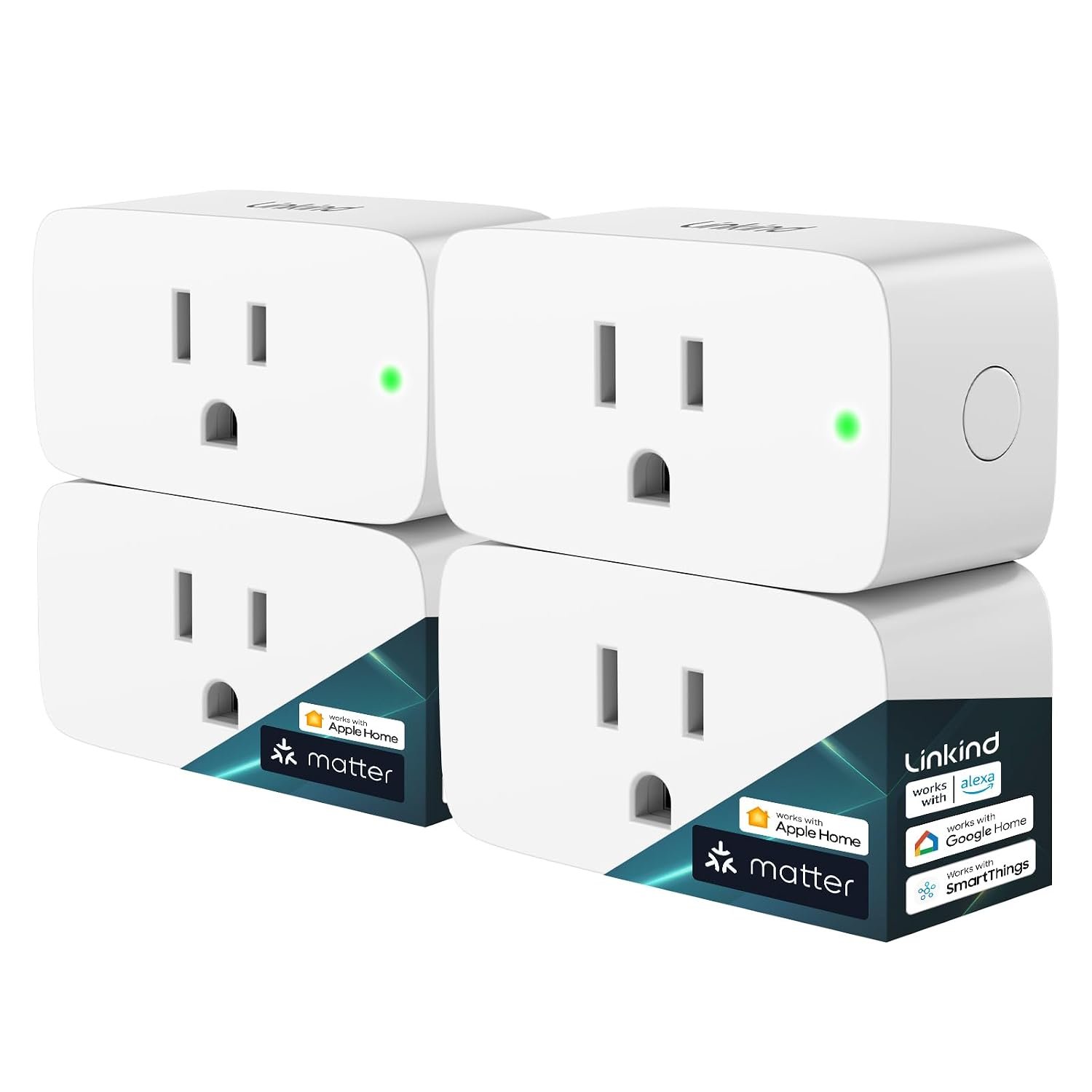
Smart plugs are one of the simplest ways to add connected control to ordinary household electronics. Instead of replacing an existing lamp, fan, coffee maker, or other compatible appliance with a dedicated smart device, a smart plug can sit between the appliance and the wall outlet and provide remote switching, scheduling, and voice-control features.
The Linkind Matter Smart Plug is designed around this idea while adding support for the Matter smart-home standard. The product is designed to work with platforms including Apple Home, Alexa, Google Home, SmartThings, and Siri, giving households more flexibility when choosing how to control their connected devices. The particular Amazon listing covered in this article is the four-pack version, identified by ASIN B0C36WXGP1.
One of the more interesting aspects of this smart plug is its use of Matter over a 2.4 GHz Wi-Fi connection. Matter is intended to make compatible smart-home products easier to integrate across different ecosystems rather than forcing users to stay inside one manufacturer’s platform.
That can be useful for households that already use Apple Home, Google Home, Alexa, or Samsung SmartThings—or for people who expect their smart-home setup to evolve over time.
This guide looks at what the Linkind Matter Smart Plug offers, how Matter changes the setup experience, where a smart plug can be useful around the home, and what should be considered before connecting appliances to a remotely controlled outlet.
Understanding the Linkind Matter Smart Plug
At its most basic level, the Linkind Matter Smart Plug turns a conventional electrical outlet into a controllable smart outlet.
The appliance itself does not necessarily need built-in Wi-Fi or Bluetooth. Instead, the plug provides the connection between the appliance and the smart-home ecosystem.
Once configured, compatible devices can potentially be switched on or off through a smartphone app, voice command, or an automation. The Linkind product supports control through Apple Home, Alexa, Google Home, SmartThings, and Linkind’s supported ecosystem.
The listed model supports up to 15 amps and 1,800 watts, according to product information associated with the Amazon listing and Linkind’s product documentation. It is designed for standard household use and is specified for 2.4 GHz Wi-Fi connectivity.
The four-pack configuration can also be useful when several ordinary devices around the home need basic smart control. Rather than adding smart functionality to only one outlet, multiple plugs can be distributed between rooms and assigned individual names within the relevant smart-home platform.
Key Features
Matter Smart Home Compatibility
Matter is one of the central features of this product.
Traditional smart-home accessories have often depended heavily on individual manufacturer ecosystems. A particular smart plug might have been designed primarily for one app or one voice assistant, creating additional complications when a household used products from several brands.
Matter was developed to provide a common communication standard for compatible smart-home devices.
The Linkind Matter Smart Plug is designed to work with several major smart-home platforms, including Apple Home, Alexa, Google Home, and Samsung SmartThings. Linkind also identifies Siri and its own AiDot platform among supported control options.
This does not mean every platform provides exactly the same features. Smart-home capabilities can vary depending on the controller, app, hub, and automation system being used.
Still, Matter compatibility can make the plug more flexible than a device tied exclusively to a single ecosystem.
Apple Home and Siri Control
For Apple households, the plug can be integrated into Apple Home.
Once the device has been properly added to a compatible Matter setup, it can become part of the same Home environment used for other supported accessories. This can make it possible to control a connected lamp or other suitable appliance alongside other smart-home devices.
Siri can provide another control method where the relevant Apple setup supports the device.
For example, a user might assign a clear name such as “Desk Lamp” or “Bedroom Fan” to the plug. A voice command can then be easier to remember than identifying the device by its technical model name.
The exact voice commands and automation options depend on the Apple Home configuration and the devices involved.
Alexa Compatibility
The Linkind Matter Smart Plug can also be used with Amazon Alexa through a compatible Matter setup.
This can be useful for households that already use Echo devices or the Alexa app for smart-home management.
A smart plug can become part of a broader routine. For example, a routine could coordinate a lamp with another compatible smart-home accessory rather than treating the plug as an isolated device.
The benefit is less about the plug itself and more about how it fits into the wider automation system.
Google Home Integration
Google Home is another supported ecosystem.
This gives households using Google’s smart-home platform an additional way to organize and control the connected outlet.
The same physical plug can therefore be approached from different smart-home environments depending on the user’s existing setup.
For people who move between ecosystems or have family members using different platforms, Matter can reduce some of the compatibility barriers that have traditionally existed between smart-home brands.
Samsung SmartThings Support
SmartThings is also listed among the compatible platforms.
This can be useful for users who already manage smart-home accessories through Samsung’s ecosystem.
As with Apple Home, Alexa, and Google Home, the availability of specific functions can depend on the Matter controller and the way the device is added to the network.
App-Based Remote Control
The Linkind Matter Smart Plug supports app-based control, allowing a connected appliance to be switched remotely through a supported smart-home application. Linkind describes remote control as a way to operate connected electronics even when the user is away from home.
Remote control can be particularly useful for simple situations.
For example, someone leaving home might realize that a lamp connected to a smart plug was left on. If the setup and network connection support remote access, the plug can potentially be switched off without returning home.
Likewise, a light connected to the plug can be turned on before someone arrives.
Remote control should not, however, be interpreted as a replacement for proper safety practices. Some appliances are not appropriate for unattended operation, even when their power supply can be controlled remotely.
Scheduling and Timers
Scheduling is another practical feature.
Instead of manually switching an appliance on and off every day, users can create a schedule through their supported smart-home platform.
A lamp could be scheduled to switch on at a particular time in the evening and off later at night. A suitable household device could also be configured around a daily routine.
Timers provide another approach when an appliance only needs to remain powered for a defined period.
These features can reduce the number of repetitive manual actions required throughout the day.
15A / 1800W Electrical Rating
The product is listed with a maximum electrical rating of 15 amps and 1,800 watts.
That specification is important because a smart plug should not automatically be treated as suitable for every electrical appliance.
The rating describes the electrical load the device is designed to handle under its specified conditions. Users should still check the appliance’s requirements before connecting it.
A device that consumes significantly more power than the plug is designed to support should not be connected.
It is also important to pay attention to appliances with motors, heating elements, compressors, or other characteristics that may require special consideration.
2.4 GHz Wi-Fi Connectivity
The Linkind Matter Smart Plug uses 2.4 GHz Wi-Fi.
This is worth knowing before installation because modern routers frequently provide multiple Wi-Fi bands.
A phone may be connected to a 5 GHz network while the smart-home accessory is designed for 2.4 GHz operation. Depending on the router and setup process, this can sometimes create confusion during initial pairing.
A good first step is to check the router configuration and follow the setup instructions supplied with the plug and the selected Matter platform.
Local Matter Communication
One of the useful characteristics of Matter is that compatible devices can communicate over the local network.
Linkind states that Matter devices configured on the same local network can communicate directly and may remain controllable locally even if the wider internet connection becomes unavailable.
This distinction is important.
A local network connection and an internet connection are not exactly the same thing. If internet access disappears, certain cloud-dependent features may no longer work, while local Matter control can continue when the necessary local infrastructure is available.
The actual behavior can depend on the smart-home controller and network configuration, so users should not assume that every feature will work identically during an internet outage.
How the Linkind Matter Smart Plug Can Be Used
The biggest advantage of a smart plug is its flexibility.
It can add smart switching to many everyday devices without requiring the device itself to be replaced.
Controlling Lamps
Lamps are among the most straightforward uses.
A bedside lamp, floor lamp, desk lamp, or decorative light can be connected to the smart plug and controlled through an app, schedule, or supported voice assistant.
A simple evening schedule can automatically turn a lamp on around a chosen time.
Another schedule can switch it off later, reducing the need to remember the switch every night.
There is one important consideration: the physical switch on the lamp generally needs to remain in the appropriate position for the smart plug to control the electrical supply. If the lamp’s own switch is turned off, cutting power to the lamp, the smart plug cannot make the bulb illuminate until the lamp’s switch is restored.
Creating a Morning Routine
A smart plug can also be incorporated into a morning routine.
For example, a suitable device can be scheduled to receive power at a particular time.
The practical benefit comes from consistency. Instead of remembering the same task every morning, the schedule can handle the repetitive part automatically.
However, users should only automate appliances that are designed to operate safely in the intended way.
Managing Decorative Lighting
Holiday lights and decorative lighting are another common smart-plug application.
A user could establish a schedule that controls when decorative lights receive power.
This can be convenient for seasonal lighting because the lights do not need to remain on throughout the day.
Before using a smart plug outdoors, however, users should verify whether the specific plug is rated for outdoor exposure. The Linkind model discussed here is a standard indoor smart plug, so it should not be treated as an outdoor-rated product merely because it can control decorative lighting.
Home Office Equipment
A desk setup may contain several devices that are manually switched every day.
A smart plug can be useful for selected low-risk accessories such as a lamp or another compatible device where automated power control makes sense.
It is generally better to use smart control selectively rather than putting an entire computer workstation behind one remotely controlled outlet.
Computers, monitors, storage systems, printers, and networking equipment can have different shutdown and startup requirements.
For devices containing important data, a normal operating-system shutdown procedure may be more appropriate than simply cutting electrical power.
Fans and Similar Appliances
Some fans and other appliances can be controlled through a smart plug if they resume operation automatically when power is restored.
This characteristic matters.
For example, if a fan has a physical power switch that remains in the “on” position and the appliance automatically resumes operation when electricity is supplied, a smart plug may provide useful scheduling.
If the appliance requires a button press after power is restored, the smart plug cannot simulate that physical interaction.
Understanding the behavior of the appliance is therefore essential before creating automation.
Small Household Appliances
Depending on their electrical requirements and operating characteristics, some small household appliances may work with a smart plug.
The most important question is not simply whether the plug can supply enough electricity.
Users should also consider whether the appliance is safe to operate when unattended and whether restoring power causes the appliance to start automatically.
Heating appliances deserve particular caution. A remotely controlled outlet should not be used as a reason to leave a potentially hazardous heating device operating without supervision.
Automation Around the Home
The plug becomes more interesting when combined with other Matter-compatible devices.
Instead of manually controlling every accessory, a smart-home system can coordinate multiple devices.
For example, a household might have:
- A smart plug controlling a lamp
- Smart lights in another room
- A motion sensor
- A smart speaker
- A Matter-compatible door or window accessory
The smart-home platform can then provide a centralized environment for controlling compatible devices.
The Linkind plug does not need to perform every part of the automation. Its role can simply be to provide controllable power to an otherwise conventional appliance.
Who the Linkind Matter Smart Plug May Be Suitable For
People Building a Matter-Based Smart Home
The product can make sense for someone intentionally building around Matter.
Instead of selecting devices exclusively based on one manufacturer’s ecosystem, Matter-compatible accessories can provide additional flexibility.
This can be especially relevant when a household already owns products from several brands.
Apple Home Users
Apple Home users may appreciate having a Matter-compatible plug that can be incorporated into their existing smart-home environment.
The same applies to people who regularly use Siri for voice control.
Alexa Users
Households already using Alexa can use the plug as another controllable accessory within a compatible Matter setup.
This can be useful when expanding a smart-home system gradually rather than replacing every appliance at once.
Google Home Users
Google Home households can similarly use the plug for controlling compatible appliances and building routines.
SmartThings Users
People who already organize their home through SmartThings may find the Matter compatibility useful for expanding their collection of connected accessories.
Renters
A plug-in accessory can be particularly practical for renters because it does not require replacing an electrical wall switch or making permanent modifications to the property.
The smart functionality can generally move with the user when they change homes.
People With Multiple Everyday Devices
The four-pack format can be useful for households that have several suitable devices they want to automate.
Instead of adding one smart plug at a time, several rooms or devices can be incorporated into the smart-home system.
Important Things to Consider Before Setup
Matter Does Not Mean Every Platform Works Exactly the Same
Matter improves interoperability, but it does not guarantee identical functionality across every smart-home platform.
Different ecosystems can expose different features, automation options, and interfaces.
Before purchasing or configuring the device, it is worth checking that the particular Matter controller being used supports the intended setup.
A Matter Controller May Be Required
Linkind indicates that compatible Matter-certified controllers or hubs may be required when using platforms such as Apple Home, Alexa, Google Home, or SmartThings. Examples listed in associated product information include devices such as a HomePod, Echo, Nest, or SmartThings Hub, depending on the ecosystem. The AiDot app provides an alternative setup path according to Linkind’s information.
This is one of the most important setup details to understand.
“Matter compatible” does not necessarily mean that a phone alone can provide every required function.
The controller requirements depend on the platform and the intended use.
Check Your Wi-Fi Setup
Because this model uses 2.4 GHz Wi-Fi, the home network should be compatible with that requirement.
If the router combines 2.4 GHz and 5 GHz networks under one name, the setup may still work depending on the router, but users should follow the manufacturer’s pairing instructions if problems occur.
Check the Appliance’s Electrical Requirements
The plug is listed at 15A/1800W, but that does not mean every 15-amp appliance is automatically suitable for every use.
Look at the appliance label and manufacturer’s documentation.
Consider the device’s normal power consumption, startup behavior, and whether it is appropriate for unattended operation.
Avoid Overloading the Plug
A smart plug should not be treated as a substitute for a properly designed electrical circuit.
Do not exceed the specified load, and avoid questionable combinations of extension cords, adapters, power strips, and high-draw appliances.
When in doubt about an electrical installation, consult a qualified electrician.
Consider What Happens When Power Returns
Some appliances automatically resume operation after a power interruption.
Others remain off until a physical button is pressed.
This distinction affects whether a smart plug can actually automate the appliance in the way you expect.
Checking this behavior before creating schedules can prevent unexpected results.
Indoor Use Matters
The standard Linkind Matter Smart Plug discussed here should not be assumed to be weatherproof.
Outdoor electrical equipment requires appropriate weather and moisture protection.
If an outdoor application is required, look specifically for a product designed and rated for outdoor use.
Think About Privacy and Account Security
Smart-home devices introduce another layer of connected technology into the home.
Use strong account credentials, keep supported apps and controllers updated, and use appropriate security settings on the home network.
Matter can help with standardized device communication, but overall smart-home security still depends on the broader network and account environment.
Comparing Smart Plug Categories
Not every smart plug is designed around the same technology. Understanding the main categories can make it easier to determine whether a Matter model fits a particular home.
| Smart Plug Category | Main Connection | Typical Advantage | Potential Consideration |
|---|---|---|---|
| Basic Wi-Fi Smart Plug | Wi-Fi | Simple app and remote control | May depend heavily on one ecosystem |
| Matter-over-Wi-Fi Smart Plug | 2.4 GHz Wi-Fi with Matter | Cross-platform compatibility | Compatible controller may be required |
| Bluetooth Smart Plug | Bluetooth | Simple local communication | Shorter range and fewer remote-control options |
| Zigbee Smart Plug | Zigbee | Works well in some smart-home networks | Usually requires a compatible hub |
| Z-Wave Smart Plug | Z-Wave | Designed for dedicated smart-home networks | Requires compatible Z-Wave infrastructure |
| Outdoor Smart Plug | Wi-Fi or another protocol | Designed for outdoor environments | Weather rating and installation requirements matter |
The Linkind model belongs to the Matter-over-Wi-Fi category.
That makes it particularly relevant to people who want to use a common smart-home standard while keeping the convenience of Wi-Fi networking.
Matter Versus Traditional Smart Plug Systems
The most important difference is the role of the communication standard.
A traditional smart plug might be tightly associated with a particular manufacturer’s app. Users may need to create an account, install the manufacturer’s application, and use that ecosystem for configuration and control.
Matter aims to reduce this fragmentation by providing a common standard that compatible platforms can recognize.
For users, this can mean more flexibility when choosing a smart-home ecosystem.
However, Matter does not eliminate all setup requirements. A compatible controller, network configuration, app, or hub can still be necessary depending on the platform.
The result is best understood as improved interoperability rather than universal compatibility with every smart-home product.
Practical Ways to Organize Multiple Smart Plugs
If several plugs are installed around a home, naming becomes surprisingly important.
Instead of generic names such as “Smart Plug 1” and “Smart Plug 2,” use names based on the device or location.
Examples include:
- Living Room Lamp
- Bedroom Lamp
- Desk Fan
- Kitchen Light
- Coffee Corner Lamp
- Entryway Light
Clear naming makes voice commands easier and reduces confusion when creating routines.
It can also help to document which physical appliance is connected to each plug.
If a household eventually contains several smart accessories, good organization can make the entire system easier to maintain.
Frequently Asked Questions
What is a Matter smart plug?
A Matter smart plug is an electrical plug accessory that uses the Matter smart-home standard to communicate with compatible smart-home platforms.
The Linkind model combines Matter compatibility with Wi-Fi connectivity and can be integrated with supported ecosystems such as Apple Home, Alexa, Google Home, and SmartThings.
Does the Linkind Matter Smart Plug work with Apple Home?
Yes. Linkind lists Apple Home among the supported smart-home platforms for this Matter smart plug.
A compatible Apple Home/Matter controller may be required depending on the intended setup.
Can it be controlled with Siri?
The product is designed to support Siri through the compatible Apple Home environment. The exact voice-control experience depends on the Apple Home configuration.
Does it work with Alexa?
Yes. Alexa is listed among the compatible platforms.
Users should follow the Matter setup process appropriate to their Alexa environment.
Does it work with Google Home?
Yes. Google Home is listed as a supported Matter ecosystem for the Linkind smart plug.
Does it support Samsung SmartThings?
Yes. Linkind identifies SmartThings as one of the supported smart-home platforms.
Does the Linkind smart plug use 5 GHz Wi-Fi?
The product information specifies 2.4 GHz Wi-Fi.
If your router uses both 2.4 GHz and 5 GHz bands, follow the manufacturer’s setup instructions when connecting the plug.
Can the plug work when the internet goes down?
Matter’s local communication capabilities can allow compatible devices to communicate over the local network without relying entirely on an external internet connection. Linkind specifically describes local Matter communication as a feature of the product.
However, the exact behavior of remote access and other cloud-dependent features can differ from local control.
Can I schedule the plug to turn on and off automatically?
Yes. Linkind lists timer and scheduling functionality for the Matter smart plug.
Schedules can be useful for lamps, selected household accessories, and other devices that are appropriate for automated power control.
Can I control the plug when I am away from home?
The product supports remote app control according to Linkind’s product information.
Remote access depends on the smart-home platform, network connection, and account configuration.
Is it suitable for every appliance?
No.
The electrical rating and the appliance’s operating characteristics should always be considered.
Particular care should be taken with heating appliances, motor-driven equipment, and devices that are not designed to restart automatically after power is restored.
Can I use it outside?
The standard product should not automatically be considered suitable for outdoor use.
For outdoor applications, use an electrical accessory specifically designed and rated for outdoor conditions.
Is a hub required?
It depends on the smart-home ecosystem.
Linkind indicates that a Matter-certified controller or hub may be required for platforms such as Apple Home, Alexa, Google Home, and SmartThings. Its AiDot ecosystem offers another setup route according to the manufacturer’s information.
What is the advantage of buying multiple smart plugs?
A multi-pack can be useful when several devices need smart control.
Rather than building the system one outlet at a time, multiple suitable appliances can be incorporated into the smart-home environment and given individual names.
Does Matter make a smart plug future-proof?
Matter is intended to improve interoperability across supported smart-home ecosystems, which can provide useful flexibility as a smart-home system evolves.
However, no technology standard can guarantee compatibility with every future product or feature. It is more accurate to view Matter as a way to reduce ecosystem dependence and improve compatibility among supported devices.
Conclusion
The Linkind Matter Smart Plug is designed for households that want to add smart control to ordinary electrical devices while using a widely supported smart-home standard.
Its combination of Matter compatibility, 2.4 GHz Wi-Fi, scheduling, remote control, and support for ecosystems such as Apple Home, Alexa, Google Home, and SmartThings makes it suitable for a variety of smart-home arrangements.
For everyday use, the concept is straightforward: connect a suitable appliance to the smart plug, configure it through a compatible Matter environment, give it a recognizable name, and use schedules, app controls, voice commands, or automations according to the capabilities of the selected platform.
The most important part is choosing the right appliances and understanding the electrical and network requirements before creating automations. A smart plug is not simply a remote switch; it becomes part of an electrical and connected-home system, so load limits, appliance behavior, Wi-Fi configuration, controller requirements, and appropriate usage all matter.
For someone gradually building a connected home, Matter compatibility can also make the decision less dependent on a single smart-home ecosystem. That flexibility can be particularly useful for households using a combination of Apple, Amazon, Google, or Samsung products.
If you are considering this type of smart plug for a particular appliance or smart-home setup,
Leave a Reply