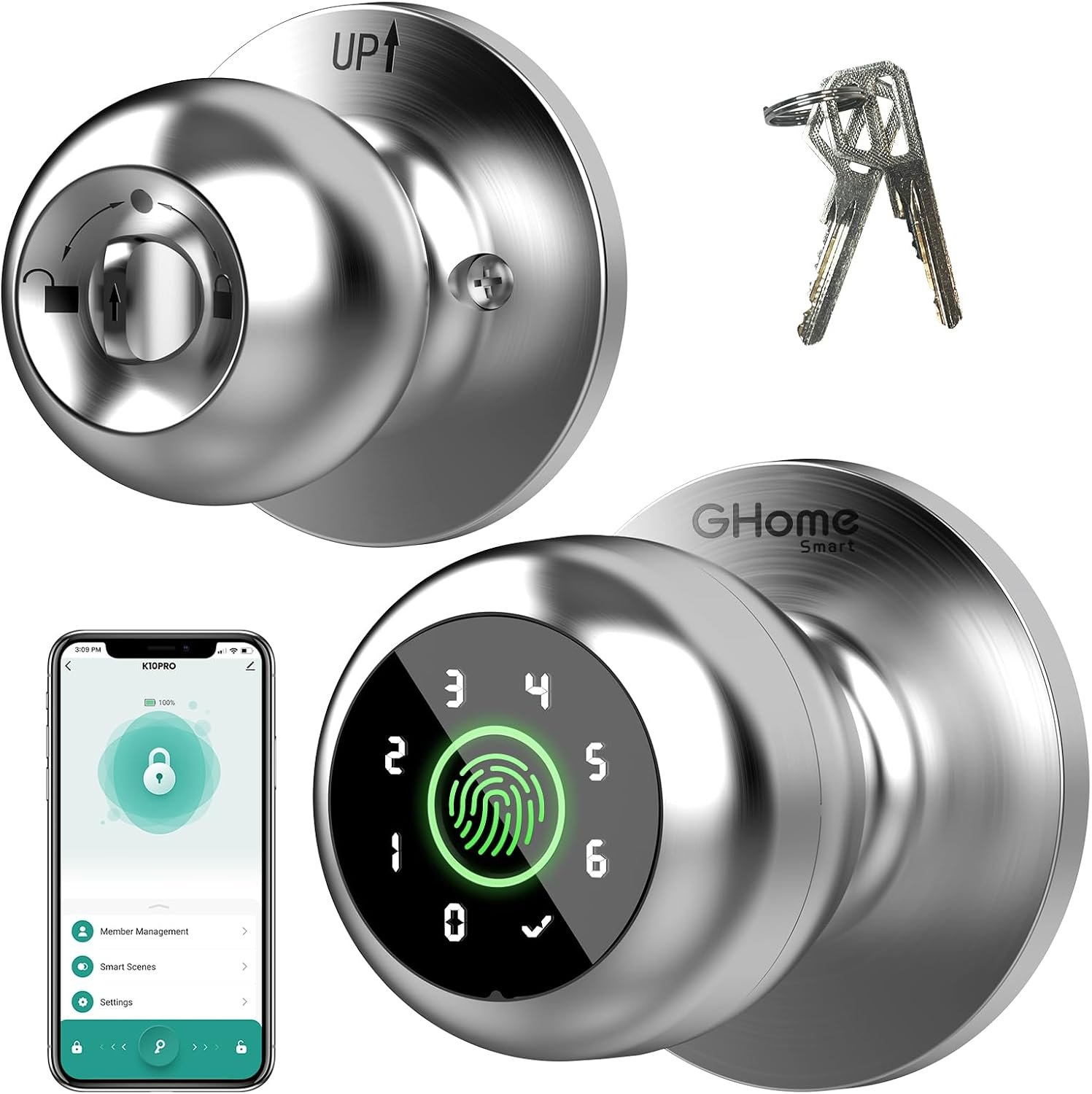
Traditional door knobs and keyed locks have remained largely unchanged for decades, but the way people manage access to homes, offices, bedrooms, apartments, and other spaces is becoming increasingly digital. Smart door locks offer an alternative by combining conventional locking hardware with technologies such as fingerprint recognition, keypads, smartphone applications, and automatic locking.
The GHome Smart Fingerprint Door Lock is designed around this concept. This particular model, identified as the PRO version and associated with ASIN B0DHS46L2F, combines four unlocking methods: fingerprint recognition, password entry through the keypad, smartphone app control, and a physical key for backup access. The product is designed for indoor applications such as bedrooms, apartments, offices, garages, and other compatible doors.
One of the main ideas behind a multi-method smart lock is flexibility. A fingerprint can provide quick access for an authorized user, while a keypad can provide access without requiring a phone. The app adds another management option, and a mechanical key provides a conventional backup method.
This combination can be useful for households and small offices where several people need access but distributing and managing physical keys is inconvenient.
At the same time, a smart lock should not be treated as a universal replacement for every type of door lock. Door measurements, lock compatibility, battery condition, installation requirements, and the way the particular door is used all matter.
This guide explains how the GHome Smart Fingerprint Door Lock works, what its main features are, where it can be useful, and what to consider before installing a biometric door knob.
What Is the GHome Smart Fingerprint Door Lock?
The GHome Smart Fingerprint Door Lock is a smart replacement door knob that combines electronic access control with a traditional mechanical key system.
Instead of relying exclusively on a key, users can authenticate themselves through several different methods. The product documentation describes four main access methods:
- Fingerprint recognition
- Password or keypad entry
- Smartphone app control
- Mechanical key access
The PRO model is listed with local fingerprint and password data storage, automatic locking, backup keys, and indoor use. Its construction uses aluminum, and the listed finish for the product associated with ASIN B0DHS46L2F is silver.
The lock is designed around Bluetooth connectivity rather than functioning as a conventional always-online Wi-Fi door lock. That distinction is important when considering app control.
The manufacturer describes app control within Bluetooth range, while remote control from outside the immediate Bluetooth range can require an additional compatible gateway depending on the specific GHome setup.
This makes the product particularly interesting for people who want smart access features without necessarily building a complete internet-connected door-lock system.
Key Features
1. Four Ways to Unlock the Door
The defining feature is the combination of four access methods.
Fingerprint Access
Biometric access allows an authorized fingerprint to be used instead of entering a code or carrying a physical key.
The manufacturer states that the lock can recognize fingerprints in approximately 0.2 seconds and supports up to 20 stored fingerprints for this version.
Fingerprint recognition can be convenient for people who frequently enter and leave the same room or property because there is no need to remember a code or locate a key.
However, biometric systems should always be considered an access convenience rather than an absolute guarantee that recognition will work perfectly in every situation. Finger condition, placement, sensor cleanliness, and enrollment quality can all affect recognition.
For this reason, having additional access methods is useful.
Keypad Access
The keypad provides another way to unlock the door.
A user can enter an assigned password rather than using a fingerprint or smartphone.
This can be particularly useful for family members, office workers, guests, or other authorized people who may not want to register a fingerprint.
The product information indicates support for up to 20 access codes.
A keypad can also be useful when someone temporarily needs access but does not have the owner’s phone.
As with any electronic keypad, codes should be managed carefully. Avoid using easily guessed combinations such as birthdays, addresses, or repeated numbers.
Smartphone App Control
The GHome Smart app provides another way to manage the lock.
Depending on the configuration, the app can be used for functions such as managing fingerprints and passwords, checking unlock records, configuring automatic locking, and adjusting certain operating modes.
App control is particularly useful for managing the lock’s settings rather than simply opening the door.
For example, an owner may want to add an authorized fingerprint, change a passcode, or review access information.
One important point is that the basic app connection is Bluetooth-based. The manufacturer’s information specifies app control within Bluetooth range for the relevant models. A separate gateway can provide additional remote-control capabilities when supported.
This means users should not automatically assume that they can unlock the door from anywhere in the world using only the standard Bluetooth setup.
Mechanical Key Backup
Although the lock is designed around keyless access, it retains a traditional mechanical key option.
This is an important practical feature.
Electronic locks depend on a power source and functioning electronics. A physical key provides an alternative when the battery is depleted, the electronic system encounters a problem, or another situation prevents normal electronic unlocking.
Keeping the backup key in a secure but accessible location is therefore an important part of using a smart lock responsibly.
2. Fingerprint Recognition and Biometric Access
Fingerprint recognition is one of the most noticeable differences between this type of lock and a conventional keypad lock.
Instead of typing a password every time, an authorized user can place a registered finger on the sensor.
The product information describes recognition in approximately 0.2 seconds and an unlocking process of around 1.5 seconds, along with a stated 99.9% recognition accuracy.
These are manufacturer or product-listing specifications rather than guarantees of performance in every real-world condition.
Fingerprint recognition can vary depending on factors such as:
- Finger placement
- Moisture
- Dirt or residue
- Very dry skin
- Sensor cleanliness
- The quality of the original fingerprint enrollment
- Changes in the user’s finger condition
For that reason, it is sensible to register fingerprints carefully and maintain at least one alternative access method.
A biometric lock works best when it is treated as one part of a broader access system rather than the only possible method of entry.
3. Local Data Storage
Privacy is an important consideration whenever biometric information is involved.
The GHome product information states that fingerprint and related access information for this model is stored locally rather than uploaded to cloud storage.
Local storage can be appealing because biometric information is particularly personal. Unlike a normal password, a fingerprint cannot simply be replaced if compromised.
However, users should still consider the security of the smartphone and app used to configure the lock.
Keeping the phone protected with a strong passcode or biometric authentication, maintaining updated software, and limiting access to the lock-management application are sensible practices.
4. Automatic Locking
Automatic locking is another useful feature for everyday use.
The lock can be configured to automatically lock after the door is closed, reducing the chance of accidentally leaving the door unlocked.
GHome documentation describes an automatic locking function and indicates that the lock can be configured for automatic locking after a short delay.
This can be particularly useful for people who frequently leave a room while carrying bags, equipment, documents, or other items.
It can also help establish a consistent routine.
Instead of remembering to manually lock the door every time, the electronic system can perform that step automatically.
There are situations where automatic locking may not be appropriate, however. A frequently accessed room may be better suited to a passage mode or manually controlled configuration.
Understanding the available modes before activating automatic locking is important.
5. Passage and Privacy Modes
Smart locks can have different operating modes depending on the situation.
GHome’s product information describes functions such as passage mode and privacy mode on compatible models.
Passage Mode
Passage mode can be useful in situations where a door needs to remain accessible without requiring repeated fingerprint or password authentication.
For example, an office or bedroom might need frequent movement through the door during a particular period.
Instead of unlocking the door repeatedly, passage mode can provide more convenient access.
Privacy Mode
Privacy mode works in the opposite direction.
It can be useful when the occupant wants to restrict exterior access temporarily.
This can be relevant to bedrooms, private offices, or other spaces where the person inside wants greater control over access.
The precise operation of these modes can vary by model and firmware, so the included instructions should be followed when configuring them.
6. Rechargeable Battery
The GHome PRO lock uses a rechargeable lithium battery rather than relying solely on conventional disposable batteries. Product information identifies a lithium-polymer battery for the PRO model, while GHome’s related documentation describes rechargeable battery operation and Type-C charging.
Rechargeable power can reduce the need to repeatedly purchase and replace disposable batteries.
The manufacturer indicates that battery performance varies according to usage, with related PRO models rated for extended operation between charges.
Actual battery life can vary significantly depending on how often the lock is used, environmental conditions, and other factors.
The most important habit is to pay attention to low-battery notifications and avoid waiting until the battery is completely depleted.
7. Type-C Emergency Power
A smart lock becoming unresponsive because of a depleted battery is an obvious concern.
GHome documentation indicates that the lock provides a Type-C connection that can be used for emergency power and charging. A mechanical key is also available as another backup method.
This creates more than one way to recover from a low-power situation.
Even so, emergency power should be considered a backup rather than a reason to ignore battery warnings.
Keeping the battery adequately charged and knowing where the mechanical key is stored can make unexpected situations much easier to handle.
8. Bluetooth Connectivity
The GHome PRO model uses Bluetooth for smart connectivity.
Bluetooth is suitable for local management and can make the lock relatively simple to configure without requiring a permanent Wi-Fi connection.
At the same time, Bluetooth has a practical range limitation.
If someone expects to unlock the door from a different city, Bluetooth alone will not provide that capability.
For users who need remote access, the manufacturer indicates that a compatible gateway can provide additional functionality such as remote control, monitoring, and alerts on supported setups.
That makes it important to distinguish between local smartphone control and internet-based remote management.
How the GHome Smart Fingerprint Door Lock Can Be Used
Bedroom Access
A bedroom is one of the most straightforward applications for this type of smart door knob.
A fingerprint can provide quick access for the occupant, while a mechanical key or keypad provides alternatives.
Privacy mode can also be useful for personal spaces where the occupant wants temporary control over exterior access.
For families, multiple fingerprints can be registered so that authorized household members do not need to share one password.
Apartment Doors
For compatible apartment doors, a smart knob can provide an alternative to carrying keys.
However, renters should verify the door’s existing hardware before installation.
Apartment doors can have different construction, lock bodies, thicknesses, and hardware configurations. The fact that a product is described as suitable for apartments does not mean it fits every apartment door.
Measurements should always be checked first.
Home Offices
A home office can benefit from controlled access when sensitive documents, computers, equipment, or other private materials are stored inside.
A fingerprint can allow the owner to enter quickly without managing another physical key.
A keypad can also be useful when access needs to be shared with an authorized person.
For home offices, privacy mode may be particularly relevant when the room needs to remain private during meetings or focused work.
Garage and Storage Areas
The product is marketed for garage and other household applications, but installation suitability should be checked carefully.
A garage door leading directly outside may have different security and environmental requirements than an interior bedroom door.
The specific GHome model is listed for indoor use, so it should not automatically be considered appropriate for exposed outdoor locations.
For garages exposed to significant temperature changes, moisture, dust, or direct weather, a product specifically rated for those conditions may be more appropriate.
Small Offices
A small office can use multiple access methods to reduce the need to distribute physical keys.
For example, authorized employees can use individual fingerprints or assigned access codes.
This can also make access management more flexible when compared with one shared mechanical key.
However, businesses should establish clear procedures for removing access when an employee or contractor no longer requires entry.
Guest Access
A keypad can provide an alternative for authorized guests who do not have a registered fingerprint.
This can be useful for short-term access to a room or property.
The important consideration is how codes are created and managed.
Sharing a single permanent code with everyone may reduce the benefits of individualized access management. Where the app supports appropriate access-code management, individual or temporary credentials can provide better organization.
Who the GHome Smart Fingerprint Door Lock May Be Suitable For
People Who Want Keyless Entry
The lock may appeal to people who frequently forget, misplace, or simply prefer not to carry traditional keys.
Fingerprint access provides a direct method of authentication, while the keypad offers another key-free option.
Families
A household can register multiple authorized fingerprints.
The product information indicates support for up to 20 fingerprints and 20 access codes.
This can make the lock more practical for households where several people need regular access.
Renters
Because the product is designed as a door-knob replacement rather than a completely new door structure, it may be relevant to renters who want smart access without making major modifications.
However, renters should check their lease requirements and make sure the existing door hardware matches the lock’s installation requirements.
Home Office Users
People who keep private documents or equipment in a home office may find controlled access useful.
The ability to use a fingerprint, code, or key provides flexibility depending on the situation.
Small Business Owners
Small offices and private workspaces can use individual access methods instead of relying exclusively on shared keys.
This can make access management easier when staff changes over time.
Important Things to Consider Before Installation
Check Your Door Measurements
This is arguably one of the most important steps.
The product manual for the GHome PRO associated with ASIN B0DHS46L2F specifies several installation requirements:
- Door thickness: approximately 1-3/8 to 2-1/8 inches, or 35-55 mm
- Door hole diameter: approximately 2-1/8 inches, or 55 mm
- Door-edge hole diameter: approximately 1 inch, or 25 mm
- Backset: approximately 2-3/8 or 2-3/4 inches, or 60 or 70 mm
The documentation also states that the lock is intended for single-cylinder doors and is not compatible with mortise locks.
These measurements should be checked before ordering.
A smart lock can have excellent features but still be unsuitable if the existing door preparation does not match.
Understand Single-Cylinder Compatibility
The manual specifically identifies single-cylinder compatibility and excludes mortise locks.
This is particularly important because “door lock” is a broad category.
Deadbolts, mortise locks, cylindrical locks, and door knobs use different hardware configurations.
A user should compare the existing lock structure with the manufacturer’s installation requirements rather than assuming compatibility based solely on appearance.
Consider the Door’s Condition
Smart hardware still depends on the physical door.
If the door is difficult to close, sticks against the frame, or requires excessive force to operate, installing a smart lock may not solve the underlying problem.
In fact, automatic locking can make an alignment issue more noticeable.
Before installation, check whether the latch moves smoothly and whether the door closes correctly without excessive pressure.
Battery Maintenance Is Important
Unlike a purely mechanical lock, an electronic door knob needs electrical power.
Even though the GHome design provides backup options, battery management should remain part of normal use.
Check the battery level periodically and recharge when necessary.
Do not wait for the lock to become completely inactive before thinking about charging it.
Fingerprints Are Not Infallible
Biometric recognition is convenient, but it is not immune to environmental or physical factors.
Wet fingers, very dry skin, dirt, or poor initial enrollment can affect recognition.
For important access points, maintain a backup code and keep the physical key available.
Do Not Depend Exclusively on the Smartphone
It can be tempting to treat the app as the main key.
However, phones can run out of battery, be misplaced, lose Bluetooth connectivity, or encounter software issues.
A smart access system is more resilient when users understand and maintain all available access methods.
Bluetooth Is Not the Same as Remote Internet Access
This distinction deserves special attention.
Basic smartphone control is available through Bluetooth within the appropriate range. GHome’s documentation explains that a gateway can provide remote functions for supported configurations.
Therefore, someone buying the lock specifically for remote unlocking should investigate whether an additional gateway is required for the desired setup.
Consider Privacy and Data Management
Biometric information deserves particular attention.
The manufacturer states that fingerprint information is stored locally for the relevant model rather than in cloud storage.
Even with local storage, users should protect the smartphone and app used to administer the lock.
Avoid leaving an unlocked phone unattended, use a strong device passcode, and keep the relevant software updated.
Smart Fingerprint Door Knob vs Other Smart Lock Categories
Different smart lock designs serve different purposes. Comparing the categories can help determine whether a biometric door knob is appropriate.
| Lock Category | Common Access Methods | Main Advantage | Important Consideration |
|---|---|---|---|
| Traditional Keyed Lock | Physical key | Simple mechanical operation | Requires carrying and managing keys |
| Keypad Lock | PIN/code | Keyless access | Codes must be managed securely |
| Fingerprint Smart Lock | Fingerprint, code, app, key | Multiple access options | Biometric recognition can vary |
| Smart Deadbolt | App, keypad, key, sometimes fingerprint | Often suited to exterior entry doors | Requires compatible deadbolt configuration |
| Wi-Fi Smart Lock | App, keypad, biometric or key | Potential remote access | Requires network and additional power considerations |
| Bluetooth Smart Lock | App, fingerprint, keypad | Local smartphone control | Limited by Bluetooth range |
| Traditional Smart Knob | App or code | Simple replacement format | Compatibility depends on door hardware |
The GHome PRO falls into the multi-method Bluetooth smart door-knob category.
Its appeal comes from combining biometric access, keypad entry, app management, and mechanical backup in one system.
Smart Lock Security Is More Than the Electronics
A common mistake when evaluating smart locks is to focus only on the fingerprint sensor or app.
Physical security still matters.
The quality and condition of the door, frame, hinges, latch, strike plate, and surrounding hardware can all affect overall security.
A sophisticated electronic lock installed on a weak or poorly aligned door does not automatically create a highly secure entry point.
Likewise, strong electronic authentication does not compensate for poor installation.
For an exterior entrance, users should evaluate the entire door assembly rather than treating the smart knob as the only security component.
Practical Setup Tips
Once compatibility has been confirmed, a few simple practices can make the setup easier.
Register fingerprints carefully
When adding a fingerprint, follow the enrollment instructions and use a finger that will be easy to place consistently on the sensor.
If the system allows multiple fingerprints per person, registering more than one finger can provide another option.
Create sensible access codes
Avoid obvious combinations.
If multiple people need access, consider assigning separate codes where supported instead of sharing one permanent password.
Name the lock clearly in the app
If the app manages several smart devices, a clear name can prevent confusion.
For example:
- Bedroom Door
- Home Office
- Garage Entry
- Apartment Door
Test every access method
After installation, do not test only the fingerprint.
Check:
- Fingerprint unlocking
- Keypad access
- App control
- Mechanical key
- Automatic locking
- Manual interior operation
- Emergency charging procedure
Testing these functions before relying on the lock gives users a better understanding of how the system behaves.
Keep the mechanical key accessible
The backup key should be available when needed without being left in an obvious location.
A practical backup strategy is particularly important for electronic locks.
Frequently Asked Questions
How many ways can the GHome Smart Fingerprint Door Lock be unlocked?
The PRO model provides four primary methods: fingerprint recognition, password/keypad entry, smartphone app control, and a mechanical key.
How many fingerprints can it store?
The product information associated with the PRO model indicates support for up to 20 fingerprints.
This allows multiple household members or authorized users to have their own registered biometric access.
How many passwords can be created?
The manufacturer information indicates support for up to 20 access codes for the relevant PRO model.
Does the lock need Wi-Fi?
The GHome PRO model uses Bluetooth for its smart connectivity rather than requiring a permanent Wi-Fi connection for basic local operation.
Additional equipment may be required for certain remote-control functions.
Can I unlock it with my phone?
Yes. The lock supports app-based control through Bluetooth within the appropriate range.
For remote operation beyond Bluetooth range, a compatible gateway may be necessary.
Does it have a physical key?
Yes. The lock includes mechanical backup keys.
This provides an alternative if electronic access is unavailable.
What happens if the battery dies?
The product supports emergency power through its charging connection, and the mechanical key provides another backup method.
Keeping the battery charged and knowing how to use both backup methods is recommended.
Is the battery rechargeable?
Yes. The PRO model uses a rechargeable lithium battery, with Type-C charging described in the manufacturer’s product information.
Does the lock automatically lock?
Yes. Automatic locking is one of the product’s listed features. The exact timing and behavior can depend on the configuration and operating mode.
Can automatic locking be disabled?
Compatible GHome models provide settings for automatic locking and passage-style operation.
The exact procedure should be checked in the instructions for the specific model.
Is the lock suitable for a garage?
It can be suitable for compatible indoor garage doors, and the product is marketed for garage applications.
However, the specific installation environment matters. The product is listed for indoor use, so it should not be assumed to be weatherproof or suitable for exposed exterior locations.
Is it suitable for an apartment?
It may be suitable for an apartment if the existing door matches the required dimensions and lock configuration.
The installation manual specifies door thickness, hole diameter, backset, and single-cylinder compatibility requirements.
Can it be installed on a mortise lock?
The manual states that the GHome PRO is compatible with single-cylinder doors and is not compatible with mortise locks.
This should be checked before attempting installation.
Does it store fingerprints in the cloud?
GHome states that fingerprint and related access data are stored locally for this product family rather than uploaded to cloud storage.
Users should still protect the smartphone and app used to manage the lock.
Can I use it without the internet?
Basic operation does not require a permanent internet connection, and the manufacturer describes Bluetooth-based setup and local operation.
Internet connectivity becomes more relevant if remote access through a compatible gateway is desired.
Is fingerprint recognition always guaranteed to work?
No biometric system should be treated as infallible.
Recognition can be affected by finger placement, moisture, dirt, sensor condition, and other factors.
The availability of a keypad and mechanical key makes the multi-method design useful as a backup system.
Can several family members use the same lock?
Yes. The PRO model supports multiple stored fingerprints and access codes, allowing authorized users to have their own credentials.
Is installation complicated?
The manufacturer describes the lock as designed for relatively straightforward installation with a screwdriver, provided that the existing door matches the required dimensions and hardware configuration.
If the existing door requires modification or does not match the specified measurements, professional installation may be more appropriate.
Conclusion
The GHome Smart Fingerprint Door Lock is designed to bring several modern access methods into a familiar door-knob format.
Its four-in-one approach combines fingerprint recognition, keypad access, smartphone control, and a mechanical key, giving users multiple ways to enter the same space. The product also provides features such as automatic locking, access management through the app, rechargeable power, and local data storage.
For bedrooms, compatible apartment doors, home offices, and certain indoor garage or workspace applications, this type of lock can provide an alternative to relying exclusively on traditional keys.
Its Bluetooth-based design also makes it different from Wi-Fi-first smart locks. Basic local app control does not require the same type of always-online connection, while users who want remote access may need an additional compatible gateway.
The most important consideration is compatibility. Before installation, users should verify the door thickness, hole dimensions, backset, latch configuration, and single-cylinder requirement. The manufacturer specifically states that the PRO model is not compatible with mortise locks.
It is also worth remembering that electronic convenience and physical security are separate considerations. A smart lock still depends on a properly functioning door, suitable hardware, sensible access-code management, adequate battery maintenance, and responsible use.
For households or small workspaces looking for multiple keyless entry options in one door knob, understanding these details can make it easier to decide whether a biometric smart lock fits the intended door and daily routine.
Leave a Reply