Introduction
The traditional alarm clock has changed considerably over the years. What was once a simple device designed to display the time and wake someone up can now be part of a broader connected-home setup. Smart alarm clocks combine a digital display with voice assistance, audio playback, timers, reminders, and other connected features.
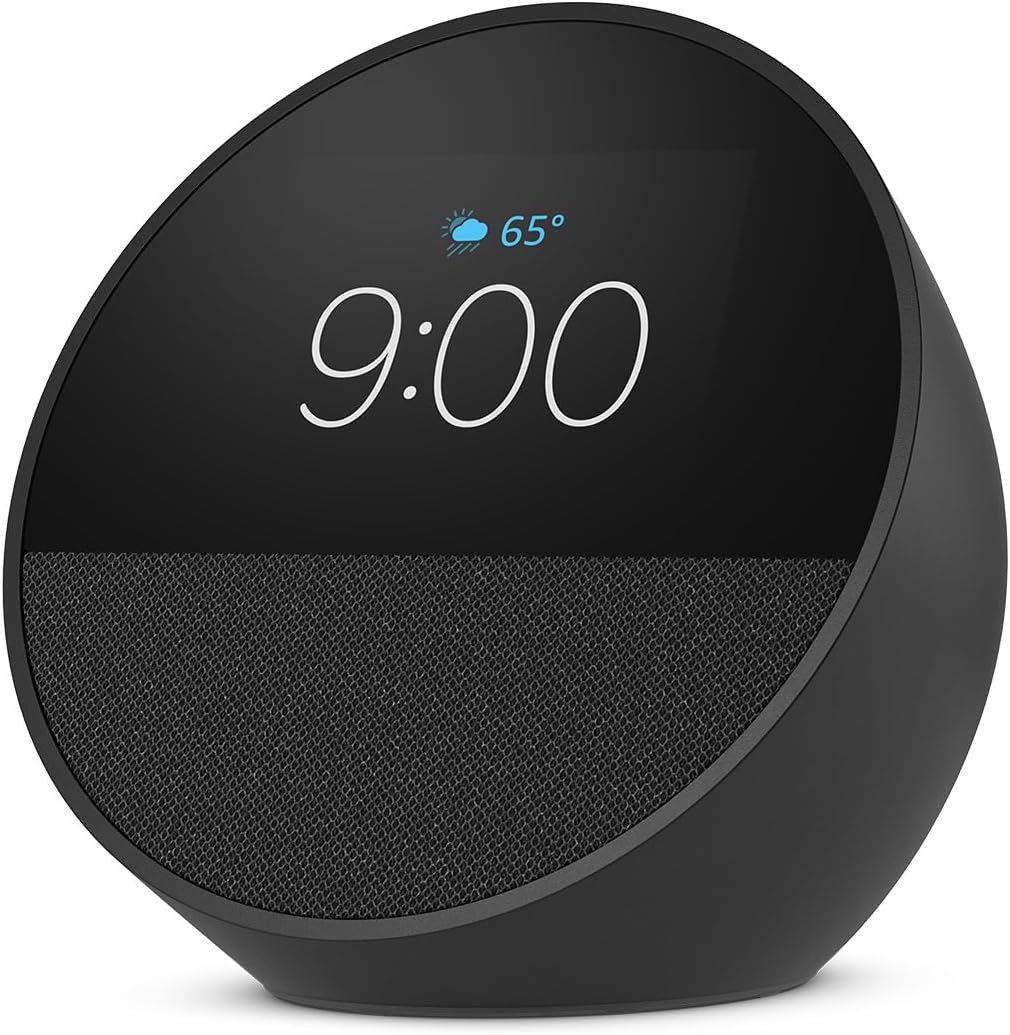
The Amazon Echo Spot, the newer generation of the Echo Spot family, is designed around this idea. It combines a compact display, speaker, microphone, and Alexa functionality in a small countertop device. Its design makes it particularly relevant for locations such as nightstands, home offices, kitchens, and other areas where having quick access to both information and voice controls can be useful.
Unlike a conventional smart display with a large screen, the Echo Spot uses a smaller visual interface focused on essential information. This can make it easier to glance at the time, alarms, or selected information without turning a larger screen toward the user.
The device is also designed for Alexa+, Amazon’s newer Alexa experience. As with other connected products, available functions can depend on factors such as region, account configuration, subscriptions, compatible services, and software updates.
This guide looks at the Amazon Echo Spot from a practical perspective. Rather than treating it as simply an alarm clock, we will explore its design, key functions, everyday applications, potential users, limitations, and how it compares with other categories of smart home and timekeeping devices.
Key Features of the Amazon Echo Spot
The Echo Spot brings several functions together in a relatively compact form. Understanding each part helps explain where the device can fit into a household.
Compact Smart Alarm Clock Design
The most noticeable difference between the Echo Spot and a traditional Echo speaker is its integrated display.
The display allows users to see selected information rather than relying entirely on spoken responses. For an alarm clock, this is particularly useful because the time can be checked with a quick glance.
The compact design can work well on surfaces such as:
- Bedside tables
- Office desks
- Kitchen counters
- Shelves
- Small side tables
A smaller device can also be easier to accommodate in rooms where countertop or desk space is limited.
Placement still matters. The display should ideally be positioned where it can be viewed easily from the intended location, while the microphone and speaker should remain reasonably unobstructed.
Customizable Display
A visual display gives the Echo Spot another layer of functionality compared with a speaker-only device.
Depending on available settings and software features, users can configure aspects of the display to suit their preferences.
The screen can provide information such as:
- Time
- Alarm information
- Weather information
- Other supported visual details
The exact options available can change over time as Amazon updates the device software and Alexa experience.
The display is not intended to function like a full-size tablet. Its smaller format is designed more for glanceable information and interaction with Alexa.
Alexa Voice Assistant
Alexa is central to the Echo Spot’s functionality.
Users can interact with Alexa using voice commands for a variety of supported activities. These may include:
- Setting alarms
- Creating timers
- Asking questions
- Checking information
- Playing supported audio
- Managing reminders
- Controlling compatible smart-home products
- Creating routines
This voice-controlled approach can be particularly useful when the user’s hands are occupied.
For example, someone preparing food in the kitchen may want to set a timer without touching a phone. Likewise, someone getting ready for work may ask Alexa for information while continuing with another task.
Designed for Alexa+
The Echo Spot is described as being designed for Alexa+, Amazon’s newer Alexa experience.
Alexa+ expands the conversational and assistant-oriented capabilities available through supported Alexa devices. However, availability can vary depending on region, account eligibility, subscription arrangements, and the specific features currently supported.
This distinction is important because smart speakers and smart displays can receive software updates that change their capabilities over time.
The hardware remains the same, but the software experience can evolve.
Audio Playback
Although the Echo Spot includes a screen, it is also an audio device.
It can be used for supported audio content such as:
- Music
- Podcasts
- Audiobooks
- Radio or other supported services
The speaker is suitable for everyday listening in smaller spaces, but it should not necessarily be considered a replacement for a dedicated home audio system.
Room size, placement, source material, and listening preferences all influence the perceived audio experience.
For a nightstand or office desk, however, having audio and voice assistance in one compact device can be convenient.
Smart Alarm Functions
The Echo Spot is particularly suited to people who want more functionality than a basic alarm clock provides.
A smart alarm can be integrated into a broader daily routine. Instead of simply sounding at a particular time, users can combine alarms with other supported Alexa functions.
Potential uses include:
- Setting multiple alarms
- Creating recurring alarms
- Using different alarm sounds
- Managing timers
- Checking the time visually
- Incorporating alarms into routines
This can make the device useful beyond the simple purpose of waking someone up.
Physical Interaction and Voice Controls
A smart alarm clock needs to be easy to interact with, especially during the night or early morning.
The Echo Spot combines physical interaction with voice control. This gives users more than one way to manage common functions.
Voice commands can be convenient when someone does not want to reach for the device, while the screen can provide quick visual confirmation.
This combination is one of the main differences between a smart alarm clock and a basic digital clock.
How the Echo Spot Can Be Used
The Echo Spot’s usefulness depends heavily on where it is placed. Its compact display and voice-assistant functionality make it adaptable to several parts of a home.
1. Bedroom and Nightstand Use
The bedroom is one of the most obvious locations for the Echo Spot.
Its compact design allows it to serve as a combination of:
- Alarm clock
- Small speaker
- Voice assistant
- Timer
- Information display
A user can glance at the time without reaching for a smartphone.
Voice commands can also be useful in the morning. For example, users may ask Alexa to provide information, start supported audio, or control compatible smart-home devices.
A smart routine could potentially connect several morning activities, depending on the services and devices configured in the household.
2. Morning Routines
A smart alarm clock can become part of a structured morning routine.
For example, a user could organize a routine around a consistent wake-up schedule and then use Alexa for supported actions such as:
- Providing the current time
- Giving selected information
- Starting audio
- Controlling compatible lights
- Managing other connected devices
The exact sequence depends on the available Alexa features and connected products.
This approach can reduce the number of separate devices needed to manage simple morning tasks.
3. Home Office Use
The Echo Spot can also work on an office desk.
A compact display can provide a quick reference for time while Alexa handles voice-controlled tasks.
Office-related uses may include:
- Setting work timers
- Creating reminders
- Managing alarms
- Playing background audio
- Asking general questions
- Controlling compatible smart-home equipment
For people working from home, a voice assistant can complement computer-based productivity tools without necessarily replacing them.
4. Kitchen Use
The kitchen is another environment where the Echo Spot can be practical.
Cooking often involves timing, multitasking, and hands that may not be clean or available to interact with a phone.
The device can potentially help with:
- Cooking timers
- Multiple timers
- Audio playback
- General information
- Unit conversions
- Reminders
- Compatible smart-home controls
For example, while preparing a meal, a user can start a timer through Alexa and continue cooking.
The display can also make it easier to confirm the time or certain supported information without relying entirely on audio.
5. Controlling Compatible Smart-Home Devices
The Echo Spot can be part of a larger smart-home ecosystem.
Depending on compatibility and setup, Alexa can provide voice control for products such as:
- Smart bulbs
- Smart plugs
- Thermostats
- Certain appliances
- Other compatible connected devices
This can be especially useful in bedrooms.
A user may be able to control compatible lights or other devices without getting out of bed.
Compatibility should always be checked before adding third-party smart-home products because supported functions can differ between devices.
6. Timers and Reminders
Timers are useful far beyond cooking.
They can be used for:
- Study sessions
- Work breaks
- Exercise
- Household chores
- Laundry
- Short tasks
- Medication reminders where appropriate
Multiple timers can be useful when several activities are happening at once.
Reminders provide another way to organize recurring tasks, although users should verify how a particular reminder function works with their current Alexa configuration.
Who the Amazon Echo Spot May Be Suitable For
The Echo Spot is designed for people who want a compact device that combines timekeeping, audio, and voice-assistant functionality.
People Looking Beyond a Traditional Alarm Clock
A conventional alarm clock mainly provides time and alarm functions.
The Echo Spot expands that concept by adding Alexa capabilities, audio playback, and smart-home integration.
For someone who wants more functionality from the space occupied by a bedside clock, this type of device may be worth considering.
Smart-Home Users
People already using compatible smart lights, plugs, thermostats, or other Alexa-compatible devices may find a smart display useful as an additional control point.
Instead of keeping a phone nearby for every command, voice interaction provides another option.
Home Office Workers
A compact smart device can sit alongside a computer without occupying much desk space.
Timers, reminders, audio, and voice commands can all be useful during a workday.
Families
A shared smart device can provide household functions such as timers, alarms, audio, and information.
However, families should consider privacy and account settings, especially when several people regularly use the same device.
Kitchen Users
People who cook regularly can use a smart speaker or display for hands-free timers and other supported voice functions.
The compact format can be easier to position on a counter than a larger smart display.
Important Things to Consider
A smart alarm clock has several advantages over a traditional clock, but there are also factors worth considering.
Internet Connectivity
Many Alexa functions rely on an internet connection.
If Wi-Fi or internet service is unavailable, cloud-based voice-assistant features may be limited or unavailable.
This is an important difference between connected smart clocks and standalone digital alarm clocks.
Privacy
Privacy is an important consideration for any voice-enabled device.
The Echo Spot includes microphones that allow Alexa to respond to voice commands. Users should review the privacy controls associated with their Amazon account and understand how voice interactions and recordings are handled.
The location of the device also matters.
A device positioned in a bedroom, office, or common area may be exposed to conversations that are unrelated to its intended use.
Understanding privacy controls before installing a voice assistant is a sensible part of setting up any connected home device.
Screen Size
The Echo Spot uses a compact display rather than a large screen.
That can be an advantage when the goal is simply to glance at the time or selected information. However, it also means that it is not designed for activities that benefit from a large visual interface.
Users looking for a device for video, detailed recipes, visual dashboards, or extensive touchscreen interaction may need to consider a smart-display category with a larger screen.
Power Requirements
The Echo Spot is designed for stationary use and requires access to electrical power.
Therefore, the location should have a suitable outlet nearby.
Unlike a battery-powered portable speaker, it is not intended to function as a completely wireless device that can be used anywhere.
Alexa and Service Availability
Some Alexa features depend on location, account type, subscriptions, or third-party service support.
A feature available to one user may not necessarily be available in another country or account configuration.
This is particularly relevant when considering newer assistant features such as Alexa+.
Smart-Home Compatibility
A smart speaker or display becomes more useful when connected to compatible devices, but compatibility should be checked individually.
Before adding a smart-home product, look for information regarding:
- Alexa compatibility
- Required hubs
- Supported voice commands
- Regional availability
- Account requirements
A product may support Alexa while still having limitations on certain advanced functions.
Audio Expectations
The Echo Spot is a compact smart device rather than a large dedicated audio system.
It may be appropriate for everyday listening in a bedroom, office, or kitchen, but users seeking powerful room-filling audio or a specialized music setup may want to explore larger speaker categories.
The right choice depends on whether voice assistance or audio performance is the primary goal.
Comparison of General Device Categories
Understanding the differences between smart alarm clocks, smart speakers, and smart displays can make the purchasing decision easier.
Traditional Digital Alarm Clocks
Traditional alarm clocks typically focus on:
- Time display
- Alarm functions
- Snooze controls
- Simple operation
They can operate independently of internet services and tend to have fewer features.
Their simplicity can be an advantage for users who want nothing more than basic timekeeping.
Compact Smart Speakers
Compact smart speakers focus primarily on:
- Voice assistance
- Audio playback
- Timers
- Reminders
- Smart-home controls
They often have little or no display.
For users who primarily want voice interaction, a compact smart speaker may be sufficient.
Smart Alarm Clocks With Displays
Devices such as the Echo Spot combine:
- Time display
- Alarm functions
- Voice assistance
- Audio playback
- Selected visual information
- Smart-home controls
This category sits between a traditional alarm clock and a larger smart display.
Full-Size Smart Displays
Larger smart displays provide a bigger visual interface.
They may be more suitable for:
- Video
- Visual recipes
- Detailed information
- Video calls
- Camera feeds
- Touchscreen interaction
The tradeoff is a larger footprint.
Smartphones
A smartphone can already provide:
- Alarms
- Timers
- Music
- Information
- Smart-home applications
However, using a dedicated smart clock can reduce the need to keep a phone beside the bed.
For some users, separating the alarm from the smartphone can also create a more dedicated nighttime setup.
Practical Setup Considerations
Once a smart alarm clock is placed in the home, a few simple considerations can improve everyday usability.
Choose a Comfortable Viewing Angle
For a bedside table, position the Echo Spot so that the display can be seen easily from the bed.
In an office, the screen should be visible without interfering with normal computer use.
Keep the Microphones Unobstructed
Avoid covering the device with objects or placing it somewhere that could interfere with voice recognition.
A relatively open position generally makes more sense for a voice-controlled device.
Give Smart-Home Devices Clear Names
If the Echo Spot is connected to several smart devices, descriptive names can make voice commands easier.
For example, names based on rooms or functions can be easier to remember than generic labels.
Start With Simple Routines
Users who are new to Alexa may find it easier to begin with simple alarms, timers, and commands before creating more complex routines.
Once the basic system is familiar, additional compatible devices and automation can be introduced gradually.
Frequently Asked Questions
What is the Amazon Echo Spot?
The Amazon Echo Spot is a compact smart device that combines a small display, speaker, microphones, alarm-clock functionality, and Alexa voice assistance.
Is the Echo Spot an alarm clock?
Yes. It is designed to function as a smart alarm clock, allowing users to set alarms while also providing additional Alexa features.
Can it display the time?
Yes. Timekeeping is one of its primary visual functions, making it suitable for bedside and desk use.
Can the Echo Spot play music?
Yes. It can play supported music and audio services through Alexa, subject to service availability and account configuration.
Can it set multiple timers?
Alexa supports timer functionality, and users can use voice commands for cooking, work, study, and other activities. Exact behavior can depend on the current Alexa software experience.
Can it control smart lights?
Compatible smart lights can be controlled through Alexa once they have been connected and configured.
Does the Echo Spot require Wi-Fi?
Most Alexa-connected functions require an internet connection, so Wi-Fi is an important part of normal operation.
Can it be used in the kitchen?
Yes. Its compact design and voice-controlled timers make it suitable for kitchen environments. Users should place it somewhere stable and away from conditions that could damage electronics.
Can it be used in a home office?
Yes. It can provide alarms, timers, reminders, audio, information, and compatible smart-home controls in an office environment.
Is the Echo Spot portable?
It is compact and can be moved between rooms, but it is designed for powered operation and is not a conventional battery-powered portable speaker.
Does it support Alexa+?
The product is designed for Alexa+, but specific Alexa+ availability and functionality can depend on region, account eligibility, subscriptions, and Amazon’s current service availability.
Is the display similar to a tablet?
No. The Echo Spot has a compact display designed primarily for glanceable information and interaction with Alexa rather than general-purpose tablet use.
Can it replace a smartphone alarm?
It can serve as a dedicated alarm device, but whether it completely replaces a smartphone depends on how someone uses alarms, calendars, reminders, and other phone-based functions.
Is it suitable for a bedroom?
Yes. The compact form factor and alarm functionality make bedroom use one of its intended applications. Privacy settings and device placement should be considered in any bedroom environment.
Does it work with third-party smart-home products?
It can work with compatible third-party devices through Alexa. Compatibility and available functions should be verified for each product.
Conclusion
The Amazon Echo Spot takes the familiar concept of an alarm clock and combines it with features associated with modern smart-home devices. Its compact display makes it possible to check the time and selected information at a glance, while Alexa provides voice-controlled access to supported alarms, timers, audio, reminders, questions, routines, and smart-home functions.
Its size makes it particularly relevant for nightstands, office desks, and kitchens where a full-size smart display may be unnecessary. At the same time, the smaller screen means that it serves a different purpose from larger touchscreen smart displays.
For anyone considering a connected alarm clock, the main question is not simply whether it can display the time. It is whether the combination of timekeeping, voice assistance, audio, and smart-home integration fits naturally into their daily routine.
As with any connected device, internet access, privacy settings, compatibility, regional availability, and evolving software features should all be considered before making a decision.
Leave a Reply