Introduction
Smart speakers have become a familiar part of many modern homes. What started as a convenient way to play music has developed into a broader category of connected devices that can provide information, manage routines, control compatible smart-home products, and make everyday tasks easier through voice interaction.
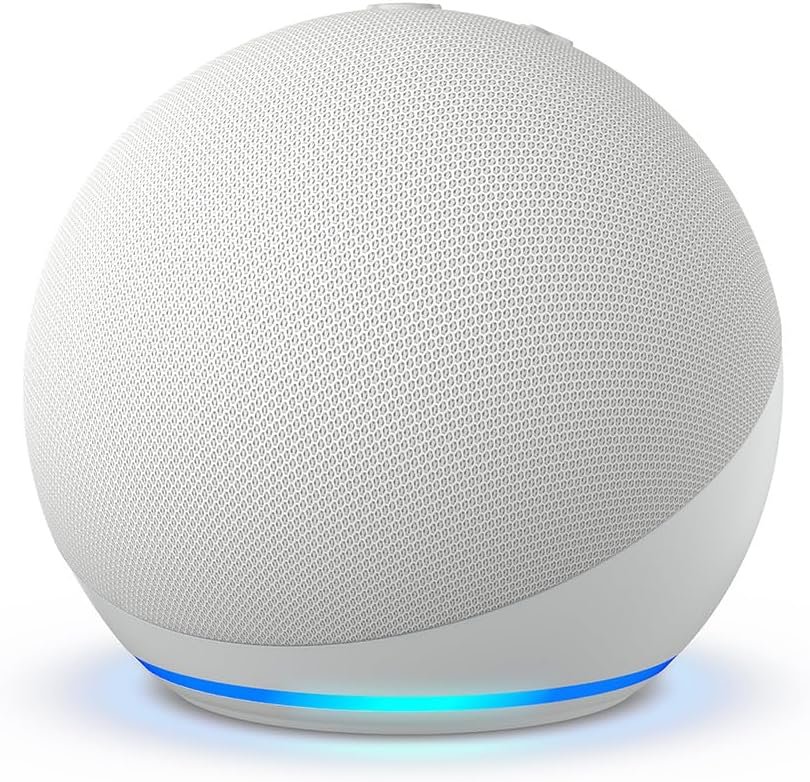
The Amazon Echo Dot in Glacier White is a compact smart speaker designed around Alexa and everyday voice-controlled functionality. Its small footprint makes it suitable for spaces such as bedrooms, dining areas, offices, kitchens, and other rooms where a larger speaker may not be practical.
The product is positioned as a newer generation of the Echo Dot family, with an emphasis on sound, Alexa-based features, and integration with connected devices and services. Depending on the services and features available in a user’s region and account, it can be used for tasks ranging from music playback and timers to smart-home controls and personalized routines.
One important point when considering any smart speaker is that its usefulness depends not only on the hardware but also on the surrounding ecosystem. Compatible smart-home devices, supported services, internet connectivity, privacy settings, and account configuration can all influence what the speaker can do.
This guide takes a closer look at the Amazon Echo Dot, including its key features, practical uses, suitability for different households, important considerations, and how compact smart speakers compare with other categories of connected home devices.
Key Features of the Amazon Echo Dot
The Echo Dot combines several functions in a relatively small device. Rather than being designed around one specific task, it acts as a voice-controlled interface for Alexa and compatible services.
Compact Speaker Design
One of the defining characteristics of the Echo Dot range is its compact form factor.
A smaller smart speaker can be easier to place in areas where desk or shelf space is limited. For example, it may fit naturally on:
- A bedside table
- An office desk
- A kitchen counter
- A bookshelf
- A dining-room cabinet
- A side table
The compact design also makes it possible to distribute multiple compatible speakers around a home if someone wants voice access in different rooms.
Placement still matters. A speaker positioned behind objects, inside a cabinet, or very close to another electronic device may not provide the same voice-interaction experience as one placed in a more open location.
Alexa Voice Assistant
The central feature of the Echo Dot is Alexa, Amazon’s cloud-based voice assistant.
Users can interact with Alexa by using voice commands for supported tasks. Depending on the services and settings available, these can include:
- Asking general questions
- Setting alarms
- Creating timers
- Checking information
- Playing supported audio
- Managing reminders
- Controlling compatible smart-home devices
- Creating or using routines
The speaker therefore serves as more than a traditional audio device. It can function as a voice-controlled access point to a range of digital services.
Because Alexa is cloud-based, many voice-assistant functions depend on an internet connection.
Audio Playback
The Echo Dot is also designed to function as a compact speaker for audio content.
Its intended uses can include listening to:
- Music
- Podcasts
- Audiobooks
- Radio or other supported audio services
- Spoken information
Sound perception is naturally influenced by room size, placement, source material, and personal preferences. A compact smart speaker is generally intended for everyday room listening rather than replacing a dedicated home theater or large audio system.
For someone working at a desk, preparing food, or getting ready in the morning, having a small speaker nearby can provide convenient access to audio without occupying much space.
Support for Alexa+
The product is presented as being designed for Alexa+, Amazon’s newer Alexa experience.
Availability and functionality of Alexa+ can depend on factors such as region, account eligibility, subscription arrangements, and the specific features Amazon makes available at a given time. Smart-assistant capabilities can also change through software updates.
This is worth remembering when comparing a smart speaker based on advertised assistant capabilities. The physical hardware is only one part of the overall experience.
Glacier White Finish
The Glacier White finish gives the device a light, neutral appearance that can work with a range of interior styles.
A neutral-colored smart speaker can be placed in common areas without drawing as much visual attention as some darker or more brightly colored electronics.
The finish is ultimately a matter of personal preference, but color can be relevant when the device is intended to remain visible on a desk, nightstand, shelf, or kitchen counter.
Voice-Controlled Timers and Alarms
One particularly practical use for a smart speaker is time management.
A user can ask Alexa to set a timer while performing another activity. This can be useful when:
- Cooking
- Working
- Studying
- Exercising
- Taking a short break
- Managing a morning routine
For example, someone preparing food may set a timer without having to stop what they are doing to interact with a phone.
Similarly, alarms and reminders can become part of a morning or evening routine.
Smart-Home Integration
The Echo Dot can also serve as a voice interface for compatible smart-home products.
Depending on device compatibility and configuration, a user may be able to control products such as:
- Smart lights
- Plugs
- Thermostats
- Certain appliances
- Other compatible connected devices
This can make simple commands more convenient. Instead of opening an application, a user may be able to use a voice command to perform an action.
Compatibility should always be checked before purchasing or configuring additional smart-home equipment because not every connected device supports every ecosystem or feature.
How the Amazon Echo Dot Can Be Used
The versatility of a smart speaker becomes clearer when looking at everyday situations rather than individual specifications.
1. Bedroom Use
A compact smart speaker can be useful in a bedroom because it occupies relatively little surface area.
Potential uses include:
- Setting a morning alarm
- Playing relaxing audio
- Listening to podcasts
- Checking the time
- Setting a bedtime timer
- Managing compatible lights
- Creating a morning routine
For example, a routine could potentially combine several supported actions, such as providing information at a particular time and controlling compatible smart-home equipment.
The exact actions available depend on the user’s configuration and Amazon’s supported features.
2. Home Office Use
A smart speaker can also fit into a home office environment.
During a workday, voice commands can help with simple tasks without requiring the user to switch away from the computer.
Possible examples include:
- Setting a meeting reminder
- Starting a short timer
- Playing background audio
- Checking information
- Managing compatible smart devices
This can be particularly useful when both hands are occupied with another task.
However, a smart speaker should not automatically be treated as a replacement for dedicated productivity software. Calendar, task-management, and communication functions depend on supported integrations.
3. Kitchen and Dining Areas
The kitchen is another environment where voice-controlled devices can be practical.
When cooking, users may need to keep their hands busy while still wanting access to certain functions.
An Echo Dot can potentially help with:
- Cooking timers
- Music or podcasts
- Unit conversions
- General questions
- Reminders
- Compatible smart lighting
For example, a user could start a timer while preparing ingredients and continue working without touching a phone.
This type of hands-free interaction is one of the more practical applications of a voice assistant.
4. Playing Music and Podcasts
Audio remains an important reason people use smart speakers.
The Echo Dot can provide a convenient way to access supported audio services through voice commands.
Instead of searching manually through an application, users can request supported music or spoken content directly.
The usefulness of this feature depends on the user’s preferred service and whether that service is supported in their location and account configuration.
5. Smart-Home Control
For people with several compatible smart devices, the Echo Dot can act as a central voice interface.
Imagine a home with compatible lights and smart plugs. Instead of physically reaching for each switch or opening separate applications, voice commands can provide another control method.
Routines can make this more structured.
A single routine might be configured to perform multiple supported actions at a particular time or after a particular voice command.
The exact possibilities depend on the connected products and available Alexa functionality.
6. Daily Routines
One of the more interesting applications of smart speakers is routine automation.
Rather than repeatedly giving several individual commands, supported routines can combine actions into a more organized sequence.
For example, a morning routine could potentially include:
- An alarm or scheduled action
- A request for information
- Audio playback
- Smart-light control
The actual sequence and available actions depend on the user’s settings.
This approach can make a smart speaker more useful over time because it shifts the device from being a simple command-based speaker toward being part of a broader daily system.
Who the Amazon Echo Dot May Be Suitable For
The Echo Dot can make sense for different types of users, although its usefulness depends heavily on individual habits.
People New to Smart Speakers
Someone entering the smart-speaker category may appreciate having several functions in one relatively compact device.
Instead of purchasing separate devices for timers, alarms, basic audio, and voice assistance, a smart speaker combines these functions.
Users Already Using Alexa
People who already use Alexa-compatible services or smart-home products may find a compact Echo device useful for extending voice access to another room.
Multiple speakers can provide a more consistent voice-assistant setup across a home, subject to account and device compatibility.
Home Office Users
For people working from home, voice access to timers, reminders, audio, and compatible smart-home functions can complement an existing computer-based workspace.
Families
A shared smart speaker can be useful in common areas for timers, music, general questions, and household routines.
Families should also consider voice purchasing settings and privacy controls, especially when multiple people interact with the same device.
Smart-Home Users
Users building a connected home may use an Echo Dot as part of a larger system of compatible devices.
The value increases when the speaker is paired with products that support the same ecosystem and desired commands.
Important Things to Consider
A smart speaker provides convenience, but there are several areas worth understanding before making it part of a home.
Internet Connectivity
Alexa’s cloud-based functions generally require an internet connection.
If the internet connection is unavailable, many online voice-assistant features may not function normally.
This is different from some standalone devices that can operate without internet access.
Privacy and Voice Data
Privacy is an important consideration with any connected voice assistant.
The device is designed to respond to a wake word and process voice interactions through Amazon’s services. Users should review the privacy controls available with their Amazon account and understand how voice recordings and related data are handled.
Households may also want to consider where the speaker is positioned. A device in a shared living area can hear conversations from multiple people, so understanding available privacy settings is important.
Smart-Home Compatibility
Not every smart-home product works with Alexa in the same way.
Before expanding a smart-home setup, users should check:
- Alexa compatibility
- Supported commands
- Required hubs or bridges
- Regional availability
- Account requirements
Compatibility labels alone do not always mean every feature will be available.
Audio Expectations
The Echo Dot is a compact speaker. It can be useful for everyday listening, but users looking for high-volume entertainment, stereo separation, deep bass, or home theater performance may want to consider a larger audio category.
A compact smart speaker and a dedicated audio system serve different purposes.
Power Requirements
Unlike portable Bluetooth speakers designed around rechargeable batteries, countertop smart speakers are generally intended to remain connected to household power.
That means placement should take access to an electrical outlet into account.
Software Updates
Smart speakers are software-driven products, so their capabilities can evolve over time.
Features may be added, changed, or discontinued. Certain services can also have their own regional or subscription requirements.
For that reason, the product’s current capabilities should be considered alongside the broader Alexa ecosystem rather than viewing the hardware as a completely fixed product.
Comparison of General Smart Speaker Categories
The Echo Dot belongs to a broader market of smart speakers and connected home assistants. Looking at the categories can help clarify what type of device fits different needs.
Compact Smart Speakers
Compact models generally focus on:
- Small physical size
- Voice-assistant access
- Everyday audio
- Smart-home control
- Timers and reminders
They are often convenient for bedrooms, offices, kitchens, and other smaller spaces.
Larger Smart Speakers
Larger smart speakers generally place greater emphasis on audio performance while retaining voice-assistant functions.
They may be more appropriate for users who want a speaker to serve as a primary music device in a larger room.
The tradeoff is usually greater physical size and a potentially different approach to placement.
Bluetooth Speakers
Traditional Bluetooth speakers focus primarily on audio playback.
They can be useful for:
- Portable listening
- Outdoor use
- Battery-powered operation
- Connecting directly to smartphones or other devices
However, they may not offer the same integrated voice-assistant and smart-home functionality as a dedicated smart speaker.
Smart Displays
Smart displays add a screen to the voice-assistant experience.
Depending on the model and software, a screen can be useful for:
- Visual information
- Video
- Recipes
- Cameras
- Video calls
- Touch controls
The larger physical footprint can make them less suitable for small spaces compared with compact speakers.
Setting Up a Smart Speaker
Although setup procedures can change with software updates, the general process for a connected speaker usually involves several stages.
Step 1: Choose the Location
Place the speaker somewhere with:
- Reliable power access
- A stable surface
- Reasonable access to Wi-Fi
- Enough open space for clear audio
Avoid placing it in locations where the microphone or speaker openings are obstructed.
Step 2: Connect Power
Connect the device using its supplied power equipment and allow it to start.
The setup process may provide visual or audio indicators to guide the next steps.
Step 3: Use the Alexa App
The Alexa application is generally used to connect compatible Echo devices to an Amazon account and home network.
The setup process can involve:
- Selecting the device
- Connecting to Wi-Fi
- Assigning a location
- Configuring preferences
Step 4: Explore Available Features
Once connected, users can explore supported Alexa functions and compatible services.
It can be useful to begin with simple commands before configuring more advanced routines or smart-home integrations.
Practical Tips for Everyday Use
A few simple habits can make a connected speaker easier to integrate into daily life.
Keep the Device Accessible
Voice assistants work most naturally when the device is positioned where users can speak toward it without major obstructions.
Use Clear Commands
Natural language is supported, but clearer commands can sometimes make interactions more predictable.
Instead of giving a long, complicated instruction, breaking a task into smaller commands may help when learning how the system responds.
Organize Smart-Home Devices
If multiple connected products are added, giving them logical names can make voice commands easier.
For example, names based on rooms or functions can reduce confusion when several devices have similar purposes.
Create Routines Around Repeated Tasks
If the same sequence of actions happens every morning or evening, a routine may reduce the number of individual commands required.
This is one of the areas where a smart speaker can become more useful than a traditional speaker.
Frequently Asked Questions
What is the Amazon Echo Dot designed for?
The Echo Dot is a compact smart speaker designed to provide Alexa voice-assistant functions, audio playback, and control of compatible smart-home devices.
Can the Echo Dot play music?
Yes. The device can play supported music and audio services through Alexa, subject to account, service, and regional availability.
Can it control smart lights?
Compatible smart lights can generally be controlled through Alexa when they have been properly connected and configured.
Can the Echo Dot be used as an alarm clock?
It can be used for alarms and timers through Alexa. Users can configure these functions according to their daily schedules.
Does the Echo Dot need Wi-Fi?
Many of its Alexa and connected services require an internet connection, so Wi-Fi connectivity is an important part of normal operation.
Is the Echo Dot portable?
It is compact and relatively easy to move, but it is designed for powered operation rather than functioning as a conventional battery-powered portable speaker.
Can it be used in a bedroom?
Yes. Its compact form can make it suitable for bedroom environments, where it can be used for alarms, audio, timers, routines, and other supported Alexa functions.
Can it be used in an office?
Yes. It can provide voice access to timers, reminders, audio, information, and compatible smart-home controls in a home-office environment.
Does Alexa+ work everywhere?
Alexa+ availability and specific features can depend on factors such as location, account eligibility, subscription arrangements, and Amazon’s current service availability.
Can multiple Echo devices work together?
Multiple compatible Echo devices can be configured within the same Amazon ecosystem, allowing users to extend Alexa access around a home and use supported multi-device features.
Does the Echo Dot replace a traditional speaker system?
Not necessarily. It is designed around a combination of voice assistance, smart-home functionality, and everyday audio. Users seeking a dedicated high-performance audio setup may prefer a different speaker category.
Is a smart speaker useful without smart-home devices?
Yes. Smart-home integration is only one part of the experience. Timers, alarms, audio playback, questions, reminders, and other Alexa functions can still be useful without additional connected devices.
Conclusion
The Amazon Echo Dot represents a compact approach to smart-home and voice-assistant technology. Rather than focusing exclusively on audio playback, it combines a small speaker with Alexa-based functions that can support everyday activities such as setting timers, managing alarms, listening to supported audio, asking questions, and interacting with compatible smart-home devices.
Its compact form can make it practical for bedrooms, home offices, kitchens, dining areas, and other spaces where a larger device may not be necessary. At the same time, its usefulness depends on factors beyond the hardware itself, including internet connectivity, supported services, privacy preferences, regional availability, and compatibility with other smart-home products.
For someone building a connected home or simply looking for a convenient voice-controlled device for everyday tasks, understanding these factors can help determine whether a compact smart speaker fits their particular routine.
Leave a Reply